Template details
W3.CSS Basic
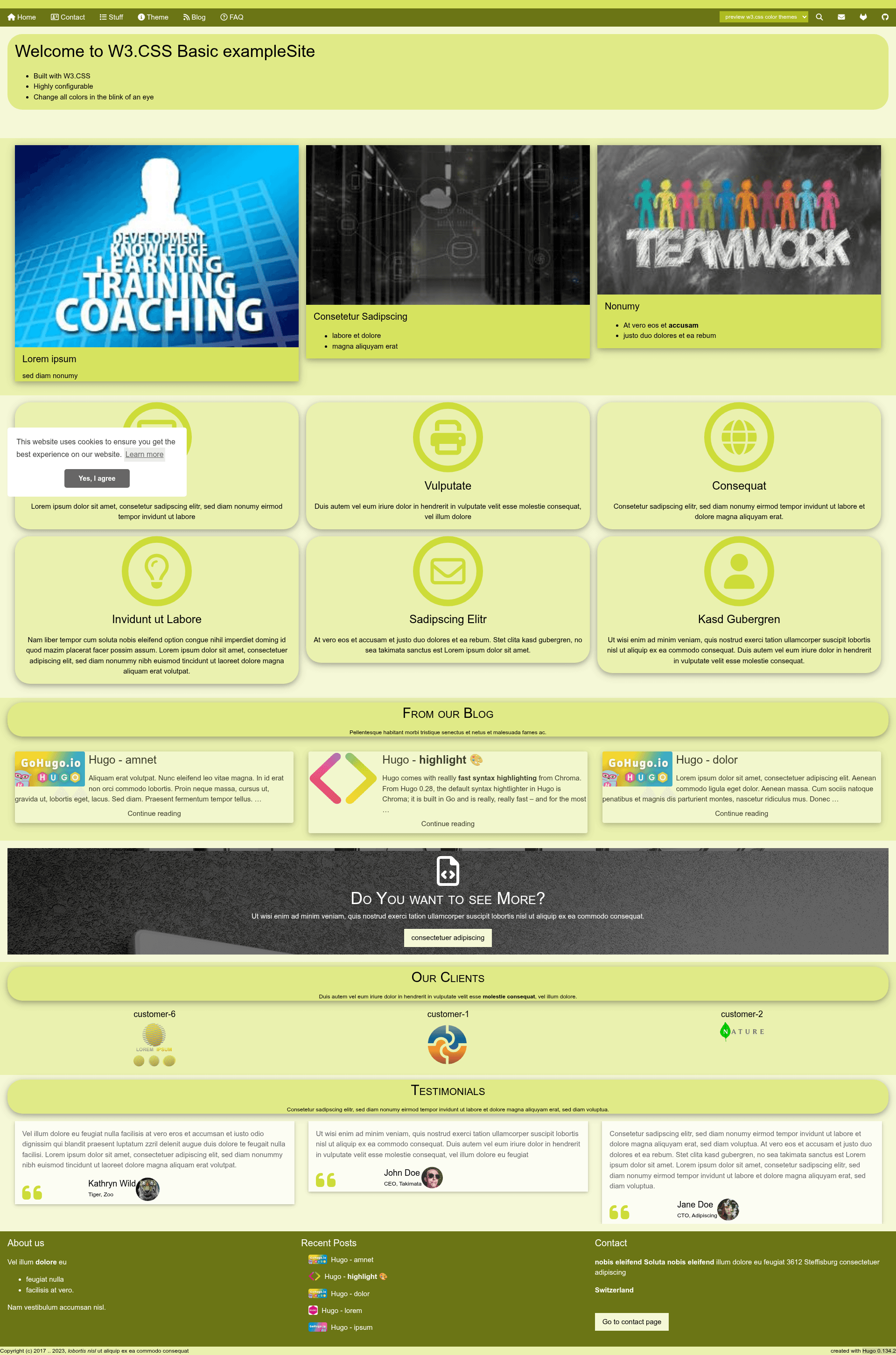
W3.CSS Basic is a highly configurable Hugo theme with 100+ monochromatic color themes, landing page modules, galleries, and blog support.
About this template
W3.CSS Basic is a Hugo theme for building landing pages, blogs, and nested page directories, built on the W3.CSS framework with more than 100 monochromatic color themes and 25 shortcodes.
What is W3.CSS Basic?
W3.CSS Basic is a free, open-source Hugo theme created by it-gro that turns Hugo content and a config file into a responsive website. It takes standard Hugo content types — blog posts, pages, data files for front-page sections, and page bundles — and renders them as a mobile-first site with either a 3-column layout on medium/large screens or a 1-column layout on small displays. The theme is built on W3.CSS (not Bootstrap), uses Font Awesome 5 icons, and bundles resources such as OwlCarousel, Animate.css, and PhotoSwipe.
Key Features
- Monochromatic color themes — Ships with all W3.CSS predefined themes (amber, blue, orange, deep-purple, etc.) plus a color-of-the-year series, switchable via a single
w3cssColorThemeconfig key; every component color (header, cards, footer) is separately adjustable. - Configurable landing page — Front page modules include an optional marquee, jumbotron carousel, photocards, features grid, recent posts, testimonials carousel, clients carousel, and a "see more" section, each driven by YAML files in the
datadirectory. - Works without JavaScript — Carousels, menus, and navigation fall back to static HTML when JS is disabled; Google Translate, Google Custom Search, and analytics are opt-in to reduce visitor tracking.
- Blog support — Includes blog list pagination (best with 3, 6, 9, or 12 posts per page), teaser images with Hugo image processing commands like
FillandResize, date format localization via i18n files, and a Disqus comment button that requires a user click (with optional count and a skip-agree setting). - Nested page navigation — For page directories, the theme provides Top/Up/Down navigation and a list of pages on the same level instead of breadcrumbs, plus an optional breadcrumb bar.
- Image galleries — Includes the hugo-easy-gallery shortcode with PhotoSwipe lightbox, and a custom
res-galleryshortcode that uses Hugo page resources for image processing. - Privacy-oriented integrations — Google Analytics via gtag, Google Translate, Google Custom Search, and Google Maps are all optional and disabled by default; a cookie consent banner (cookieconsent) is included.
- Custom fonts and colors — Fonts can be loaded locally or via Google Fonts API with per-element configuration, and custom CSS/JS can be injected.
Who is it for?
W3.CSS Basic is aimed at Hugo users who want a W3.CSS-based alternative to the many Bootstrap themes. Content editors who like monochromatic, single-hue color schemes will find the theme's color-theme system and per-component color overrides useful. Developers building a small corporate or personal site with a landing page and blog can use the pre-built data-driven front sections. It also suits people who care about privacy, since the theme works with JavaScript disabled and third-party integrations are opt-in.
What can you do with W3.CSS Basic?
- Create a landing page — Assemble a homepage from optional marquee, jumbotron, photocards, features, testimonials, and clients sections, each populated from YAML files with images, icons, and links.
- Run a blog — Publish posts with teaser images, tags/categories, syntax highlighting via Hugo's Chroma, pagination, and a consent-based Disqus comment system.
- Build structured documentation or content sections — Organize content under
content/pagesin nested folders; the theme auto-generates Top/Up/Down navigation and same-level page cards. - Showcase images — Use the
res-galleryor hugo-easy-gallery shortcodes for thumbnails and lightboxes, with Hugo image processing to resize images per configuration.
How does W3.CSS Basic work?
Installation is standard for Hugo themes: clone the repository into the themes directory, then copy the exampleSite's config.toml as a starting point. Configuration happens mainly through config.toml — enabling front-page sections, choosing a color theme, setting Disqus shortname, and configuring navigation menus. Content is authored in Markdown with front matter for teaser images, icons, and page weights; data-driven sections read from YAML files in data/.
Alternatives
- Universal — The Hugo theme that provided inspiration for W3.CSS Basic; it is based on Bootstrap instead of W3.CSS.
- Other Hugo themes — The Hugo Themes gallery offers many Bootstrap- and Tailwind-based themes, but W3.CSS Basic is among the few built directly on the W3.CSS framework.
FAQ
Does W3.CSS Basic work without JavaScript?
Yes. The theme is designed so basic usage works without JavaScript: carousels fall back to a static display, navigation menus truncate instead of collapsing, and the mobile menu does not rely on JS. Third-party features like Google Translate and Google Custom Search only activate when enabled and when JS is available.
What color themes are available?
The theme includes all W3.CSS predefined monochromatic themes — for example amber, blue, brown, indigo, khaki, lime, orange, pink, purple, red, teal, and yellow — plus a color-of-the-year series (from 2006 Sand Dollar to 2016 Warm Taupe). You can also create a custom W3.CSS theme and reference it via w3cssColorTheme.
Can I use custom fonts?
Yes. Set fontsUseGoogleApis = true to load any Google Font and map it to HTML tags (headings, body text, code) through the [params.googleApiFonts] section. Alternatively, set it to false and serve local font files from static/vendor/google/fonts to reduce third-party tracking.
Does the theme support comments?
Yes, through Hugo's built-in Disqus integration. The theme adds a consent button so comments are not loaded until the user clicks, and you can optionally show the comment count via disqusButtonShowCount. A disqusSkipAgree flag lets you bypass the consent step.
Is there a demo site?
Yes. The exampleSite is hosted at https://it-gro.github.io/hugo-theme-w3css-basic.github.io/ and the full configuration is available in the repository's exampleSite directory.