Template details
Hexo Theme Aurora
Futuristic auroral theme for Hexo with gradient colors, SPA navigation, and Gitalk/Valine comments.
About this template
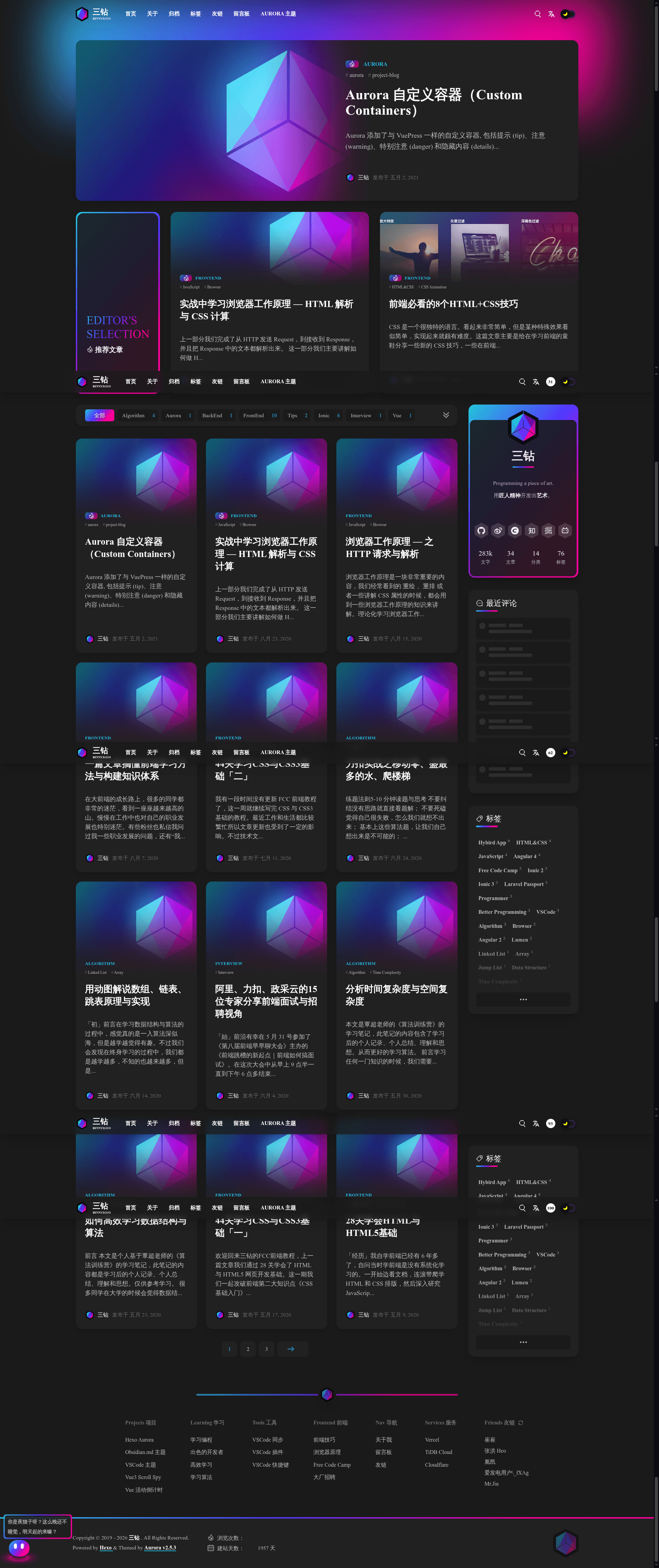
Hexo Theme Aurora is an open-source, futuristic auroral-themed template for the Hexo static site generator that transforms a markdown-based blog into a fast single-page app with gradient colors, a magazine layout, and built-in search and comment widgets.
What is Hexo Theme Aurora?
Hexo Theme Aurora is a blogging theme designed to be used with the Hexo static site generator. It takes your Hexo site's markdown posts and renders them as a modern blog with an aurora color scheme, a magazine grid homepage, and client-side routing that loads pages instantly without a full refresh. The theme is maintained by the auroral-ui organization on GitHub, with lead developer TriDiamond, and is distributed through npm/yarn for installation since version 1.1.0.
Key Features
- Featured section — Add a feature meta to any post, and it gets pinned into the featured section on the home page.
- Multi-language support — Switch the main UI texts between languages dynamically without changing browser language settings.
- Statistics — View article word counts, total posts, categories, and tags displayed on the blog.
- Article reading time — Each article shows an estimated reading time based on word count.
- MathJax support — Write LaTeX-style math in markdown and have it rendered with MathJax.
- SPA navigation — No page loads or freezes when moving between pages, because navigation happens in the browser.
- Comment plugins — Use either Gitalk or Valine for post comments.
- Blog search — Search all articles in the blog with a built-in search widget.
- Latest comments widget — Display recent Gitalk or Valine comments in a sidebar block.
Theme and customization options
Aurora offers two built-in color schemes: light and dark. The homepage uses a magazine-style grid layout with gradient colors throughout, and archives are presented as a timeline. Configuration options include a Beian config for Chinese users to show ICP filing info in the footer, a customizable menu that accepts internal links, external links, and custom pages, post navigation for previous/next articles, support for adding arbitrary custom pages, and a page navbar that attaches a sidebar sub-menu to specific pages.
Who is it for?
- Hexo users who want a modern look — Instead of using default Hexo themes, you can install Aurora and get a futuristic design with minimal setup.
- Technical bloggers and writers — The MathJax support and reading time estimates make it suitable for content with formulas and long-form articles.
- Chinese bloggers — The built-in Beian config saves you from manually editing footer templates to comply with Chinese regulations.
- Developers who like open source — The theme is developed openly on GitHub, so you can fork it, report bugs, or contribute.
What can you do with Hexo Theme Aurora?
- Launch a personal blog — Install the theme via npm/yarn, configure your site in Hexo, and start publishing markdown posts that render with the aurora design.
- Create a portfolio or documentation site — Use custom pages and the customizable menu to build sections beyond the blog, with each page able to have its own sidebar.
- Engage readers with community features — Enable Gitalk or Valine comments and the latest comments widget to keep conversations active.
- Optimize for reading — The reading time and statistics widgets give readers context, while search helps them find posts quickly.
How does the theme work?
The theme is installed into a Hexo project. After installation, you write markdown files in the usual Hexo source/_posts directory. Aurora processes those files and outputs static HTML, CSS, and JavaScript that behave like a single-page application in the browser. Configuration is done in a theme config file, where you set up menus, enable comment plugins, customize the featured section, and turn on features like MathJax or the Beian config.
FAQ
Is Hexo Theme Aurora free?
Yes, Aurora is an open-source theme released on GitHub, and you can use it without paying a license fee. Because it is open source, you can also modify it to fit your needs.
How do I install Hexo Theme Aurora?
Since version 1.1.0, you can install the theme using npm or yarn inside your Hexo project. The official documentation at aurora.tridiamond.tech provides step-by-step installation and configuration instructions.
Does the theme support comments?
Yes, Aurora supports both Gitalk and Valine comment systems. You can enable one of them in the theme configuration, and a latest comments widget can display recent comments in the sidebar.
Can I use MathJax in my posts?
Yes, Aurora includes MathJax support, so you can write math formulas in your markdown posts and have them rendered on the page. You may need to enable the MathJax option and install the required Hexo processor for full functionality.
Can I create pages other than blog posts?
Yes, Aurora supports custom pages. You can add any page to your Hexo site and link it through the customizable menu, and you can attach a sidebar to a specific page using the page navbar feature.