Template details
Hexo Theme Book
[No Longer Maintained] A simple, elegant, book-like hexo theme with some useful features.
About this template
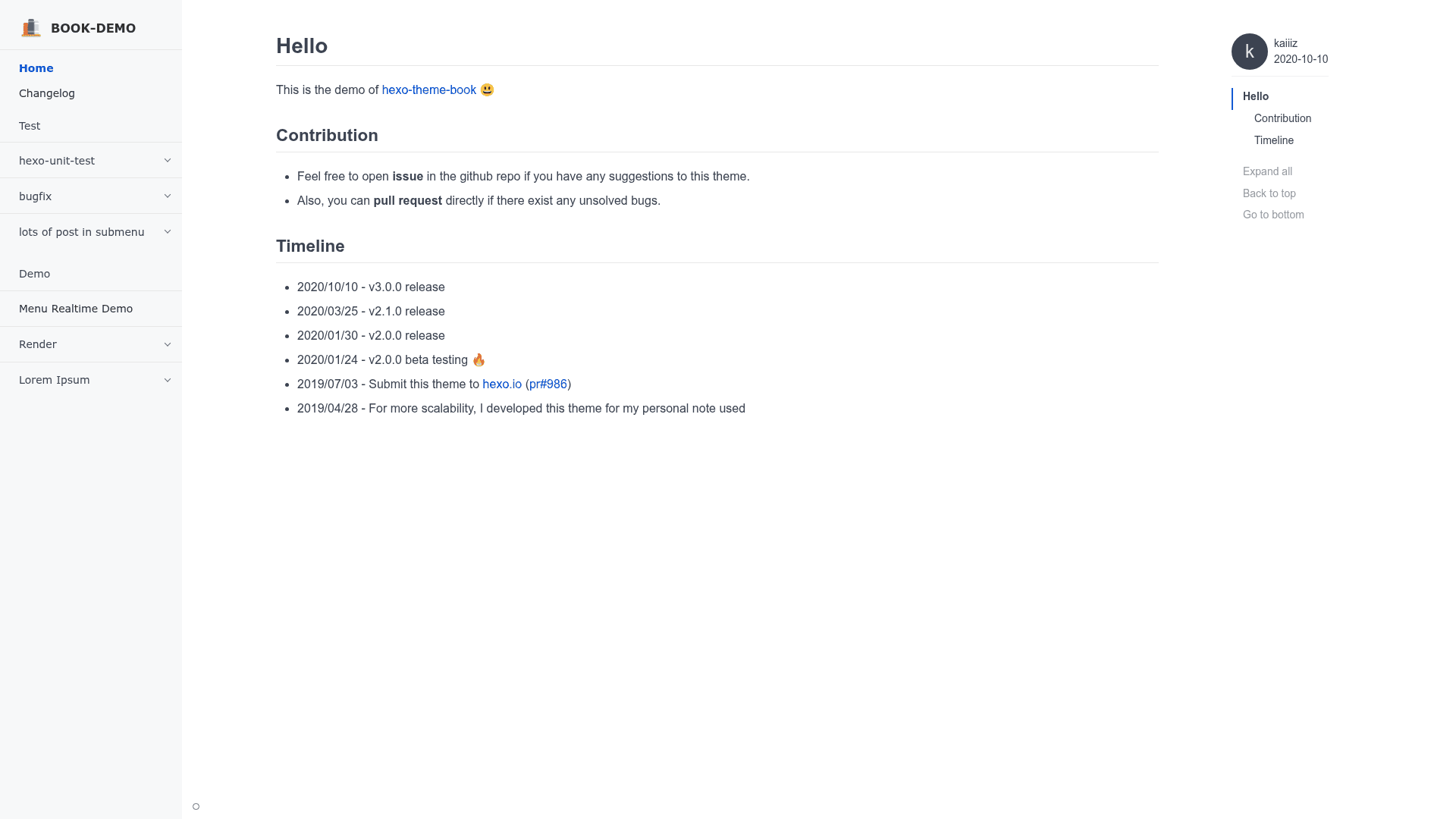
Hexo Theme Book is a simple, elegant, book-like theme for the Hexo static site generator, converting Markdown blog posts into a navigable two-page book layout with a customizable sidebar, syntax highlighting, and multiple comment-system integrations.
What is Hexo Theme Book?
Hexo Theme Book runs on the Hexo framework, which generates static sites from Markdown content. It takes Markdown posts as input and renders them in a book-like two-page interface with a sidebar menu, replacing the standard single-column blog layout. The theme is authored by kaiiiz and distributed as the GitHub repository kaiiiz/hexo-theme-book. It is no longer maintained, so users should expect potential bugs and security issues.
Key Features
- Book-like layout — Presents posts in a two-page book view with a sidebar index.
- Comment integrations — Supports three comment systems: utterances, Disqus, and Gitalk, configured through the theme's config file.
- Syntax highlighting themes — Uses Hexo's built-in highlighter based on highlight.js, with five Tomorrow color schemes: Normal, Night, Night Eighties, Night Blue, and Night Bright.
- Image zooming — Includes the zooming library so readers can click images to enlarge them.
- Google Analytics — Built-in integration that just needs your analytics ID in the config.
- Customizable sidebar menu — Fully configurable sidebar with a live demo; menu structure is set in the theme config.
- Responsive layout — Adapts to different screen widths to keep the book layout readable on mobile and desktop.
- Smooth update via data file — Supports placing a book.yml config in source/_data so theme updates via git pull don't overwrite your settings.
Who is it for?
- Hexo bloggers — who want a distinctive, book-like presentation for their existing Markdown posts.
- Developers — who want to build a custom blog theme and need a base with SCSS styling and multiple comment options.
- Content-heavy sites — like personal essay or tutorial sites that benefit from a sidebar index and reading-focused layout.
What can you do with it?
- Personal bloggers: Convert a standard Hexo blog into a book-style reading experience with sidebar navigation and comments.
- Technical writers: Show code with a choice of five Tomorrow syntax-highlighting themes and click-to-zoom images.
- Theme customizers: Fork the project to fix bugs or adapt the SCSS, since the original is unmaintained.
How does it work?
The installation uses git clone into themes/book, then npm install hexo-renderer-scss to process the SCSS files, and setting theme: book in _config.yml. Updating is done with git pull inside the theme folder; to keep custom settings across updates, copy the theme config to source/_data/book.yml.
FAQ
Is Hexo Theme Book free?
Yes, the theme is open source on GitHub and free to use, though it is no longer maintained and may contain bugs.
What comment systems does it support?
It supports utterances, Disqus, and Gitalk, so you can choose between GitHub-based comments and hosted comment platforms.
Do I need to install extra dependencies?
You need hexo-renderer-scss to compile SCSS; the syntax highlighting uses Hexo's built-in highlighter, so no extra highlighter package is required.
Can I customize the sidebar menu?
Yes, the sidebar menu is fully customizable through the theme configuration, and a real-time demo is linked in the repository.
What happens if I update the theme?
You can run git pull in the theme folder, but to preserve your custom settings, you should copy the theme config into source/_data/book.yml before updating.