Template details
XMin
Extremely minimal Hugo theme by Yihui Xie: about 140 lines of HTML and CSS, no dependencies, built to teach Hugo beginners.
About this template
XMin is an open-source Hugo theme by Yihui Xie that builds a complete blog or personal site from roughly 140 lines of HTML and CSS, with no external dependencies.
What is XMin?
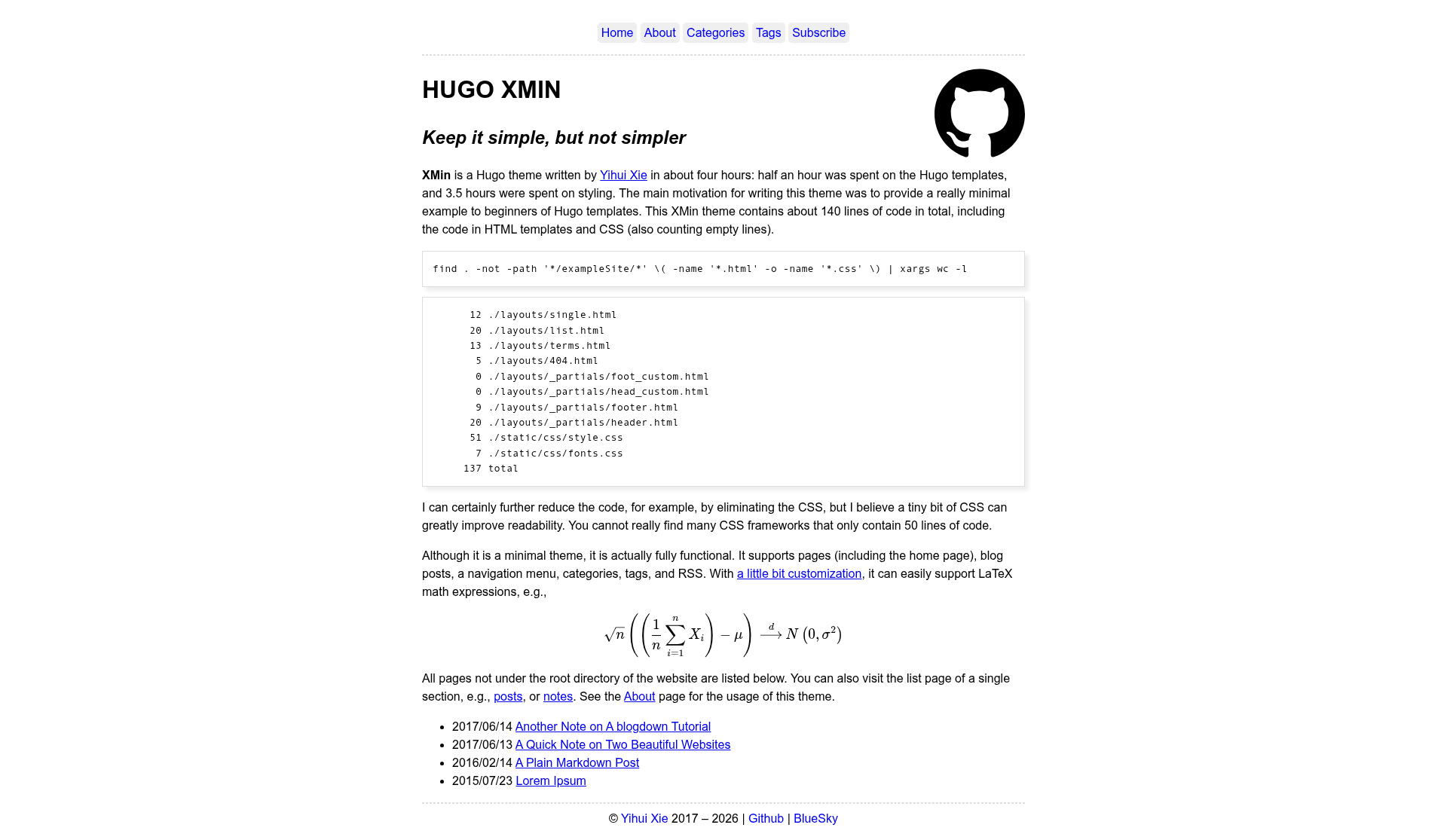
XMin is a deliberately minimal Hugo theme created by statistician and software developer Yihui Xie as a teaching aid for Hugo beginners. It takes your Hugo content in Markdown and renders it through five layout files — single.html, list.html, terms.html, 404.html, plus header and footer partials — into a static website. The entire theme, counting empty lines, comes to about 140 lines: 51 lines of style.css, 7 lines of fonts.css, and roughly 80 lines of HTML. It runs wherever Hugo runs, and Yihui hosts a live demo at xmin.yihui.org.
Key Features
- Extreme minimalism — The complete codebase is about 140 lines, including empty lines, with the main stylesheet at just 51 lines and fonts.css at 7 lines.
- No dependencies — No CSS framework, JavaScript library, or build tool is required; the GitHub repository explicitly lists “no dependencies” in its description.
- Built for learning — Yihui wrote the theme in about four hours (30 minutes on templates, 3.5 hours on styling) specifically to show beginners the minimal structure of Hugo templates.
- Small layout set — Five templates cover every page type: single.html (12 lines), list.html (20 lines), terms.html (13 lines), 404.html (5 lines), plus header (20 lines) and footer (9 lines) partials.
- Customization hooks — Empty head_custom.html and foot_custom.html partials let you inject your own code without editing core files.
- Readable typography — A tiny fonts.css maintains basic serif/sans-serif fallbacks, and you can swap the 51-line stylesheet for your own design.
- Public and starred — The GitHub repository has 969 stars, and the demo site is live at xmin.yihui.org.
Who is it for?
- Hugo beginners — Read through a complete theme that fits on one screen to understand how Hugo templates, partials, and CSS interact.
- Minimalist bloggers — Launch a fast, no-dependency blog or personal site without inheriting a large UI framework’s opinions.
- Theme developers — Fork XMin as a starting point for a custom Hugo theme; because the code is so short, you can see every line’s effect.
What can you do with XMin?
- Hugo learners: Study the 12-line single.html and 20-line list.html to see exactly how Hugo maps content files to rendered pages.
- Personal site owners: Publish a clean, readable blog or CV using the default typography, with no JavaScript and no third-party assets.
- Designers: Replace the 51-line stylesheet entirely with your own CSS, using the layout templates as a neutral skeleton.
- Prototypers: Stand up a Hugo site in minutes to test content structures, taxonomies, and terms pages before adding features.
How does XMin work?
XMin relies on Hugo’s standard template lookup order. single.html renders individual pages, list.html renders section pages, terms.html renders taxonomy term listings, and 404.html handles missing URLs. Every page includes the header and footer partials, and the empty head_custom.html and foot_custom.html files are available for your own snippet injection. The output is static HTML with two CSS files; there is no JavaScript and no build pipeline beyond Hugo itself.
FAQ
Is XMin free to use?
XMin is an open-source Hugo theme distributed through GitHub, so you can clone or fork it without paying. No pricing model or commercial license is mentioned in the repository, and the demo site runs on GitHub Pages.
Does XMin require JavaScript?
No. The theme consists solely of HTML templates and two CSS files — no JavaScript and no external dependencies — so the generated site works without any client-side scripting or build tooling.
How many lines of code does XMin have?
About 140 lines in total, counting empty lines. That breaks down to 51 lines in style.css, 7 lines in fonts.css, and about 82 lines across the HTML templates: 20 for the header partial, 20 for list.html, 13 for terms.html, 12 for single.html, 9 for the footer partial, and 5 for 404.html.
Can I customize XMin without modifying core templates?
Yes. XMin ships with empty head_custom.html and foot_custom.html partials where you can place custom links, scripts, or markup. Because these are separate files, your additions remain intact even when you update the theme’s core templates.