Template details
Hexo Theme React
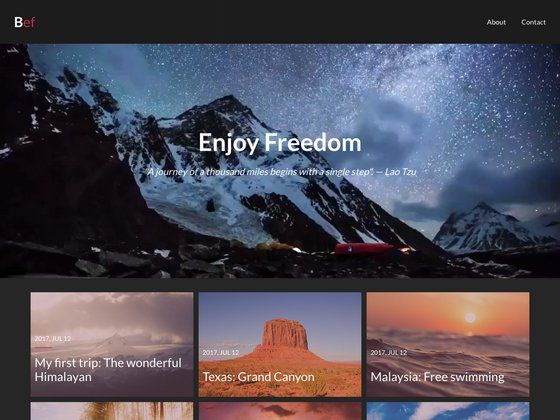
A Hexo theme porting the React Material Design multipurpose template, with 9 color themes, blog/project layouts, and data-driven sections.
About this template
Hexo Theme React is a Hexo theme that ports the React Material Design multipurpose template from ThemeForest into the Hexo static site generator, producing a one-page portfolio and blog site with multiple color themes, blog and project sections, and data-driven sections for services, philosophy, about, and FAQs.
What is Hexo Theme React?
Hexo Theme React is an open-source Hexo theme available on GitHub that migrates the design of the "React - Material Design Multipurpose Template" (originally sold on ThemeForest and developed by pimmey) to work with Hexo. It requires a Hexo installation and uses the hexo-renderer-pug and hexo-renderer-sass plugins to render Pug templates and Sass stylesheets into static HTML. The theme accepts Hexo posts and projects (defined in front matter) plus YAML data files for additional sections, and produces a single-page website with a blog roll and project grid.
Key Features
- Pug and Sass rendering — The theme requires the Hexo plugins
hexo-renderer-pugandhexo-renderer-sass; all templates are written in Pug and styles in Sass. - Nine built-in color themes — Includes combustion-purple, combustion-yellow, fuzzy-hue, fuzzy-saturation, ring-blue, ring-green, tunnel, waves-deep-purple, and waves-light-blue, selectable via the theme config.
- Blog and project layouts — Set
layout: postorlayout: projectin front matter to publish content into the home page's blog or projects sections. - Data-driven sections — Sample YAML data files for services, philosophy, about, and FAQs are provided in
sample/_data; copy them to your Hexo site'ssource/_datafolder. - Linea icons — Icons come from linea.io, and icon names must correspond to existing linea icons.
- Featured and background images — Use the
featuredfront matter field for post/project thumbnails andbackgroundfor modal popup backgrounds; place images undersource/img. - Disabled sections — Leave the
display-nameempty for a menu item to remove that section from the site. - Favicon override — Create a
source/faviconsfolder and place generated favicon files there to replace the defaults. - Sample scaffolds — The
sample/_scaffoldsfolder includes scaffold files to copy into your Hexo site'sscaffoldsfolder for new posts and projects.
Who is it for?
- Hexo users who want a material-design styled personal site without building a theme from scratch. They can clone the repo into
themes/react, install the required renderers, and generate a static site. - Developers transitioning from the original React theme who previously worked with pimmey's
react-docsor the ThemeForest template and now want a Hexo-native version with the same visual style. - Portfolio and blog owners who need a single-page layout with sections for services, philosophy, about, FAQs, blog posts, and projects, along with configurable color schemes.
What can you do with Hexo Theme React?
- Personal bloggers: publish posts with
layout: postand a featured image; the theme shows the latest 5 posts on the home page. - Portfolio owners: publish projects with
layout: projectand a featured image; the theme displays the latest 5 projects in a grid. - Site customizers: modify the
menublock in the theme config to disable sections, or change the active color theme from the nine built-in options.
How does Hexo Theme React work?
After installing Hexo, install the two renderer plugins, clone the theme repository into the themes/react folder, and set theme: react in the site's _config.yml. Run hexo clean && hexo g to generate the static site. To populate sections, copy the sample scaffolds and data files, then create posts and projects with the appropriate front matter.
Pros and cons
- Pros: Free and open-source; multiple color themes; data-driven sections; no React runtime required despite the name; simple front-matter workflow for content.
- Cons: The current version only supports the latest 5 posts and 5 projects on the home page—it does not implement pagination or archive list layouts.
Pricing
Hexo Theme React is publicly available for free from its GitHub repository and requires no purchase. The original React theme on ThemeForest is a commercial product, but this migration is distributed as a standalone Hexo theme.
FAQ
Is Hexo Theme React actually built with React?
No. Despite its name, the theme is written entirely with Pug templates and Sass stylesheets, and it runs on Hexo's Node.js static site generator. It is a migration of the visual design from a React-based template, but it does not require or use React in the generated site.
How do I install Hexo Theme React?
First ensure Hexo is installed. Then install the required renderers with npm i -S hexo-renderer-pug and npm i -S hexo-renderer-sass. Clone the theme repository into themes/react, set theme: react in your site config, and run hexo clean && hexo g.
How do I change the theme color?
Edit the theme's _config.yml and set the theme option to one of the nine available values: combustion-purple, combustion-yellow, fuzzy-hue, fuzzy-saturation, ring-blue, ring-green, tunnel, waves-deep-purple, or waves-light-blue. Preview all options at http://react.pimmey.com/.
How do I add a blog post?
Create a new markdown file in your Hexo source/_posts folder and set layout: post in its front matter. Optionally add a featured image path and place the image under source/img.
Why do only 5 of my posts or projects appear?
The theme currently has a limitation: it only supports the latest 5 projects and 5 posts on the home page. To support full blog/project listing, you would need to implement new layout files, as noted in the theme's documentation.