Template details
Barber
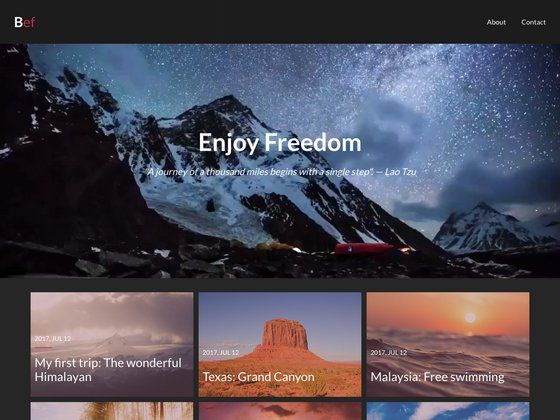
Minimal Jekyll blog theme with masonry grid, endless scrolling, and page transitions, by Thomas Vaeth.
About this template
Barber is a minimal blog theme for Jekyll, built by Thomas Vaeth for Samesies, that presents posts in a masonry grid with endless scrolling and page transitions.
What is Barber?
Barber is a blog theme for Jekyll, with a companion version available for Ghost on GitHub. It takes standard Jekyll posts and pages as input and produces a styled blog with a masonry layout, infinite-scroll pagination, and JavaScript page transitions. The theme is written in HTML, Sass, and ES6 JavaScript, and is released for free under an open-source repository.
Key Features
- Masonry grid with endless scrolling — Posts display in an asymmetric masonry grid, and the built-in pagination loads more posts so readers can scroll indefinitely.
- Page transitions — Navigation between pages and posts uses JavaScript-powered transitions instead of hard page reloads.
- Formcarry contact form — A ready-made popup contact form sends submissions to your inbox via Formcarry, with the endpoint configured in
_config.yml. - Disqus comments — Blog posts support Disqus; replace the
disqusshortname in_config.ymlto enable comments. - MailChimp email capture — A subscribe form connects to a MailChimp post-json endpoint for newsletter signups.
- Google Analytics and SEO settings — The site config includes fields for Google Analytics, URL, description, and a default social share image.
- Font Awesome social icons — Social links and per-post share buttons use Font Awesome icons, editable via
_includes/social.htmland_includes/share.html. - Sass and ES6 source structure — The
_assetsfolder organizes SCSS partials by base, components, regions, tools, utils, and vendor, with ES6 JavaScript compiled through Gulp.
Who is it for?
Barber is for bloggers and developers who want a Jekyll site with an image-heavy editorial look and minimal setup. Personal bloggers can publish markdown posts under _posts and configure all site details in _config.yml without touching layout files. Freelance developers can use it as a client blog starter, adding authors, tags, and pages quickly, then deploy to Netlify or AWS S3. Jekyll users who like the Ghost aesthetic can run Barber locally with bundle exec jekyll serve or npm start.
What can you do with Barber?
- Personal bloggers: write posts in Markdown with optional front matter for author, tags, and images to get a polished masonry blog with automatic tag pages.
- Developers: customize the layout by editing Gulp-compiled SCSS and ES6 files, then build a production-ready
_sitefolder withnpm run build. - Client projects: use the built-in Formcarry contact form, Disqus comments, MailChimp subscribe form, and social links to deliver a complete blog without extra services.
How does Barber work?
Installation requires the dependencies in the Gemfile; after cloning, run bundle install, then bundle exec jekyll serve or npm start for development. Posts are added to _posts with front matter that specifies layout, title, date, image, author, and tags; pages are created in the root with layout: page. To go live, build with bundle exec jekyll build or npm run build and deploy the _site folder.
Pros and cons
- Free and open source — Released at no cost, with optional donations via PayPal, Bitcoin, Ethereum, or Litecoin.
- Complete feature set — Includes contact form, comments, newsletter, analytics, SEO, and social sharing out of the box.
- Needs a build step for GitHub Pages — GitHub Pages does not support the custom Jekyll plugins used for tag lists and tag pagination, so you must build locally and upload
_site, connect Netlify, or use the included s3-website package.
Pricing
Barber is free to download and use. The README notes that comparable themes sell for around $29 on ThemeForest and invites donations via PayPal and cryptocurrency.
FAQ
Is Barber free?
Yes, Barber is released for free. Donations are optional and can be sent via PayPal, Bitcoin, Ethereum, or Litecoin using the addresses in the README.
Does Barber work with GitHub Pages out of the box?
No. The theme uses custom Jekyll plugins for tag functionality, which GitHub Pages does not support. You can deploy by manually adding the contents of _site to the gh-pages branch, linking the repo to Netlify, or using the included s3-website package for AWS S3.
How do I set up the contact form?
Barber's contact form uses Formcarry. Set the formcarry URL and the contact_img in _config.yml, then edit labels in _includes/formcarry.html if needed, and submit one test message to confirm delivery.
How do I change social media links?
Social icons are defined in _config.yml under the social list, using Font Awesome icon names. The templates that render them are _includes/social.html for the site's social links and _includes/share.html for the per-post share buttons.