Template details
Hiero
A free, open-source magazine-style blog theme for Hexo with customizable sidebar, code highlighting, and built-in search.
About this template
Hiero is a free, open-source magazine-style blog theme for Hexo, the static site generator, that turns a standard Hexo blog into a visually rich editorial site with configurable sidebar, code highlighting, and built-in search.
What is Hiero?
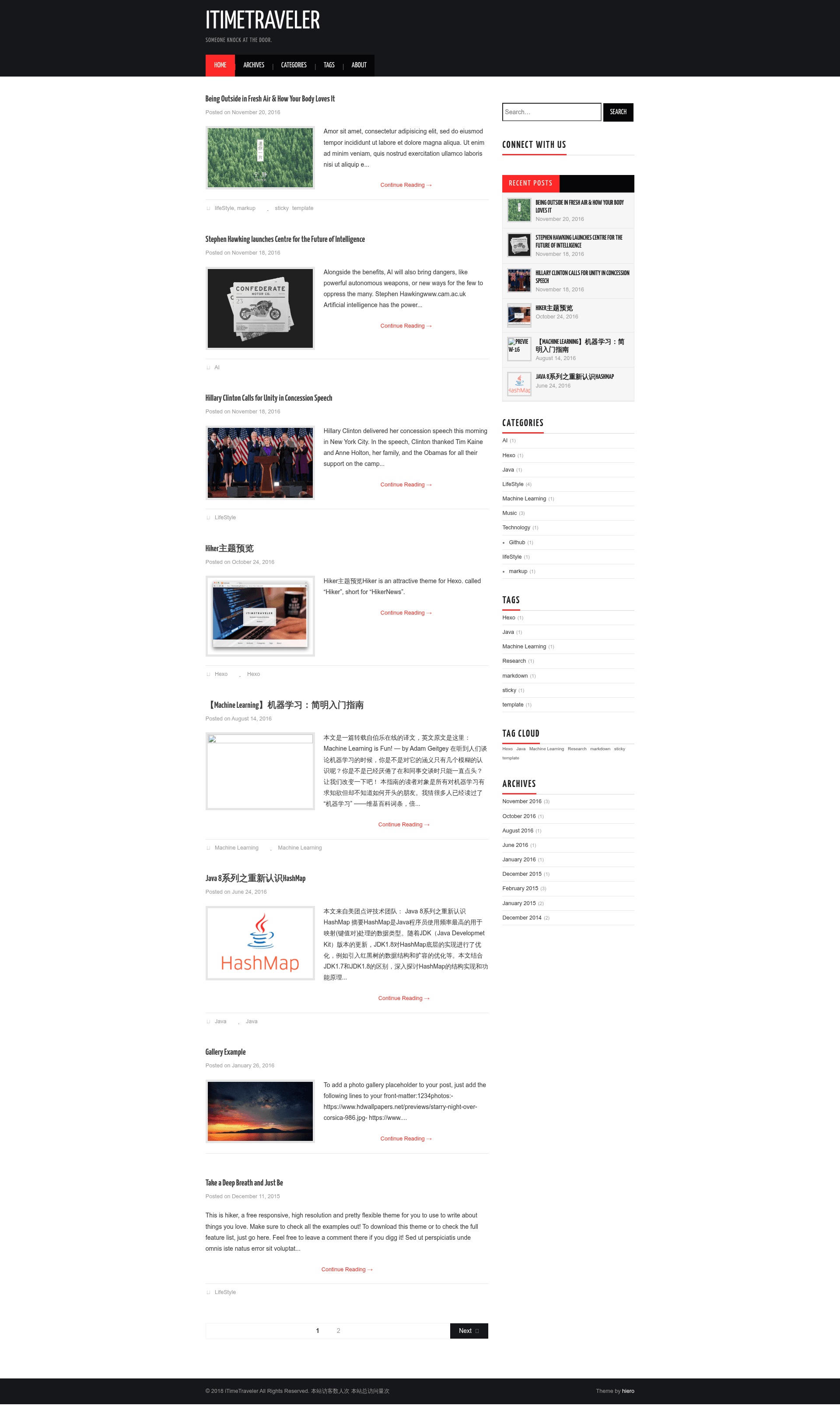
Hiero is a magazine theme designed for Hexo, a static site generator that compiles Markdown content into a fast, HTML-only website. The theme takes your existing Hexo posts, categories, tags, and pages and renders them into an editorial layout with a customizable sidebar, logo, and typography. It was created by developer iTimeTraveler for Hexo, and its design is adapted from the WordPress theme Hiero by ATHEMES. The project lives on GitHub, is covered by the MIT license, and has a live preview at itimetraveler.github.io/hexo-theme-hiero.
Key Features
- Image logo support — Replace the default text title with an image by enabling the
avatarsetting in the theme config, with options for width, height, and URL. - Six code highlight themes — Code blocks are styled with the Tomorrow theme, offering
default,normal,night,night blue,night bright, andnight eightiesoptions. - Configurable sidebar — The sidebar can appear on the left, right, or bottom, and includes seven built-in widgets: search, social, recent posts, category, tag, tagcloud, and archive.
- Built-in Insight Search — Client-side search that requires no third-party service; install the
hexo-generator-json-contentplugin to activate it. Swiftype and Baidu search are also supported. - Fancybox lightbox — Photos open in a lightweight lightbox, usable through standard Markdown image syntax or a custom
fancyboxtag. - Donation button — Enable a donation section with QR codes for WechatPay and AliPay, configured in the theme's YAML file.
- Comment system support — Native support for DuoShuo and Disqus, with a shortname config to choose which one to display.
Who is it for?
- Hexo users who want a magazine-style layout — You can replace the default theme with something more visual without building templates from scratch.
- Technical bloggers and developers — The built-in code highlighting and site search make it easy to publish and navigate code-heavy posts.
- Chinese-speaking bloggers — The theme natively supports DuoShuo comments and WechatPay/AliPay donations, which are common in that community.
- Photographers and visual portfolios — Fancybox integration and a focus on imagery suit photo-rich posts.
What can you do with Hiero?
- Tech bloggers: Publish tutorials with sample code in one of six Tomorrow-based color schemes, and let visitors search the whole site instantly with Insight Search.
- Writers in China: Accept reader support through WechatPay or AliPay QR codes and engage with DuoShuo comments without adding extra plugins.
- Anyone portfolio-savvy: Showcase photography or creative work using Fancybox lightboxes and the magazine-style homepage.
How does Hiero work?
- Clone the repository into the
themes/hierofolder of your Hexo site. - Set
theme: hieroin the site's main_config.yml. - Customize
hiero/_config.ymlfor logo, highlight theme, sidebar widgets, search, donation, and comments. - Update anytime with
git pullfrom the theme directory.
Pros and cons
- Free under the MIT license.
- No third-party service needed for search if you use Insight Search (still requires installing the
hexo-generator-json-contentnpm package). - Wide range of customization options through a single YAML config.
- Limited to one comment system at a time (choose DuoShuo or Disqus).
Pricing
Hiero is free and open-source under the MIT license. You can download, modify, and use it for personal or commercial projects without a license fee.
Alternatives
Other Hexo themes include NexT (a popular minimalist theme) and hexo-theme-hiker (another magazine-style theme by the same author).
FAQ
Is Hiero free?
Yes, Hiero is open-source software released under the MIT license, so you can use it at no cost for personal or commercial sites.
How do I install Hiero?
Clone the GitHub repository into themes/hiero, then set theme: hiero in the _config.yml file at the root of your Hexo project. Run git pull to update the theme later.
What code highlighting options are available?
The theme uses the Tomorrow color scheme with six choices: default, normal, night, night blue, night bright, and night eighties — set via the highlight_theme option.
Does Hiero require third-party plugins for search?
Insight Search needs the hexo-generator-json-content npm package, but no external search engine. Alternatively, you can enable Swiftype or Baidu search from the config.
Can I use more than one comment system?
Hiero supports both DuoShuo and Disqus, but only one can be displayed at a time. Set the appropriate shortname in the theme configuration.