Template details
Hugo ReFresh
A Hugo theme for personal blogs and websites with multilanguage support, tag-based sidebar, and developer-focused shortcodes.
About this template
Hugo ReFresh is a Hugo static site generator theme for building personal websites and blogs, forked from the Fresh theme and extended from a single-page template into a multipage site structure.
What is Hugo ReFresh?
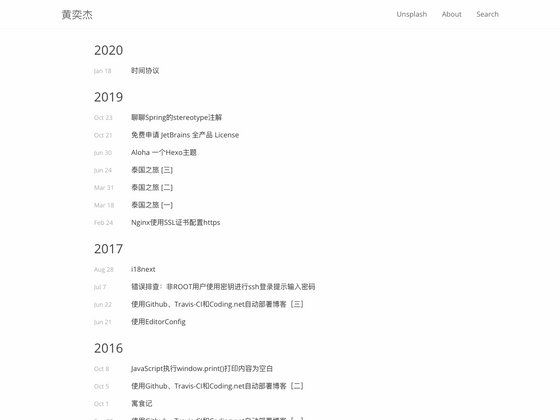
Hugo ReFresh is a theme for the Hugo static site generator, originally derived from StefMa's Fresh theme. It takes markdown content and a YAML configuration file as input and produces a full static website featuring a top navbar, a tag-driven sidebar, article summaries, and a blog-style layout. It is maintained by PippoRJ and demonstrated on the author's personal website at rjordaney.is. Because the theme compiles .sass files through Hugo's TOCSS pipeline, it requires the extended version of Hugo.
Key Features
- Multipage architecture — Unlike the original single-page Fresh theme, ReFresh organizes content into separate pages, with the menu automatically generated from the content folder structure (two levels supported).
- Multilanguage support — Ships with English, Spanish, French, Italian, Russian, Chinese, Polish, German, and Portuguese; the default language is set by the DefaultContentLanguage option in config.yaml.
- Code-focused shortcodes — Includes shortcodes for inline code (codeInline), standard code blocks (code), full-width code blocks (codeWide), tabbed code views with up to 6 tabs (tabsCode and tabs), plus syntax highlighting via highlight.js with the monokai-sublime theme and line numbers.
- Dynamic tag sidebar — The left sidebar lists tags and their occurrence counts directly from page content, rather than from a manually maintained config list.
- Configurable theming — Font families for the navbar, sidebar, and content can be set in config.yaml; theme images (including the favicon) are processed as SVG templates so their colors follow the main theme color.
- Page-level customization — Front matter fields include summaryImage, keepImageRatio, custom summary, hideLastModified, showInMenu, and tags, allowing each article to control its summary display and menu visibility.
- Locally loaded assets — All JavaScript and CSS files are served from the theme itself rather than from third-party CDNs, and JS/CSS can optionally be minified via a config flag.
- Media and layout shortcodes — Additional shortcodes cover image resizing (figure), side-by-side images (twoFigure), paired YouTube videos (twoVideos), book covers (book), colored messages/notifications, and exercise boxes.
Who is it for?
Hugo ReFresh suits independent bloggers and technical writers who publish code-heavy posts and want a tag-based content organization. It's also a strong fit for educators running lecture pages where side-by-side images, videos, and code examples are core. Multilingual site owners benefit from the nine included language files without needing to create translations from scratch.
What can you do with Hugo ReFresh?
- Programming tutorials: embed multi-language solutions with the tabsCode shortcode, line-numbered code blocks, and inline code snippets, as used in the author's code exercise pages.
- Lecture or course content: present two images side-by-side with twoFigure and pair YouTube videos with twoVideos; the ratio parameter accepts 16:9 or 4:3.
- Book or resource lists: display book covers and metadata with the book shortcode, which supports an image plus title and authors, and a size parameter like 300x for width in pixels.
How does Hugo ReFresh work?
After creating a new Hugo site, you clone the theme as a git submodule, remove the default config.toml, and fetch the example config.yaml from the repository. To run the example site, copy the exampleSite folder contents into your site root and launch hugo server -D. If you encounter a TOCSS style.sass transformation error, install the extended Hugo build (for example, snap refresh hugo --channel=extended on Ubuntu).
Pros and cons
- Pros: automatic menu from content structure; tag counts generated dynamically; local asset loading improves privacy; shortcodes cover code, images, and video layouts.
- Cons: only two menu levels are allowed at the moment; the theme is intended for personal websites and blogs, not for broader web apps; the Sass build step requires the extended Hugo binary.
FAQ
Which languages does Hugo ReFresh support?
Hugo ReFresh includes translation files for English, Spanish, French, Italian, Russian, Chinese, Polish, German, and Portuguese. You can set the default language with the DefaultContentLanguage setting in config.yaml, and multiple languages can be enabled simultaneously.
Do I need a special Hugo version?
Yes, you need the extended version of Hugo because the theme processes .sass files via TOCSS. On Ubuntu, you can run snap refresh hugo --channel=extended to switch to the extended build.
How do I customize the menu?
The menu is built automatically by scanning the content folder structure, so there is no menu list to edit in the config file. The theme currently supports two levels of nesting in the automatically generated menu.
What code formatting shortcodes are available?
The theme provides codeInline for inline snippets, code and codeWide for normal and full-width blocks (with optional line-numbers and language parameters), and tabsCode for displaying up to six files side by side in tabs, each with its own language, title, and optional icon.