Template details
Awesome
Free Next.js blog template with MDX and Notion support, deployable to Vercel.
About this template
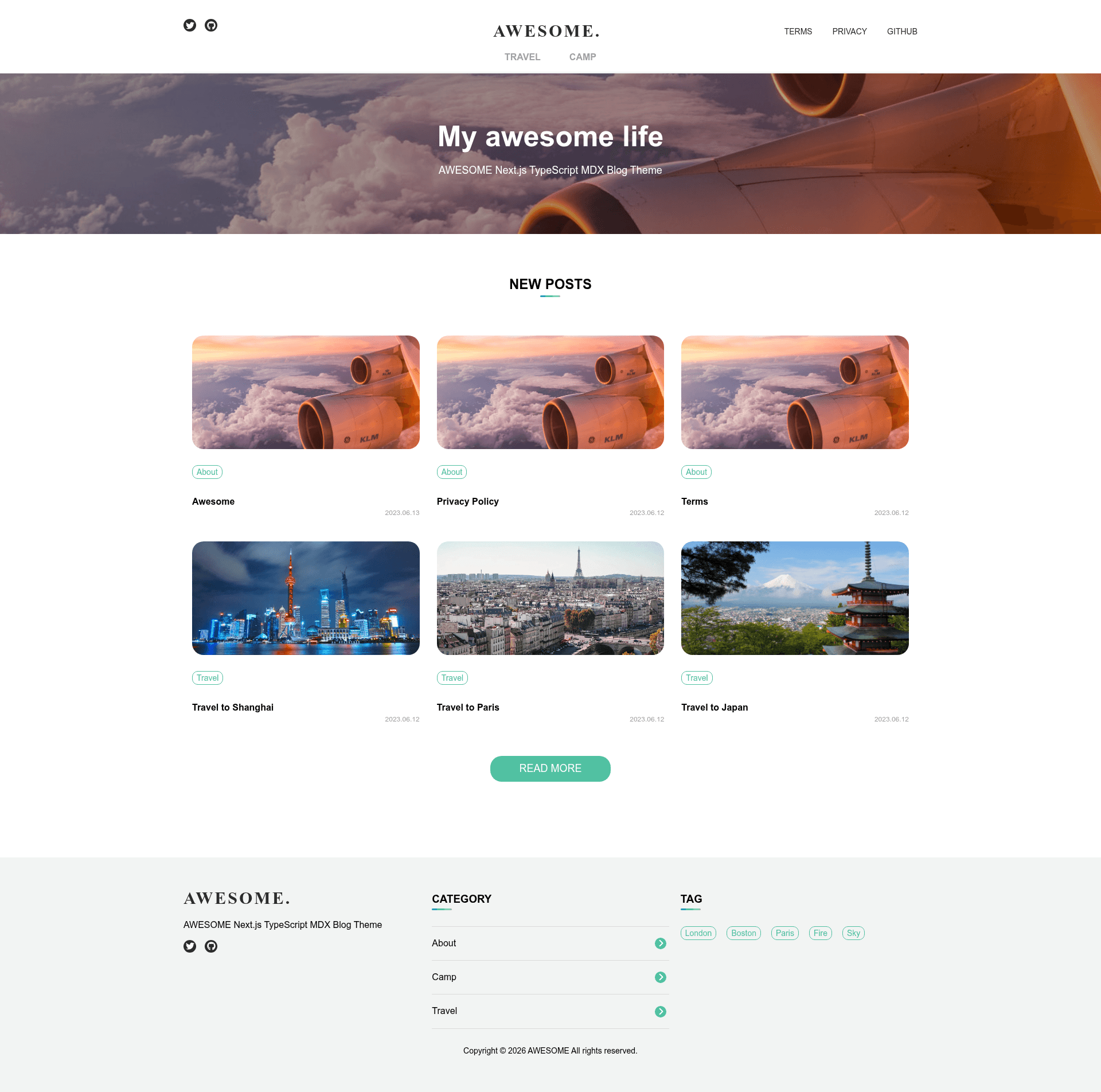
Awesome is a free, open-source Next.js blog template that converts Markdown/MDX files or a Notion database into a deployable blog, and it is distributed under the MIT license with a demo at theme-awesome.vercel.app. It is built on Next.js with TypeScript and PostCSS, and it is designed to run without any SaaS content service such as Contentful or Strapi — you manage content as files in a Git repository or as pages in a Notion database.
What is Awesome?
Awesome is a Next.js + TypeScript blog theme that reads blog posts from either a local contents folder of .mdx files or a connected Notion database, and generates a static blog with category, tag, author, and index pages. It takes YAML frontmatter metadata (title, date, writtenBy, category, tags, related, thumbnail) for each article, and outputs a website you can deploy to Vercel or any Node host. The theme is created by steelydylan and currently has 23 stars on GitHub.
Key Features
- Next.js + TypeScript — Built on the Next.js framework with TypeScript, using PostCSS for styling; the development server runs on port 3300 and production builds are configured through next.config.js.
- MDX content authoring — Write each article as an index.mdx file under the contents folder, with YAML frontmatter for title, date, author, category, tags, related posts, and thumbnail.
- Notion CMS mode — Switch the content source by setting use: "notion" in blog.config.ts and adding NOTION_DATABASE_ID and NOTION_TOKEN to a .env file; the theme will pull posts from a Notion database that contains Page, Slug, Published, Date, Authors, Thumbnail, Description, and Category properties.
- Single-file configuration — The blog.config.ts file centralizes the site logo, site name, SEO title and description, colors, breakpoints, hero, account/social links, navigation items, default thumbnail, articles per page, categories, and tags — no separate admin panel.
- Categories and tags — Define categories with an id, title, image path, and description, and list tags with id and title; each article can belong to one category and multiple tags, generating dedicated index pages.
- Vercel deployment workflow — Copy the theme to a GitHub repository, import the repository on Vercel, and the included vercel.json plus Next.js defaults handle the build and deploy pipeline.
- Responsive design tokens — The styles configuration exposes container max width (default 1280px), colors including a primary gradient, and breakpoints for huge, large, medium, and small screens, letting you re-skin the theme without touching component code.
Who is it for?
- Developers who want a Git-based blog with no external CMS dependency — you edit MDX files, push to GitHub, and deploy.
- Next.js learners who want a working TypeScript blog they can explore and modify; the codebase separates components, hooks, layouts, pages, and utilities into clear folders.
- Notion power users who want to write posts in a Notion database and automatically publish them through the same template by providing a token and database ID.
- Bloggers who like to customize — the configuration file exposes logo, hero, navigation, author, category, tag, and styling options so you can tailor the site without editing React components.
What can you do with Awesome?
- Run a no-SaaS blog: write mdx files locally, run npm install then npm run dev for local preview, and deploy the same repository to Vercel.
- Publish from Notion: create a database with the required properties, set the integration secret and database ID in .env, then the theme generates blog pages from Notion records.
- Brand your blog: change the siteLogo, colors, hero image, navigation, default thumbnail, and per-article thumbnails through blog.config.ts and frontmatter.
- Organize articles by category and tags: define categories and tags in the config, then use the frontmatter fields to group articles and generate index pages.
How does Awesome work?
Awesome reads a config file (blog.config.ts) that defines the content source as "mdx" or "notion". For MDX, it looks for index.mdx files in the contents directory and parses their YAML frontmatter. For Notion, it queries the database identified by NOTION_DATABASE_ID using the NOTION_TOKEN, and maps the database properties to article fields. The theme then renders pages with Next.js, so any change to the content can be redeployed via git push to GitHub and Vercel.
FAQ
Is Awesome free?
Yes, Awesome is released under the MIT License, and the theme source is available on GitHub; you can download the latest version as a zip from a public storage URL. The demo site is hosted at theme-awesome.vercel.app.
Can I use Notion as a CMS instead of MDX files?
Yes, set use: "notion" in blog.config.ts and add NOTION_DATABASE_ID and NOTION_TOKEN to the .env file. The theme will fetch articles from the Notion database you create, using properties such as Page, Slug, Published, Date, Authors, Thumbnail, Description, and Category.
What are the system requirements?
You need Node.js and npm installed on your machine. The theme is a Next.js project, so after running npm install you can use npm run dev to start the development server on port 3300 and npm run build to create a production build.
How do I configure a default thumbnail for articles?
Set the article.defaultThumbnail field in blog.config.ts to an image path such as /images/thumbnail.png. Individual articles can override it by defining a thumbnail key in their YAML frontmatter.