Template details
Hyperspace Jekyll Theme
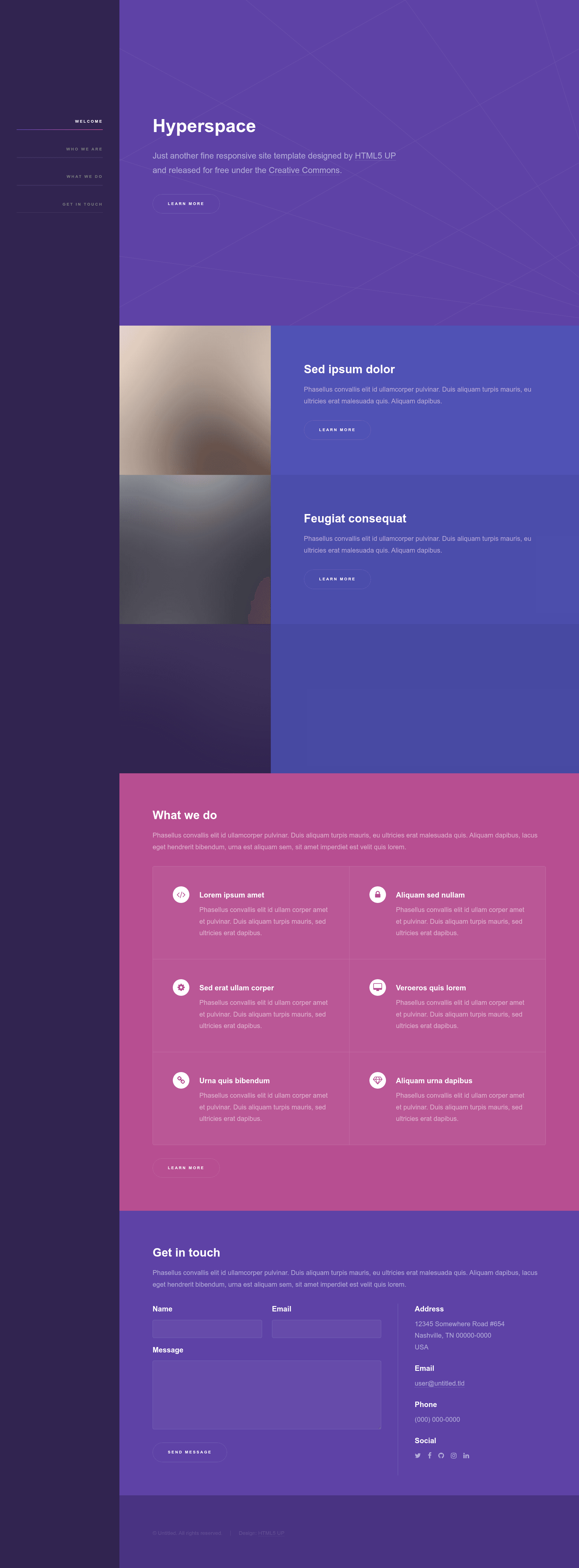
A Jekyll version of the 'Hyperspace' theme by HTML5 UP.
About this template
Hyperspace is a Jekyll theme that ports HTML5 UP's "Hyperspace" one-page design into a static site template for Jekyll-powered sites, with support for posts, pages, and front matter.
What is the Hyperspace Jekyll Theme?
The Hyperspace Jekyll Theme is a Jekyll implementation of the original "Hyperspace" theme by HTML5 UP, created by Andrew Banchich. It takes a standard Jekyll site structure as input and produces a styled static website with a "fun, blocky, one-page design with a lot of color, a bit of animation, and an additional 'generic' page template." The theme runs on Jekyll, so it works with GitHub Pages and GitLab Pages when configured correctly. The repository is marked as work in progress and has earned 21 stars at the time of writing.
Key Features
- One-page design — The layout is built around a single-page portfolio style with colorful blocks and a generic interior template for additional pages.
- Jekyll integration — Uses standard Jekyll front matter, posts, and pages, so content is written in Markdown or HTML and rendered by Jekyll.
- Easy setup on GitLab — Fork the repository and edit
_config.ymlto get started. - Easy setup on GitHub — Fork the repository, create a branch named
gh-pages, and edit_config.ymlto publish. - Responsive framework — The original theme uses Skel (a responsive design framework) along with jQuery and html5shiv.js for cross-browser support.
- Icon support — Includes Font Awesome icons via the original HTML5 UP assets.
- Demo images from Unsplash — The design uses CC0 images from Unsplash, though the demo images are not included in the repo.
- License — The original theme is free for personal and commercial use under the Creative Commons Attribution 3.0 (CCA 3.0) license.
Who is it for?
- Jekyll beginners — People who want a visually distinctive Jekyll site without starting from scratch; they can fork the repo and edit
_config.ymlto change site metadata. - Portfolio owners — Individuals or freelancers who need a one-page personal site with an extra interior page for a resume, project details, or about me.
- Bloggers — Anyone wanting to blog with Jekyll and use the standard post and page features while inheriting the Hyperspace look.
- GitHub/GitLab Pages users — Developers who want to deploy their site on either platform using the documented fork-and-branch workflow.
What can you do with it?
- Create a personal landing page — Configure the site metadata in
_config.ymland publish a one-page presence with links to your social profiles. - Set up a project site — Use the generic interior page template to document a project, add a detailed page, or serve as an about page.
- Start a blog — Use Jekyll's native writing workflow to create posts and have them styled automatically with the theme.
How does it work?
The theme is distributed as a Jekyll template that you fork. For GitLab, you simply fork the repo and edit _config.yml. For GitHub, you fork the repo, create a branch named gh-pages, then edit _config.yml. After that, Jekyll builds the site from your content and your changes are reflected in the deployed site. Issues and feature requests are handled through the GitLab repository, which is the canonical source (the GitHub repo is a mirror).
FAQ
Is the Hyperspace Jekyll Theme free?
Yes, the original Hyperspace theme by HTML5 UP is free for personal and commercial use under the Creative Commons Attribution 3.0 license. The Jekyll port is hosted on GitLab and GitHub as a public repository, so it is free to fork and use.
How do I deploy this theme on GitHub Pages?
Fork the repository on GitHub, create a branch named gh-pages, and edit the _config.yml file with your site settings. The site will build automatically. The README notes this is the recommended workflow.
Can I report bugs or request features?
Yes. Use the GitLab repository to open issues for bugs, questions, and feature requests. You can also email issues to the address listed in the README. The GitHub repository is only a mirror, so issues should go to GitLab.
Does the theme work with Jekyll's standard blog features?
Yes, because it is a Jekyll theme, it supports front matter, writing posts, and creating pages as described in the Jekyll documentation. The README links to those basics for newcomers.
What is the status of this theme?
The repository is marked as work in progress (WIP). It has 21 stars, but there is no indication of a stable release. Users should expect ongoing changes.