Template details
Next.js Partial Prerendering Demo
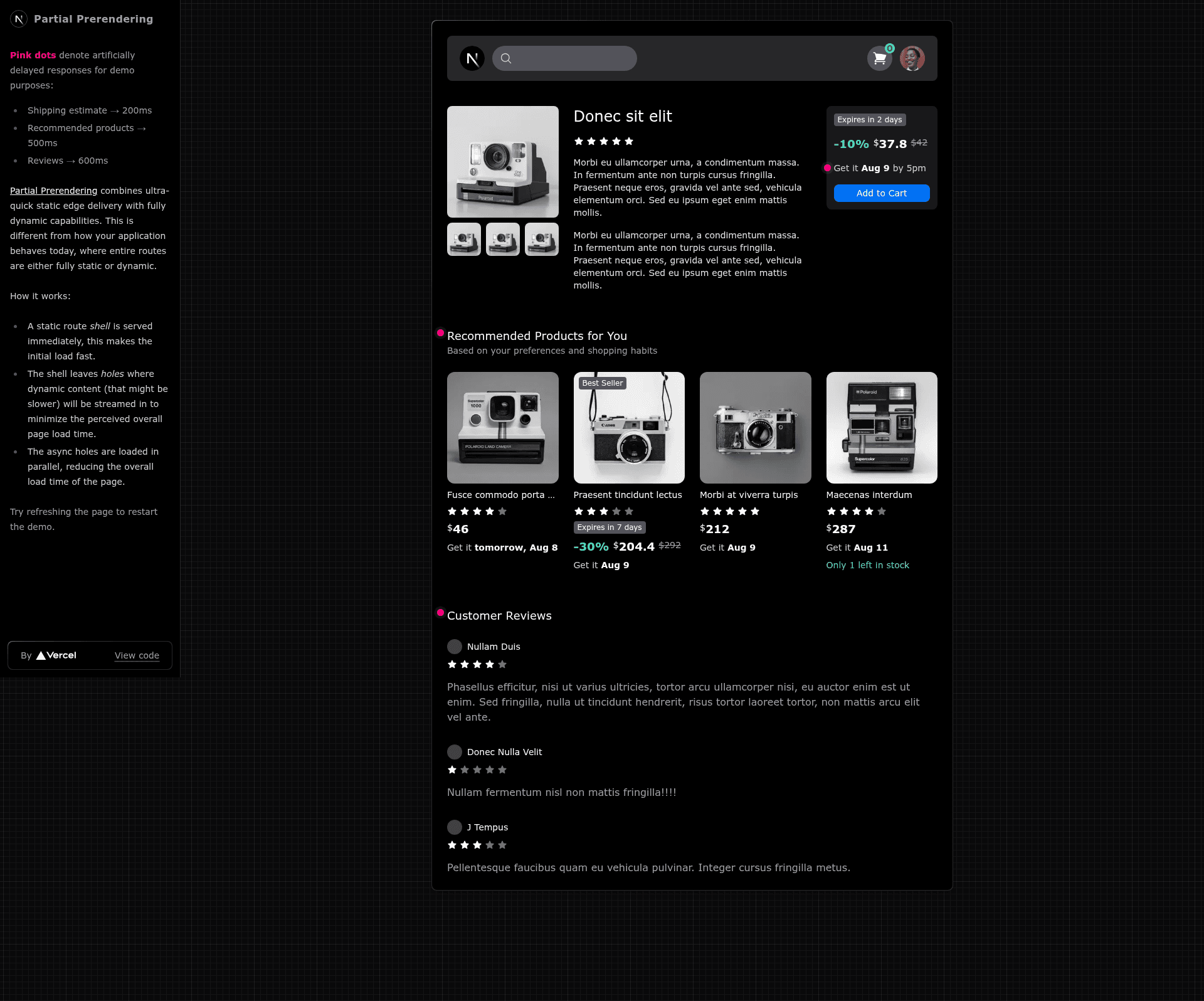
Demo of Next.js App Router using experimental Partial Prerendering for hybrid static and dynamic rendering.
About this template
The Next.js Partial Prerendering demo is a minimal example project that shows how to combine static edge delivery with dynamic regions in a single route using the experimental PPR flag introduced in Next.js 14.
What is the Next.js Partial Prerendering demo?
This is a small Next.js application built on the App Router that demonstrates the experimental Partial Prerendering (PPR) feature. It takes a standard Next.js project and adds the ppr: true flag in next.config.js, then wraps dynamic components in <Suspense> boundaries. The output is a working index route at / that serves a static shell with dynamic holes, showing the core pattern PPR uses to mix instant static responses with fully dynamic capabilities. The demo is published as a public repository with 326 stars and is tagged with nextjs and vercel.
Key Features
- Experimental PPR flag — Enable Partial Prerendering by adding
experimental: { ppr: true }insidenext.config.js, as shown in the demo. - Suspense-based dynamic regions — Wrap dynamic content in
<Suspense>so the route shells out static HTML while dynamic parts render asynchronously. - App Router support — Built on the Next.js App Router, which provides enhanced layouts, colocation of components, tests, and styles, plus component-level data fetching.
- Minimal codebase — The demo is intentionally small, with a single index route, making it easy to inspect every file and understand how PPR works.
- Cloud-edge delivery — Designed to serve static content from the edge while keeping dynamic parts flexible, aligning with Vercel's vision for web rendering.
Who is it for?
- Next.js developers who want a hands-on, minimal example of enabling Partial Prerendering in an existing project.
- Technical architects evaluating hybrid rendering models for content-heavy applications that also need personalization or real-time data.
- App Router adopters looking for a reference implementation of Suspense boundaries and dynamic rendering within a static shell.
What can you do with the Next.js Partial Prerendering demo?
- Experiment with PPR safely: Clone the repo and toggle the
pprflag to compare behavior with standard static or dynamic rendering. - Learn the Suspense pattern: See exactly where to place
<Suspense>around dynamic content to create static-dynamic hybrid routes. - Use as a starter for a proof of concept: Build a small app that needs fast static delivery on most of the page and dynamic data in isolated sections, such as a dashboard with static navigation and a live-data widget.
How does the demo work?
- Enable the experimental flag by adding
experimental: { ppr: true }tonext.config.js. - Wrap any dynamic components or data-fetching regions in
<Suspense>within the App Router layout or page. - Run the Next.js development server or deploy to Vercel to see the route deliver a static shell while dynamic regions stream in.
The demo itself contains only a single route at /, keeping the workflow easy to trace.
Pros and cons
- Fast static delivery — Pages get an immediate static shell served from the edge.
- Simple configuration — Just one flag and Suspense wrappers are enough to activate PPR.
- Experimental status — PPR is not recommended for production; you may encounter developer experience issues, especially on larger codebases, as noted in the repo's warning.
FAQ
Is Partial Prerendering production-ready?
No. The demo's README explicitly warns that PPR is an experimental technology not recommended for production. You may run into developer experience issues, especially on larger code bases.
What version of Next.js does the demo require?
The demo uses the experimental Partial Prerendering feature available in Next.js 14. It relies on the App Router, which is the default in recent Next.js versions.
Do I need to use the App Router to use PPR?
Yes, the demo is built with the App Router, and PPR is designed to work within the App Router's Suspense and layout model. The demo shows the App Router setup with layouts and component-level data fetching.
What does Partial Prerendering actually do?
Partial Prerendering combines ultra-quick static edge delivery with fully dynamic capabilities. Instead of choosing between static generation and server-side rendering for a whole page, you get a static shell with dynamic holes that render asynchronously, a pattern the Vercel blog suggests could become the default rendering model for web applications.
Can I use this demo as a production template?
Because PPR is experimental and not recommended for production, the demo is intended for learning and prototyping rather than as a production starter. For production use, stick to standard Next.js rendering modes until PPR is stable.