Template details
JAMStack Starter
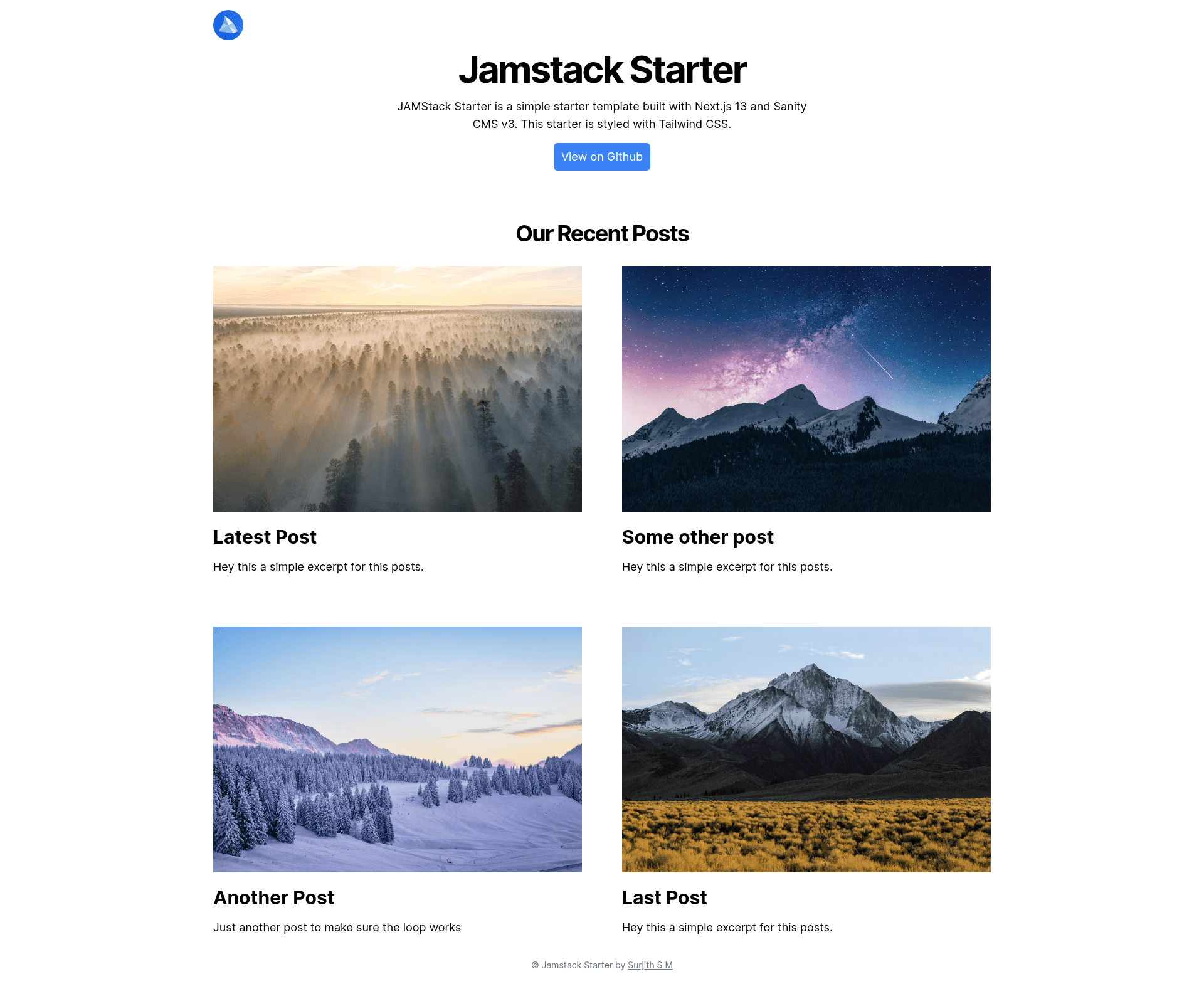
JAMStack Starter is a simple starter template built with Next.js 13 and Sanity CMS v3. This starter is styled with Tailwind CSS.
About this template
JAMStack Starter is a free starter website template from Web3Templates that couples a Next.js 13 frontend styled with Tailwind CSS to Sanity CMS v3 as a headless content backend, yielding a deployable JAMStack site plus an embedded content editor.
What is JAMStack Starter?
JAMStack Starter is a starter template built by Web3Templates (GitHub user surjithctly) that combines Next.js 13, Tailwind CSS, and Sanity CMS v3. It takes a Sanity dataset — optionally seeded with demo content via an import script — and produces a styled website with Sanity Studio mounted at the /studio route for editing. The repository is published as a free template and can be deployed through a one-click Vercel button that automates the GitHub, Sanity, and environment configuration.
What makes JAMStack Starter stand out?
- One-click Vercel deployment — the Deploy to Vercel button clones the GitHub repo, creates a Sanity project, installs the Sanity integration in Vercel, adds CORS and API settings, injects the required .env variables, and deploys both Sanity Studio and the Next.js frontend automatically.
- Next.js 13 with Tailwind CSS — the frontend is built on Next.js 13 and styled entirely with Tailwind CSS; the repo ships standard npm and pnpm scripts including dev, build, and import.
- Sanity CMS v3 content studio — editors reach the content manager at the /studio route on the deployed URL (for example your-published-url.com/studio) and at localhost:3000/studio during local development.
- Demo content importer — running
npm run importorpnpm importloads the demo posts and images seen in the live demo so the first launch is not blank. - Pre-configured environment variables — the .env.local.example file defines NEXT_PUBLIC_SANITY_PROJECT_ID, SANITY_STUDIO_PROJECT_ID, NEXT_PUBLIC_SANITY_DATASET, and SANITY_REVALIDATE_SECRET to connect frontend, studio, and revalidation.
- Linked local development —
npx vercel linkfollowed bynpx vercel env pullpulls the deployed environment variables into the local .env.local so local and production configurations stay in sync. - Community support — the README points users with setup trouble to the Web3Templates Discord community.
Who should use JAMStack Starter?
- Developers starting a JAMStack project — use the template to skip wiring up a CMS and deploy a working Next.js plus Sanity site to Vercel in a single click.
- Content-driven site owners — manage posts and images in Sanity Studio at the /studio route while the Next.js frontend renders the public site.
- Freelancers building client sites — clone the repo, run the demo import, and replace the seeded content with a client's own posts and branding.
- Teams adopting a headless CMS — use the pre-configured Sanity integration, CORS settings, API settings, and revalidation secret as a reference setup for other projects.
What can you do with JAMStack Starter?
- Launch a blog or content site quickly: deploy with the one-click Vercel button and run
npm run importto populate the site with demo content before adding your own. - Set up a headless CMS workflow: author content in Sanity Studio while the Next.js frontend renders it, using SANITY_REVALIDATE_SECRET to trigger revalidation.
- Create a consistent local environment: clone the generated repository, run
npx vercel linkandnpx vercel env pull, and develop at localhost:3000 against the same variables used in production.
How does JAMStack Starter work?
The README documents a four-step setup. First, deploy by clicking the Vercel button (or clone the template with the Use this Template button), and let the automated deploy create the GitHub repository, Sanity project, CORS and API settings, and .env variables. Next, run npm run import to load demo data, then add content at the /studio URL before visiting the published site — the README warns that skipping this leaves a blank or broken website.
FAQ
Is JAMStack Starter free?
Yes. The repository lists free in its GitHub topics, and no paid tier or license fee is mentioned in the README. The template can be cloned with the Use this Template button or deployed through the one-click Vercel button at no cost.
What does JAMStack Starter do?
It is a starter template that connects a Next.js 13 frontend styled with Tailwind CSS to Sanity CMS v3. It produces a deployable website with Sanity Studio mounted at the /studio route and includes a demo data import script so the site is populated on first launch.
How do I deploy JAMStack Starter?
Click the Deploy to Vercel button in the README. The deploy automatically creates a GitHub repository, signs in to or signs up for Sanity, creates a Sanity project, installs the Sanity integration in Vercel, adds CORS and API settings, sets the .env variables, and deploys both Sanity Studio and the frontend.
How do I add content to JAMStack Starter?
Visit the /studio path on your published URL, or localhost:3000/studio during local development, and add content before opening the public page. Alternatively, run npm run import or pnpm import to load the demo content shown in the live demo.
Can I set up JAMStack Starter without the one-click deploy?
Yes. Clone the repository, run npm install, create a Sanity project with npm create sanity@latest (without installing dependencies), copy the Project ID and Dataset into .env.local, and run npm run dev. The frontend runs at localhost:3000 and the studio at localhost:3000/studio.