Template details
Jekyll CV
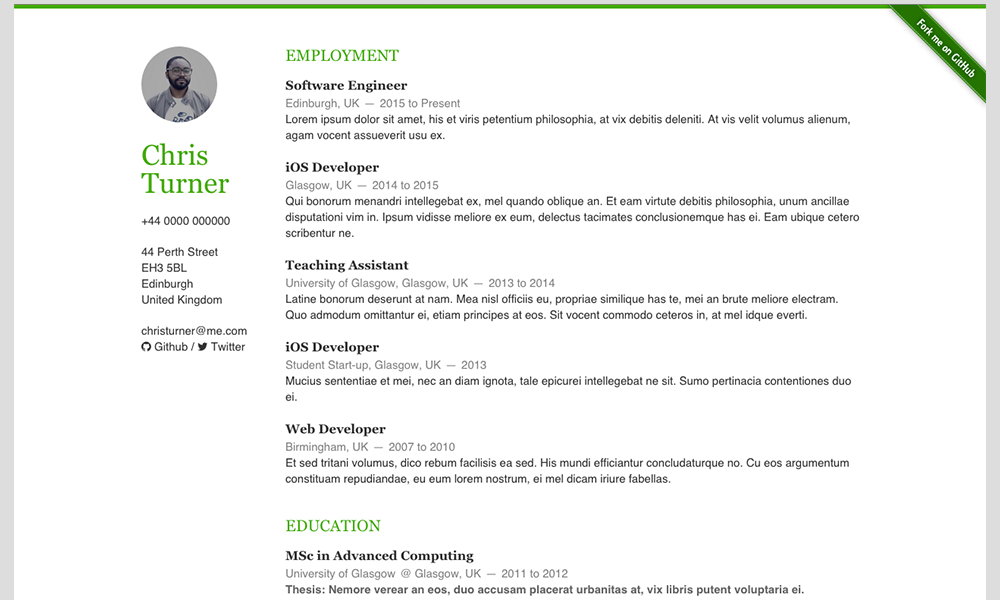
A free, lightweight Jekyll theme for creating a mobile-responsive CV with dark mode support.
About this template
Jekyll CV is a free, open-source Jekyll theme that generates a lightweight, mobile-responsive CV website from YAML data files, with built-in dark mode support and GitHub Pages deployment.
What is Jekyll CV?
Jekyll CV is a static-site theme built on the Jekyll framework, designed specifically for publishing a resume or CV online. It takes structured data from _data/data.yml and configuration from _config.yml and renders a single-page personal website. The theme was created by Stavros Panakakis (GitHub user stavrospanakakis) and is released under the MIT License. A live demo is available at jekyll-cv.stavrospanakakis.com.
Key Features
- Lightweight — The theme has no heavy JavaScript or frameworks; it serves plain HTML and CSS for fast loading.
- Free & Open Source — The entire source is available on GitHub under an MIT license, so anyone can use, copy, or modify it.
- Mobile Responsive — The layout resizes cleanly on phones and tablets, not just desktop screens.
- Dark Mode Support — Visitors can switch between light and dark appearance using a built-in toggle.
- GitHub Pages Ready — The official installation flow uses a
gh-pagesbranch, making deployment to GitHub Pages a matter of a few clicks. - YAML-Driven Content — There is no HTML editing for content; you replace the placeholder values in
data.ymland_config.ymlwith your own details.
Who is Jekyll CV for?
- Developers and technical professionals who want a minimal, no-dependency personal site to present their work history.
- Job seekers who prefer hosting their resume on their own GitHub account with a custom domain at no cost.
- Jekyll users who want a small base theme to fork and extend into a portfolio or link-in-bio page.
What can you do with Jekyll CV?
- Publish a professional CV — Replace the dummy data in
_data/data.ymlwith your name, experience, and skills, and the theme renders them as a clean single-page site. - Get a free custom-URL resume — Because it is designed for GitHub Pages, you can host the result at
username.github.ioor bind your own domain through the repository settings. - Experiment with Jekyll theming — The codebase is small enough to read and modify, so it works as a learning project for static-site development.
How does Jekyll CV work?
The workflow follows the README installation steps: fork the repository, create a gh-pages branch, select that branch as the GitHub Pages source in the repository settings, then replace the placeholder content in _data/data.yml and _config.yml. After pushing changes, the site builds automatically and becomes available at https://username.github.io/jekyll-cv/.
FAQ
Is Jekyll CV free?
Yes, the theme is free and open-source, released under the MIT license. You can use it for personal or commercial projects without paying any licensing fees.
How do I install Jekyll CV?
Fork the repository, create a gh-pages branch, select it as the GitHub Pages source in your repository settings, and then replace the dummy data in _data/data.yml and _config.yml. After pushing, the site is live at https://username.github.io/jekyll-cv/.
Does Jekyll CV support dark mode?
Yes, dark mode support is one of the featured capabilities, letting visitors toggle between light and dark themes on the generated CV site.