Template details
Vitae
Jekyll-based personal resume/CV homepage template, generating a static site that can be hosted free on GitHub Pages.
About this template
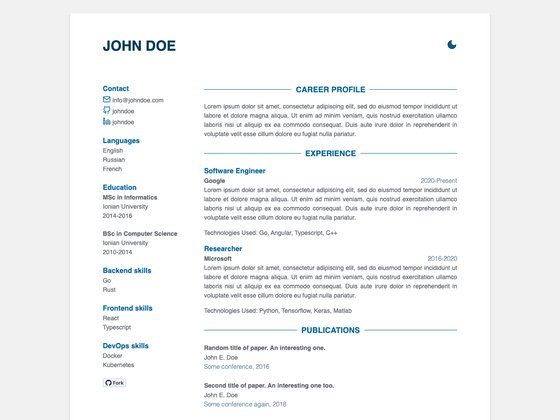
Vitae is a Jekyll-based personal homepage template for building a curriculum vitae or resume site, generated as a static website and designed to be hosted for free on GitHub Pages.
What is Vitae?
Vitae is a personal resume/CV website template built on Jekyll 3.9.0 and styled with the Skeleton CSS boilerplate. It takes your profile information from a _config.yml file and produces a static HTML single-page resume, which can be published to GitHub Pages, Netlify, or any Jekyll-compatible host. The project is maintained by the jekyllt organization and adapted from João Moreno's original resume theme. A live demo is available at jekyllt.github.io/vitae.
Key Features
- Jekyll static site generation — Built with Jekyll v3.9.0 on Ruby v2.6.3, generating static HTML from a YAML config and content files.
- Skeleton CSS styling — Uses the lightweight Skeleton framework for responsive layout without pulling in a heavy UI kit.
- GitHub Pages ready — Designed for free hosting on GitHub Pages; personal pages use the master branch, project pages use the gh-pages branch.
- Multiple deployment methods — Supports GitHub Actions, Travis CI via jekyll-travis, local
bundle exec jekyll serve, and third-party hosts like Netlify. - Live demo — A working resume page is hosted at jekyllt.github.io/vitae to preview the layout.
- MIT License — Released under the MIT License (2015-2021), allowing free use, modification, and redistribution.
- Contribution friendly — The repository uses a public issue tracker and accepts pull requests for fixes and improvements.
Who is it for?
Vitae suits anyone who wants an online resume without relying on a hosted resume service. Job seekers can publish a clean CV at their own username.github.io address. Developers can customize the Jekyll theme and automate builds with GitHub Actions or Travis CI. Academics and freelancers can present experience, education, and contact details in a fast, static page that costs nothing to host.
What can you do with Vitae?
- Job seekers: Edit
_config.ymlwith your details, push to a GitHub repository, and get a live resume page under your username domain. - Developers: Set up GitHub Actions to rebuild the site on every push, so the published resume always matches the source.
- Freelancers: Deploy to Netlify's free starter plan and serve the site through a global CDN.
- Students: Build a portfolio-style CV page to share with recruiters, with no database or CMS to maintain.
How does Vitae work?
Start by cloning the repository and editing _config.yml to add your name, biography, links, and other resume fields. To preview locally, run bundle exec jekyll serve and upload the generated _site folder to GitHub Pages. For automated publishing, configure GitHub Actions or Travis CI to build the site and push the HTML to the gh-pages branch.
Pricing
Vitae is free. The template is released under the MIT License, and the recommended hosting options — GitHub Pages for public repositories and Netlify's free starter plan — are also free at the entry level.
FAQ
Is Vitae free to use?
Yes. Vitae is distributed under the MIT License, so you can use, modify, and distribute it without charge, including for commercial projects. Free hosting is available through GitHub Pages and Netlify's free tier.
What versions of Ruby and Jekyll does Vitae require?
The README states that the install builds well with Ruby v2.6.3 and Jekyll v3.9.0. If you run into build problems, you can report them on the project's GitHub issue tracker.
How do I deploy Vitae to GitHub Pages?
You can let GitHub Actions build and push the resulting files to the gh-pages branch, set up Travis CI with a secure key, or generate the site locally and push the _site contents manually. Personal pages use the master branch; project pages use the gh-pages branch.
Can I host Vitae outside GitHub Pages?
Yes, because Vitae outputs a static website, any Jekyll-compatible host works. The README specifically mentions Netlify, which can deploy from your GitHub repository and serve the site through CDNs.
Does Vitae come with a profile picture?
The repository includes a sample profile photo sourced from Pexels. You can replace it with your own image when you customize the site.