Template details
Jekyll CV Crafter
A lightweight Jekyll theme for generating a CV webpage from a YAML data file, easy to integrate into GitHub Pages sites.
About this template
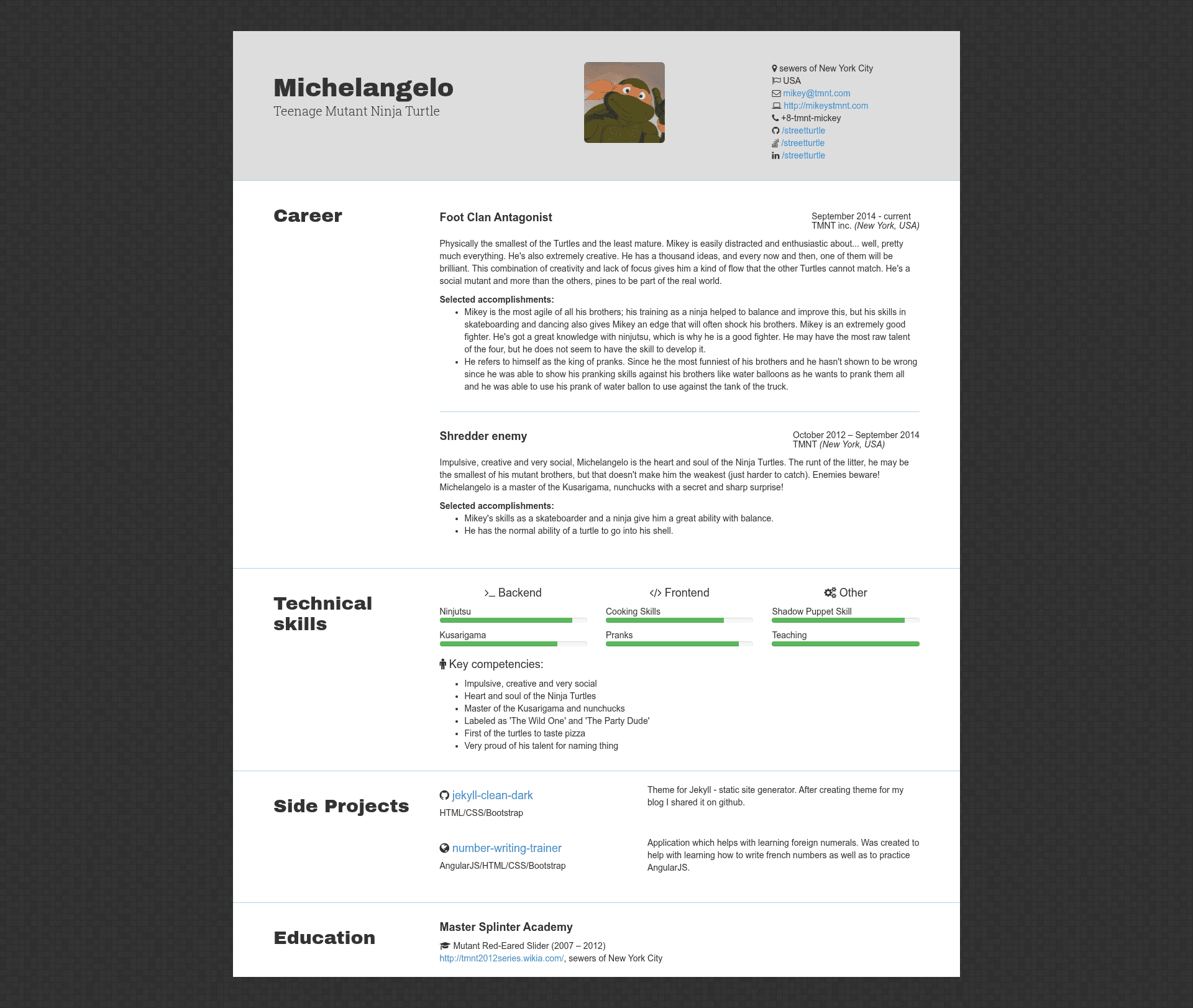
Jekyll CV Crafter is an open-source Jekyll theme that generates a static CV page from a single YAML data file, designed for developers who host their sites on GitHub Pages.\n\n## What is Jekyll CV Crafter?\n\nJekyll CV Crafter is a Jekyll-based CV generator with a 3-file core: _data/cv.yml holds your biographical and professional details, index.html is the Liquid/HTML layout, and css/cv.scss provides the styling. It produces a self-contained static HTML page that renders your information with Bootstrap and Font Awesome icons, and it can be dropped into an existing Jekyll blog hosted on GitHub Pages. The project is maintained by Pavel Makhov, as shown on the demo at pavelmakhov.com/jekyll-cv-crafter and the author's own CV at pavelmakhov.com/cv.\n\n## Key Features\n\n- Lightweight structure — Just three files to understand and edit: YAML data, an HTML/Liquid template, and a SCSS stylesheet.\n- Bootstrap + Font Awesome — The default look relies on Bootstrap's grid and components and Font Awesome icons for social links and skill lists.\n- Data-view separation — You only fill _data/cv.yml; the template and CSS handle all rendering, so the CV can be regenerated whenever the data changes.\n- Easy GitHub Pages integration — Copy cv.yml into your blog's _data directory, place cv.scss in your css folder, and rename index.html to cv.html to get a /cv page.\n- Customizable themes — Modify index.html and cv.scss directly, or create an entirely new theme; the author's personal CV at pavelmakhov.com/cv is a working example of a custom design.\n- Community template support — A vertical template is listed as a work in progress, and the repository invites pull requests with new template variations.\n\n## Who is it for?\n\n- Developers with a Jekyll blog — Add a CV page to their existing GitHub Pages site without introducing a separate generator or service.\n- Job seekers who track changes in Git — Keep their résumé as a text-based YAML file, making diffs and version history straightforward.\n- Developers who prefer writing over dragging — Edit a structured data file and get a styled page, instead of formatting inside a word processor.\n\n## What can you do with it?\n\n- Standalone CV site — Clone the repository, fill in cv.yml, and deploy to GitHub Pages to publish a live résumé at your own URL.\n- Integrated blog CV — Follow the three-file copy steps to add a /cv page to an existing Jekyll site, reusing the site's own styles or the template's.\n- Custom theme experiment — Use the minimal codebase as a starting point to build a unique CV layout with Bootstrap and Font Awesome.\n\n## How does it work?\n\nClone or download the repository, edit _data/cv.yml with your details, and the Jekyll build renders index.html. To integrate into an existing GitHub Pages blog, place the data file in the _data folder, the SCSS in the css folder, and rename the template file to cv.html; Jekyll then generates the page on the next build.\n\n## Pricing\n\nThe project is open source and free to use, with the source available on GitHub and distributed as a Ruby gem via badge.fury.io.\n\n## FAQ\n\n### How do I install Jekyll CV Crafter?\n\nClone or download the repository from GitHub. The entire template is contained in three files: _data/cv.yml, index.html, and css/cv.scss. After filling in cv.yml, you can run Jekyll locally or push the repository to GitHub Pages to generate the CV page.\n\n### Can I add this CV to my existing Jekyll blog?\n\nYes. Copy cv.yml into your blog's _data directory, put cv.scss in your css directory, and rename index.html to cv.html. The next Jekyll build will output a CV page at your blog's /cv address.\n\n### What files do I need to edit?\n\nThe only file you must edit is _data/cv.yml, which contains your personal and professional details. If you want to change the design, you would also edit index.html or css/cv.scss.\n\n### Is there a demo available?\n\nYes. The project has a live demo at pavelmakhov.com/jekyll-cv-crafter, and the author's own CV at pavelmakhov.com/cv shows a further customized example of the template.\n\n### Is this template free?\n\nYes, Jekyll CV Crafter is open source and free to use. It is published as a Ruby gem and the repository appears on badge.fury.io, and the author accepts issues, pull requests, and comments.