Template details
Flowbite React
Official React component library built on Tailwind CSS, with 30+ components, CLI setup, and framework integration guides.
About this template
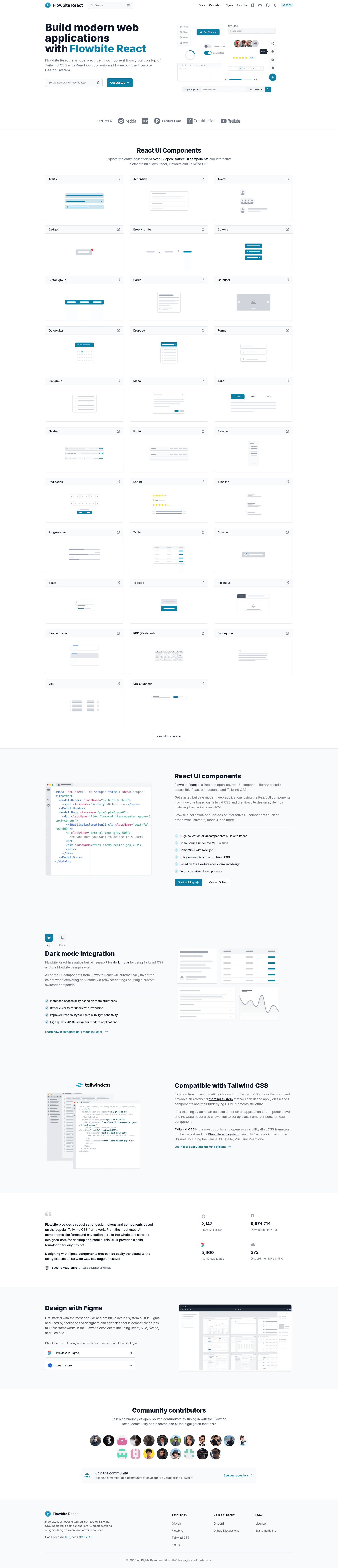
Flowbite React is an open-source React component library built on Tailwind CSS utility classes, providing interactive UI components as a starting point for user interfaces and websites.
What is Flowbite React?
Flowbite React is the official React implementation of the Flowbite design system, developed by Bergside Srl and distributed via npm. It takes React and Tailwind CSS as its foundation and produces accessible, styled components such as accordions, alerts, modals, dropdowns, datepickers, tables, and timelines. The library is currently in pre-release, so APIs may change before the final release.
Key Features
- Component variety — More than 30 components are included, from Accordion and Alert to Table, Tabs, Timeline, and Toast, plus a Sticky Banner.
- CLI project setup —
npx create-flowbite-react@latestscaffolds a new project with a selected template, whilenpx flowbite-react@latest initadds dependencies and configuration to an existing project. - Framework integration guides — Official setup guides cover 24 frameworks and tools including Next.js, Astro, Remix, Gatsby, Vite, Laravel, RedwoodJS, Bun, and Webpack.
- TypeScript and accessibility — The project lists TypeScript and accessibility (a11y) among its topics, indicating a TypeScript-based codebase with accessible component goals.
- Storybook-driven development — Storybook appears as a project topic, used for building and showcasing the components in isolation.
- Open-source MIT license — The library is free to use under the MIT license, with Flowbite name and logo trademarks belonging to Bergside Srl.
- Figma design files — Flowbite provides access to the component design files in Figma to bridge design and development.
Who is it for?
- React developers building with Tailwind CSS can import ready-made interactive components instead of hand-rolling modals, dropdowns, and pagination.
- Existing Flowbite users who want the same design system in React can switch to these components while keeping the Tailwind utility-class workflow.
- Full-stack teams using frameworks like Next.js, Remix, or Astro can follow the integration guides to add Flowbite React to their existing projects quickly.
- Product and engineering teams building dashboards, admin panels, or marketing sites can reuse a consistent component set across multiple projects.
What can you do with Flowbite React?
- Dashboard builders: combine Sidebar, Navbar, Card, Table, Progress bar, and Rating components into a functional admin interface with interactive modals and dropdowns.
- Marketing site creators: use Banner, Alert, Navbar, Footer, and Button components to assemble landing pages and content sections with Tailwind styling.
- Form-heavy applications: leverage the Forms, Input, and validation components to build sign-up, login, and checkout flows (form logic remains up to you).
How does Flowbite React work?
- Run
npx create-flowbite-react@latestfor a new project ornpx flowbite-react@latest initfor an existing project to set up the library. - Follow the framework integration guide for your stack (Next.js, Astro, Remix, etc.) if you need specific configuration steps.
- Import individual components from
flowbite-reactin your React code and pass props and Tailwind classes to customize them.
Pros and cons
- Pros: open-source MIT license, large component set, framework integration guides, TypeScript-based, and includes Storybook for development.
- Cons: the library is a pre-release, so APIs may change; some components from the vanilla Flowbite library are not yet available in Flowbite React.
Pricing
Flowbite React is free to use under the MIT license.
Alternatives
- Material UI (MUI) — a React component library implementing Google's Material Design.
- Chakra UI — a React component library with a modular and accessible API and its own theming system.
- shadcn/ui — a collection of copy-paste-able React components built with Radix UI and Tailwind CSS that live in your own codebase.
FAQ
Is Flowbite React free?
Yes, Flowbite React is open-source and released under the MIT license, so it is free to use in personal and commercial projects.
Is Flowbite React ready for production?
Flowbite React is currently a pre-release version, which means the APIs may change before the final release. It is not explicitly labeled as production-ready.
Which frameworks does Flowbite React support?
The project provides official integration guides for 24 frameworks and tools, including Next.js, Astro, Remix, Gatsby, Vite, Laravel, RedwoodJS, Bun, and Webpack.
Does Flowbite React include all Flowbite components?
No. The README notes that some components from the vanilla Flowbite library are not yet available in Flowbite React. The current list covers 30+ components but is not complete.
How do I install Flowbite React?
For a new project, run npx create-flowbite-react@latest. For an existing project, run npx flowbite-react@latest init. Then import components from the package.