Template details
Jekyll Polymer
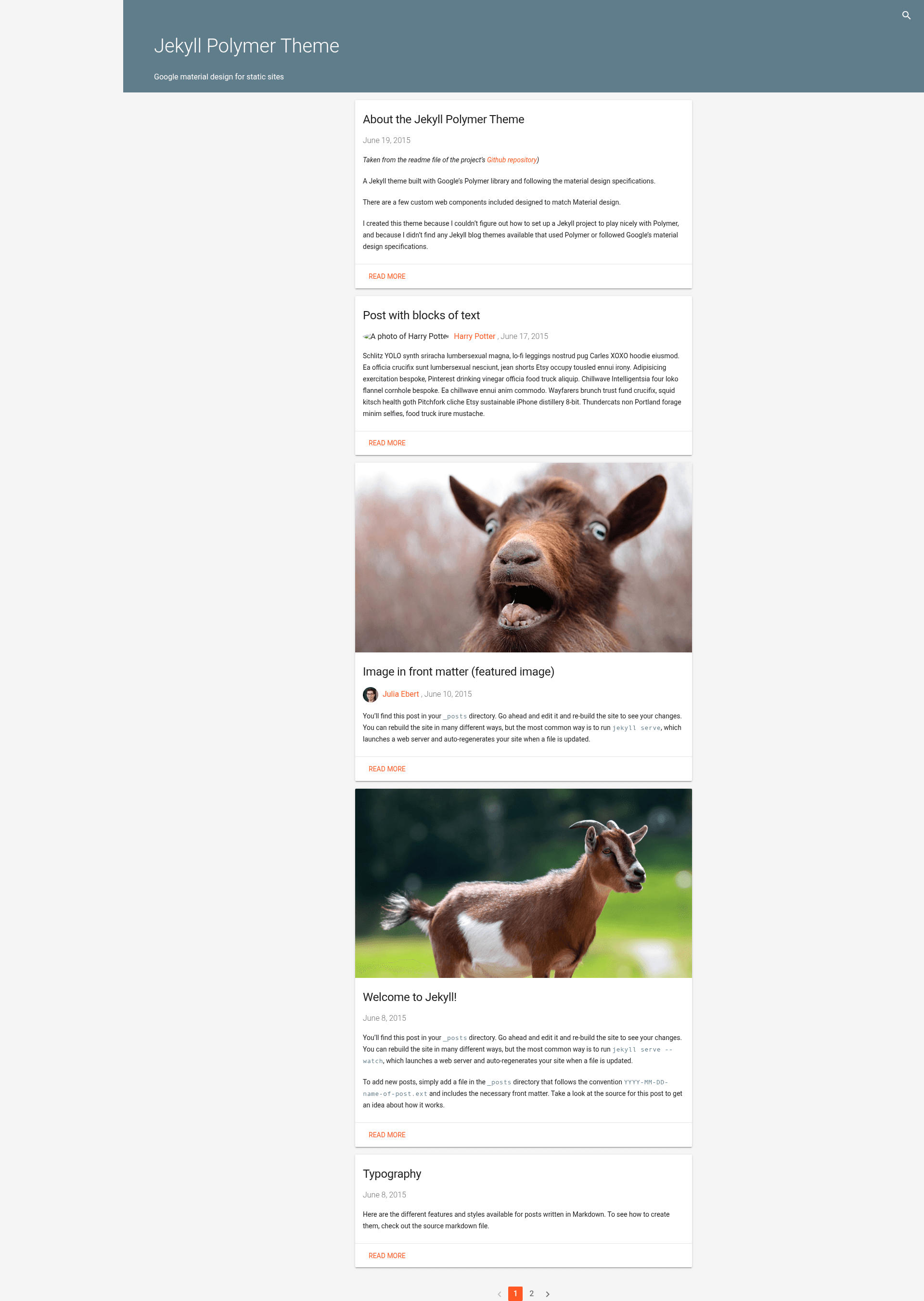
A material design theme for Jekyll built with Google's Polymer library, featuring full-text search, pagination, and Disqus.
About this template
Jekyll Polymer is a material design blog theme for Jekyll that builds on Google's Polymer 1.x web components and a Gulp task runner to produce a static site with a Material Design look.
What is Jekyll Polymer?
Jekyll Polymer is a Jekyll theme that generates a static blog with Google Material Design styling through custom Polymer web components. It takes Jekyll content — posts, pages, authors defined in _data/authors.yml, and images under app/images/ — and outputs a built site into a dist/ directory via Gulp. The theme uses Polymer 1.x (not 2.x), with the author noting plans to update to 2.x. It was created because no Jekyll themes combining Polymer and Material Design were available at the time.
Key Features
- Full-text search — Uses simple-jekyll-search to provide client-side search across the generated site without a separate search service.
- Paginated home page — The homepage paginates posts automatically, controlled through Jekyll's pagination settings.
- Featured post images — Posts can include a featured image that appears on the card-style previews on the homepage.
- Threaded Disqus comments — Comments are powered by Disqus and support threaded discussion on each post.
- Google Analytics — Google Analytics integration is built in; you add your tracking ID to the configuration.
- One-command GitHub Pages deployment —
gulp deploy-gh-pagespushes the current build to thegh-pagesbranch;gulp build-deploy-gh-pagesrebuilds first. - Tag archives — Posts are tagged and an archive page groups posts by tag.
- Author profiles with Gravatar — Multiple authors are listed in
_data/authors.ymland each post can display the author's Gravatar icon.
Who should use Jekyll Polymer?
- Jekyll bloggers who want a Material Design look without manually wiring Polymer into a Jekyll project — this theme provides the integration out of the box.
- Developers learning Polymer who want a working example of Polymer 1.x elements used inside a Jekyll site, including custom elements in
app/elements/. - GitHub Pages users who want a one-command deploy workflow from a local build to the
gh-pagesbranch withgulp deploy-gh-pages. - Multi-author blogs can define several authors in
_data/authors.ymland display a Gravatar for each post.
What can you do with Jekyll Polymer?
- Personal bloggers: Publish a Material-styled blog with featured images, tag archives, and Disqus comments, then deploy to GitHub Pages with a single command.
- Developers: Extend the custom Polymer elements in
app/elements/to add new Material-style components, then rebuild withgulp. - Content editors: Add posts with standard Jekyll front matter, including a featured image, tags, and an author, and the theme handles formatting.
- Site owners: Connect Google Analytics by adding a tracking ID and start collecting visitor data from the generated static pages.
How does the build work?
First clone or download the repository and install dependencies: bundle install for Ruby gems, then npm install -g gulp bower && npm install && bower install for Node and web component dependencies. The Gulp workflow builds the Jekyll site, vulcanizes the Polymer elements, and outputs the optimized site to dist/. For local development, gulp serve starts a Jekyll server on port 4000 (or another port with gulp serve --port 6666).
Pros and cons
- Pros: free and open source under the MIT License; includes full-text search, Disqus, Google Analytics, and GitHub Pages deployment out of the box; uses a clear
app/anddist/folder structure separating source from built output. - Cons: currently on Polymer 1.x, not 2.x; JavaScript and HTML are not minimized in the build;
gulp serve:distdoes not work when a Jekyll baseurl is configured; there is known extra spacing between a post excerpt and the read more button on cards.
Pricing
Jekyll Polymer is free and open source, released under the MIT License.
FAQ
Is Jekyll Polymer free?
Yes. The theme is released under the MIT License, so you can use, modify, and distribute it freely, including in commercial projects.
What is Jekyll Polymer?
It is a Jekyll blog theme built with Google's Polymer 1.x library that follows Material Design specifications. It combines Jekyll content with custom Polymer web components and a Gulp build pipeline to produce a static site.
Does Jekyll Polymer use Polymer 2.x?
No. The current version uses Polymer 1.x. The theme author has stated plans to update to Polymer 2.x in the future.
How do I deploy to GitHub Pages?
From the project root, run gulp deploy-gh-pages to push the current build in dist/ to the gh-pages branch. To rebuild first, use gulp build-deploy-gh-pages.
How do I run the theme locally?
Run gulp serve to start a Jekyll server on port 4000. You can change the port with gulp serve --port PORT, and gulp serve:dist serves the built site from the dist/ directory.