Template details
Gridster Jekyll Theme
A multimedia-focused Jekyll theme with video, audio, image, and gallery post types, material design, and Grunt automation.
About this template
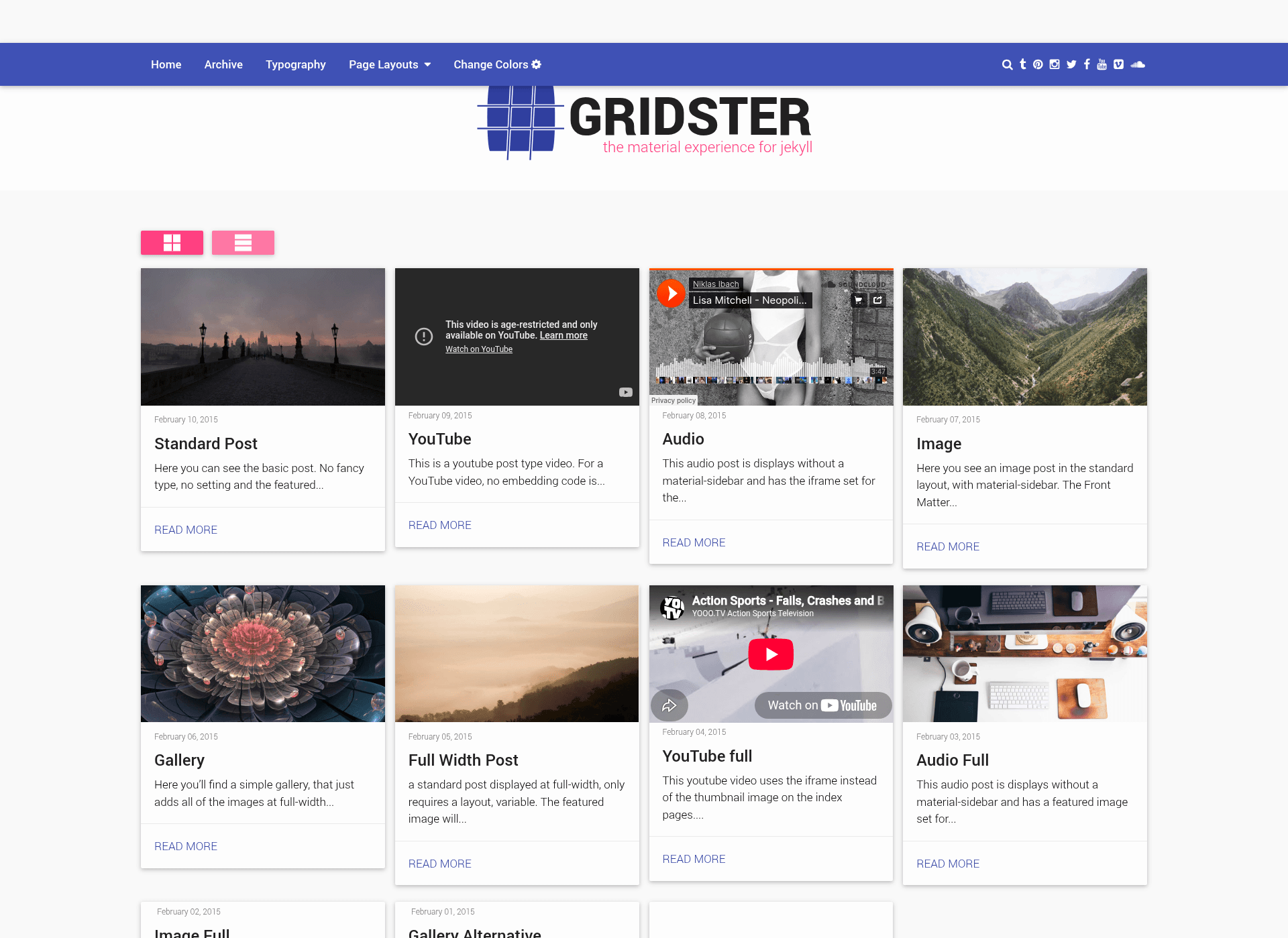
Gridster is a Jekyll theme focused on multimedia, providing built-in post types for video, audio, image, and gallery content and a material design layout.
What is Gridster Jekyll Theme?
Gridster is a Jekyll theme built around multimedia content. It runs on the Jekyll static-site generator and outputs a static website from posts written in Markdown or HTML. The theme was originally published by DigitalMindCH, and this repository contains the original, unmodified source from the now-abandoned DigitalMindCH repo. As a Jekyll theme, it is designed to work with GitHub Pages hosting, so you can publish a Jekyll site by configuring your repository to use the theme.
The theme includes dedicated post types for video, audio, image, and gallery posts, making it easy to publish media-rich content. It emphasizes customization through a large set of variables that let you adjust the theme's appearance and behavior without editing source code. The visual style follows Google's Material Design aesthetic, giving the site a clean, layered look.
Key Features
- Multimedia post types — supports video, audio, image, and gallery posts, each with a dedicated layout.
- Material design styling — uses Material Design components and layouts for a consistent visual experience.
- Extensive variable customization — a large number of variables are exposed for theme configuration, so you can change colors, typography, and more.
- Grunt automation — comes with a gruntfile that includes tasks to compile, concatenate, minify, and deploy your site.
- Extensive documentation — the linked docs guide you from installing dependencies to customizing, creating posts, publishing, and hosting on GitHub Pages with plugins.
- GitHub Pages friendly — documentation covers hosting the theme with plugins on GitHub Pages, making deployment straightforward.
- Original unmodified source — this repository preserves the exact original theme code from the abandoned DigitalMindCH project without modifications.
Who is it for?
- Photographers and visual artists — use the image and gallery post types to present portfolios in a material design layout.
- Videographers and filmmakers — create video posts to showcase films or embedded media.
- Podcasters and musicians — use the audio post type to share episodes or music tracks.
- Media-focused bloggers — build a blog that mixes text with video, audio, and galleries without custom development.
What can you do with Gridster?
- Showcase a portfolio — create gallery posts that display multiple images or videos in a clean, material design grid.
- Publish a video blog — add new video posts via front matter and the theme renders the appropriate player or embed.
- Release an audio series — post individual audio files as a podcast feed or music collection.
- Automate your build — run Grunt tasks to compile assets, concatenate files, minify output, and deploy the finished site to GitHub Pages.
How does Gridster work?
Gridster works like a standard Jekyll theme: you write posts in Markdown or HTML, set front matter to choose a post type, and the theme renders the page with the correct layout. The included Grunt tasks streamline the workflow, letting you compile and deploy from the command line. The documentation walks through every step from installing dependencies to publishing, including specific instructions for hosting the theme with plugins on GitHub Pages.
FAQ
Is Gridster still maintained?
The original DigitalMindCH repository is abandoned, and this repository explicitly states it is the original, unmodified gridster-jekyll-theme. There is no sign of recent maintenance, so you may want to fork the project if you plan to use it long term.
What post types does Gridster support?
Gridster includes post types for video, audio, image, and gallery posts. You select the desired post type per entry, and the theme automatically uses the matching layout, making it simple to publish different forms of media.
Can I use Gridster with GitHub Pages?
Yes. The theme's documentation explains how to host the site on GitHub Pages, including how to enable plugins. Because Jekyll is natively supported by GitHub Pages, you can deploy by pushing your repository to GitHub.
How do I customize Gridster?
Gridster exposes many variables for customization. By editing these variables in your Jekyll configuration file, you can change the theme's colors, layout options, and other behavior without touching the theme's source code.
What Grunt tasks are included?
The theme ships with a gruntfile that includes tasks for compiling, concatenating, minifying, and deploying your site. These tasks automate asset processing and publishing, so you can build and deploy with a single command.