Template details
Jekyll Professional Resume
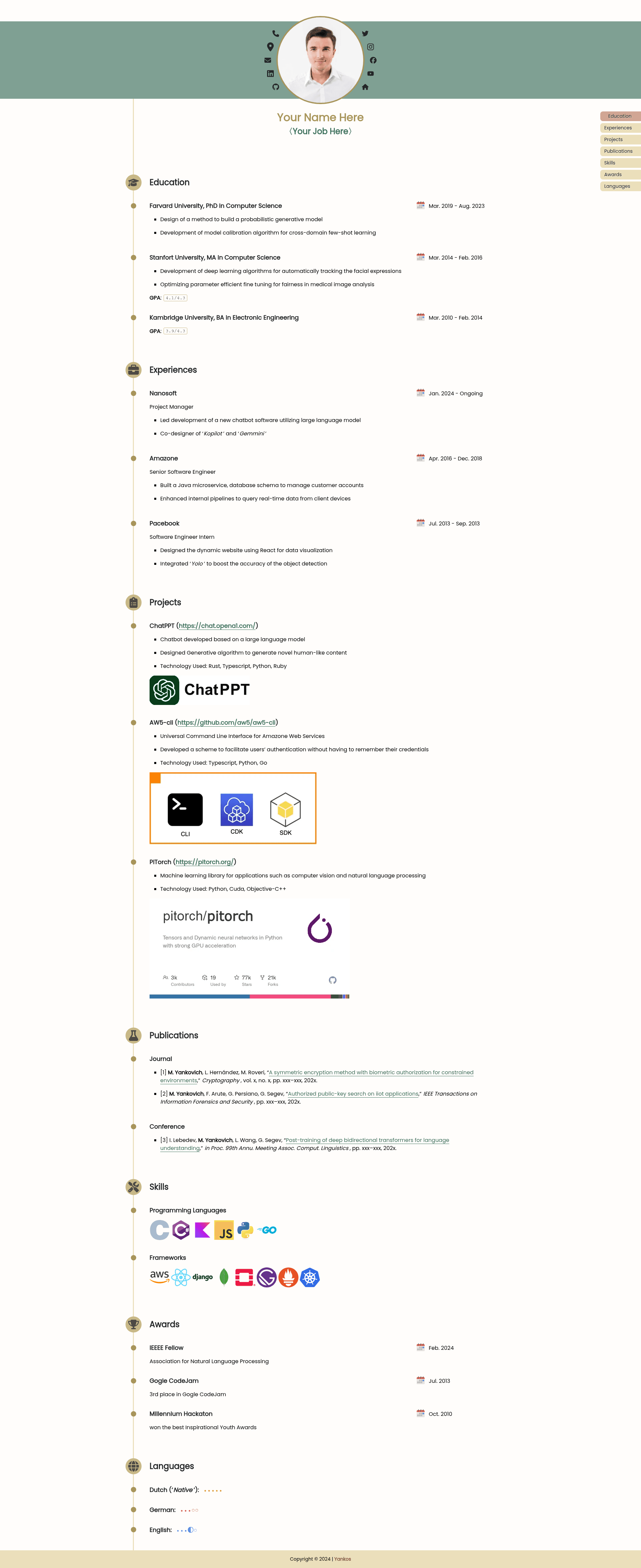
A simple, modern resume template for Jekyll, designed for academic CVs and engineer portfolios.
About this template
Jekyll Professional Resume is an open-source Jekyll theme that turns YAML data files into a static, single-page resume website, purpose-built for academic CVs and engineer portfolios.
What is Jekyll Professional Resume?
Jekyll Professional Resume is a Jekyll theme for generating a static resume site from structured YAML files. It takes personal information and section data (education, experience, projects, skills, publications, awards, languages) as input and produces a clean, modern, single-page HTML website as output. The theme runs on Jekyll 3.9 or newer, is compatible with GitHub Pages, and is maintained by Yankos under the MIT License.
Key Features
- Data-driven sections — Manage each resume subject as a separate
.ymlfile in the_datadirectory (e.g.,Education.yml,Projects.yml,Skills.yml). - Flexible section ordering — Set
listing-orderin each YAML file to control where a section appears on the page. - Markdown and HTML support — Use bold, italic, links, images, and custom HTML inside each entry, as shown in the example Projects entry.
- Customizable color palette — Edit CSS variables in
assets/css/style.scssto change the entire theme color scheme. - Profile customization — Update photo, phone, email, and social links (LinkedIn, GitHub) directly in
_config.yml. - Shortcut icon control — Replace the browser tab icon by changing
icon_imgin_config.yml. - Flexible installation — Either fork the repository or install the theme as a Ruby gem; both options are documented.
- GitHub Pages ready — Works out of the box with a
USERNAME.github.iorepository or with a custombaseurlfor project sites.
Who is it for?
Jekyll Professional Resume is designed for anyone who needs a clean, maintainable resume site with minimal effort.
- Academics — Create an academic CV with sections for publications, awards, education, and a GPA display in markdown.
- Software engineers — Showcase projects with descriptions, technology stacks, and embedded images, plus a skills section.
- Job seekers — Publish a personal portfolio on GitHub Pages for free, with a professional layout and easy contact links.
- Jekyll users — Developers who prefer editing YAML over HTML can manage resume content without touching markup.
What can you do with Jekyll Professional Resume?
- Academics — Build a multi-section CV with education, publications, awards, and languages, and control the order of each section via
listing-order. - Engineers — Present a portfolio of projects, each with a title, markdown description, tech stack, and optional screenshot image.
- Job seekers — Deploy a personal resume site to GitHub Pages by renaming the repository to
USERNAME.github.ioand editing_config.yml.
How does Jekyll Professional Resume work?
Start by forking the repository or downloading the source. Then edit _config.yml with your profile details (name, job, contact info, social links). Create a YAML file for each resume section in the _data folder, using the documented structure of subject, listing-order, icon, and contents. Finally, push to GitHub Pages, or build locally with Jekyll 3.9+.
Pricing
Jekyll Professional Resume is free and open source, released under the MIT License.
FAQ
Is Jekyll Professional Resume free?
Yes, the theme is open source under the MIT License, so you can use, modify, and distribute it freely, including for commercial purposes.
How do I change the profile photo?
Edit the profile_img field in _config.yml to point to your own image path or URL. Similarly, the browser tab icon is controlled by icon_img.
How do I add a new section to my resume?
Create a new .yml file in the _data directory with the required fields (subject, listing-order, icon, contents). The section will appear automatically on the page.
Can I use markdown in my resume entries?
Yes, the template supports GitHub-flavored markdown inside YAML content, including bold, italic, links, and even raw HTML elements like images and spans.
Does this theme work with GitHub Pages?
Yes, it is built for Jekyll 3.9+ and is compatible with GitHub Pages. You can deploy by pushing to a USERNAME.github.io repository or setting a baseurl for a project site.