Template details
Jekyll Theme Jakarta EE
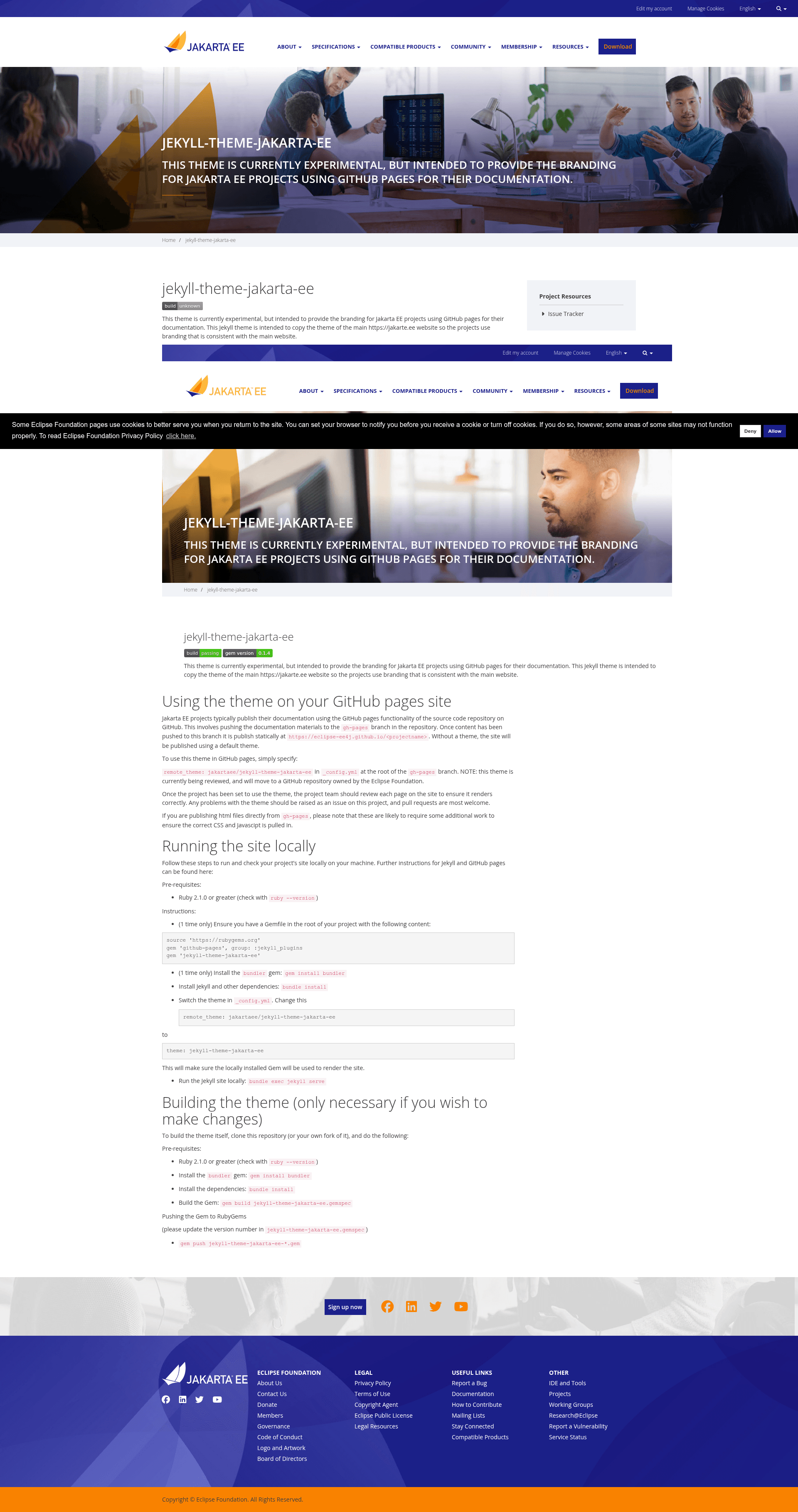
A Jekyll theme for Jakarta EE projects to publish documentation on GitHub Pages with branding consistent with the main jakarta.ee website.
About this template
Jekyll Theme Jakarta EE is an experimental Jekyll theme that gives Jakarta EE project documentation sites on GitHub Pages the same branding as the main jakarta.ee website.
What is Jekyll Theme Jakarta EE?
Jekyll Theme Jakarta EE is an open-source Jekyll theme maintained by the Jakarta EE project to replicate the visual branding of the main jakarta.ee website. It takes Markdown documentation pushed to a GitHub repository's gh-pages branch and renders it as a static documentation site under https://eclipse-ee4j.github.io/. The theme is activated with a one-line remote_theme: jakartaee/jekyll-theme-jakarta-ee entry in _config.yml and is also published on RubyGems as jekyll-theme-jakarta-ee.
What makes Jekyll Theme Jakarta EE stand out?
- Remote theme activation — projects add
remote_theme: jakartaee/jekyll-theme-jakarta-eeto_config.ymlinstead of copying theme files into their own repository. - Jakarta EE branding — the layout, colors, and styling mirror the main jakarta.ee website so Eclipse project documentation looks consistent across the ecosystem.
- Project Resources sidebar — a right-side box populated from
_config.ymlvariables:links.source,links.javadocs,links.docs,links.faq,links.download,links.mailinglist, andlinks.hide_issuetracker. - Relative link support — values such as
javadocs: docs/api/andfaq: FAQcan be relative paths to other pages in the samegh-pagesbranch. - gh-pages workflow — designed for sites published statically from the
gh-pagesbranch tohttps://eclipse-ee4j.github.io/with no separate build server. - Local preview — documented setup for running the site locally with Ruby 2.1.0+, Bundler, and
bundle exec jekyll serve.
Who should use Jekyll Theme Jakarta EE?
- Jakarta EE project teams — publish project documentation on GitHub Pages with branding that matches the main jakarta.ee website instead of the default GitHub theme.
- Eclipse EE4J maintainers — migrate existing javaee GitHub organization sites by replacing the
themeentry withremote_theme, deleting the_layoutsdirectory, and updatinglinksin_config.yml. - Documentation contributors — preview changes locally with Jekyll before pushing content to the
gh-pagesbranch.
What can you do with Jekyll Theme Jakarta EE?
- Launch a branded docs site: point the theme at a
gh-pagesbranch and every Markdown page renders with the jakarta.ee look. - Reuse existing content: keep assets like images and CSS that your pages depend on — the
assetsdirectory stays unless nothing references it. - Extend the theme: clone the repository, update the version in
jekyll-theme-jakarta-ee.gemspec, build withgem build, and publish to RubyGems withgem push.
How does Jekyll Theme Jakarta EE work?
- Add
remote_theme: jakartaee/jekyll-theme-jakarta-eeto_config.ymlat the root of thegh-pagesbranch. - Optionally set the
links.*variables to fill the Project Resources box. - Push content to
gh-pagesand GitHub Pages publishes it statically underhttps://eclipse-ee4j.github.io/. - Run
bundle installandbundle exec jekyll serveto check the site locally first.
Pros and cons
- Pros: consistent Jakarta EE branding; one-line activation; no fork or file copying required; documented migration path from legacy javaee sites; local preview workflow included in the README.
- Cons: the theme is currently experimental, so project teams should review every rendered page and report issues; raw HTML files published directly from
gh-pageswill likely need extra work to load the theme's CSS and JavaScript.
Pricing
The theme is free to use and modify, published on RubyGems and hosted in the public jakartaee GitHub repository.
Alternatives
GitHub Pages' built-in default theme, which is applied automatically when a site has no theme or remote_theme entry in its _config.yml.
FAQ
Is Jekyll Theme Jakarta EE free to use?
Yes — the theme is published on RubyGems as jekyll-theme-jakarta-ee and its source code is hosted publicly in the jakartaee GitHub organization, so projects can use it at no cost and submit pull requests.
What are the prerequisites for running the site locally?
Ruby 2.1.0 or greater, the bundler gem, and a Gemfile containing github-pages plus jekyll-theme-jakarta-ee. After running bundle install, start the site with bundle exec jekyll serve.
How do I activate the theme on GitHub Pages?
Add remote_theme: jakartaee/jekyll-theme-jakarta-ee to the _config.yml file at the root of your repository's gh-pages branch. Once content is pushed, GitHub Pages renders the site using the theme.
How do I customize the sidebar links?
Edit the links section of _config.yml with keys like source, javadocs, docs, faq, download, mailinglist, and hide_issuetracker. Values can be absolute URLs or relative paths to other pages in the gh-pages branch.
Can I publish raw HTML files with this theme?
The theme is built for Jekyll-generated content, so HTML files pushed directly from gh-pages are likely to require additional work to pull in the correct CSS and JavaScript.