Template details
Jekyll Theme Material You
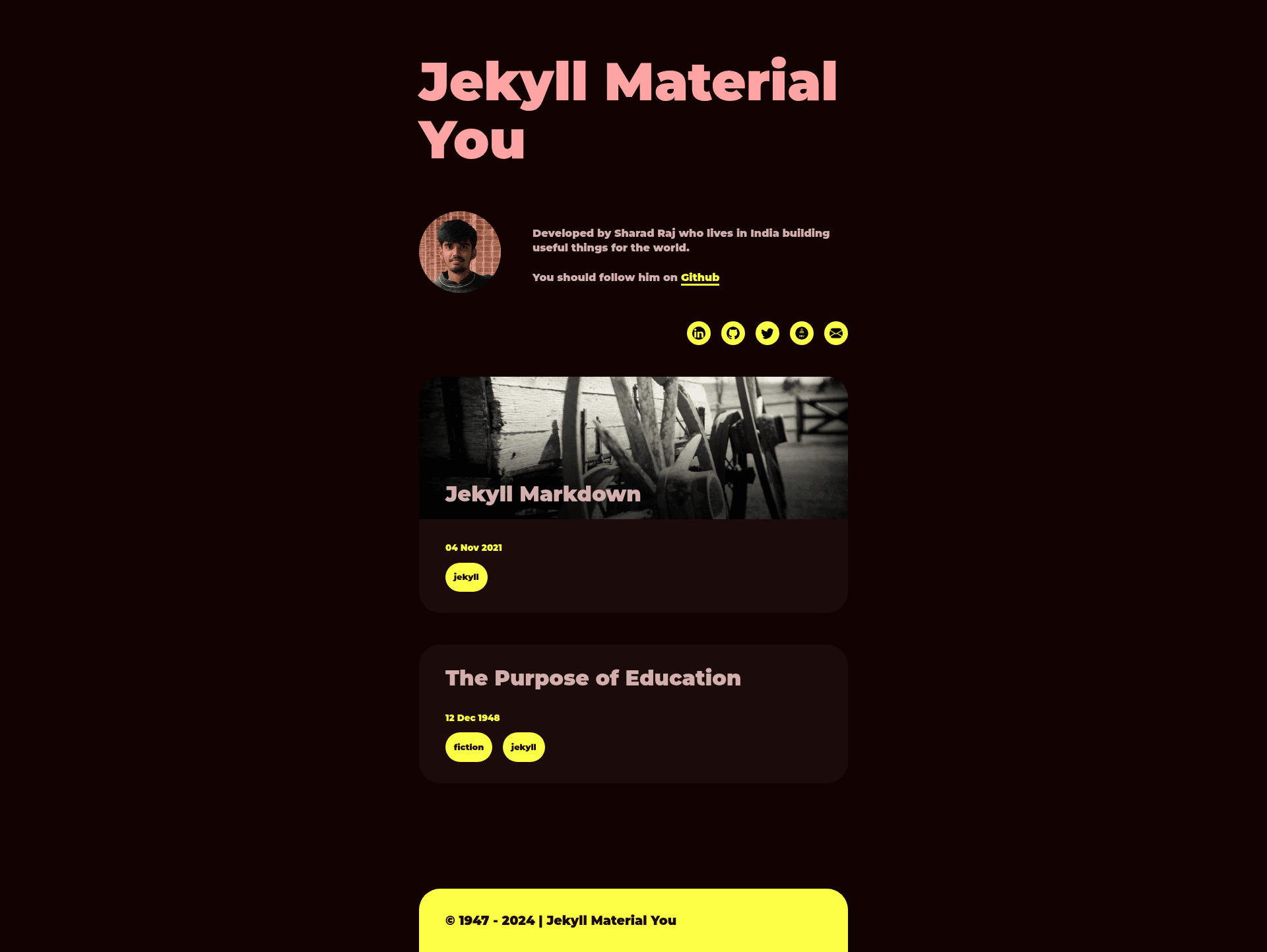
A free, open-source Jekyll blog theme that applies Google's Material You design to static sites with a categories modal.
About this template
Jekyll Theme Material You is a free, open-source Jekyll blog theme that applies Google's Material You design language to static-site blogs, with a live demo on GitHub Pages.
What is Jekyll Theme Material You?
Jekyll Theme Material You is a Jekyll-based theme for building personal blogs and static websites with a Material You visual style. It takes a standard Jekyll project (with _config.yml and _data/author.yml files) and outputs a fully static blog site that includes a blog listing page, individual post pages, and a categories modal for filtering posts. The theme is created by sharadcodes, distributed on GitHub, and runs on any Jekyll installation, including GitHub Pages.
Key Features
- Material You design — The theme uses Google's Material You design language, visible in the rounded cards, pastel color palettes, and modern typography shown in the blog page, categories modal, and post screenshots.
- Dark theme support — The repository topic list includes "dark-theme", indicating the theme ships with a dark color scheme for low-light reading.
- Category pill navigation — A categories modal displays category pills; clicking a pill generates the matching category archive link using the
categories.jsscript insideassets/js. - Jekyll native setup — Installed with standard Jekyll commands: clone the repo, run
bundle install, thenbundle exec jekyll serve. - Customizable author metadata — Blog author details such as name, bio, and social links are configured in
_data/author.yml, so you can update personal info without editing layouts. - GitHub Pages ready — The live demo runs on GitHub Pages; for a user site at
your-username.github.io, you remove theurlandbaseurlfields from_config.yml.
Who is it for?
- Personal bloggers who want a Material You aesthetic and a ready-to-use Jekyll theme, with minimal setup.
- Jekyll users who are comfortable editing
_config.ymland_data/author.ymland want a more colorful alternative to the default Minima theme. - Developers building static sites who need a blog with built-in category filtering and a responsive layout, and who may want to customize the HTML, CSS, and JavaScript directly.
What can you do with it?
- Launch a personal blog on GitHub Pages: Clone the repo, edit
_config.ymland_data/author.yml, removeurlandbaseurl, and push to a repository namedyour-username.github.ioto publish. - Set up a project documentation site: Use the same blog structure to publish posts that document a project, taking advantage of the category pills to organize topics.
- Learn by example: Study the theme's
categories.jsand layout files to see how a category modal is implemented in plain JavaScript, though the author warns not to altercategories.jsunless you know what you're doing.
How does it work?
- Download or clone the repository from GitHub.
- Enter the folder and run
bundle installto install Jekyll and dependencies. - Start the local server with
bundle exec jekyll serve. - Edit
_config.ymland_data/author.ymlto set site title, author info, and other settings. - Upload the files to your GitHub repository to deploy, remembering to remove
urlandbaseurlfor a user site.
Pros and cons
- Pros: Free to use and modify; simple installation with Jekyll's standard tooling; includes a working categories modal; optimized for GitHub Pages hosting.
- Cons: Category names must not contain spaces or they will break the categories modal — use underscores instead; the author advises against editing
categories.jsunless you understand the script, limiting deep customization of that feature.
Pricing
The theme is free and open source. The author accepts voluntary donations through GitHub Sponsors, with a sponsor button on the repository page.
FAQ
How do I install this Jekyll theme?
Clone the repository, run bundle install, then bundle exec jekyll serve. Access the site at localhost. Edit _config.yml and _data/author.yml to personalize the blog.
Is Jekyll Theme Material You free?
Yes, the theme is free and open source. The author welcomes donations via GitHub Sponsors but does not require payment.
How do I deploy it on GitHub Pages?
For a user site, remove the url and baseurl from _config.yml, then push the files to a repository named your-username.github.io. For a project site, keep the settings that match GitHub Pages conventions.
Why do my categories break the modal?
The categories modal relies on category names to generate links. If a category name contains spaces, it breaks the link generation. Use underscores instead of spaces in category names.