Template details
Elfaseo
Fast and SEO optimized Hugo Theme
About this template
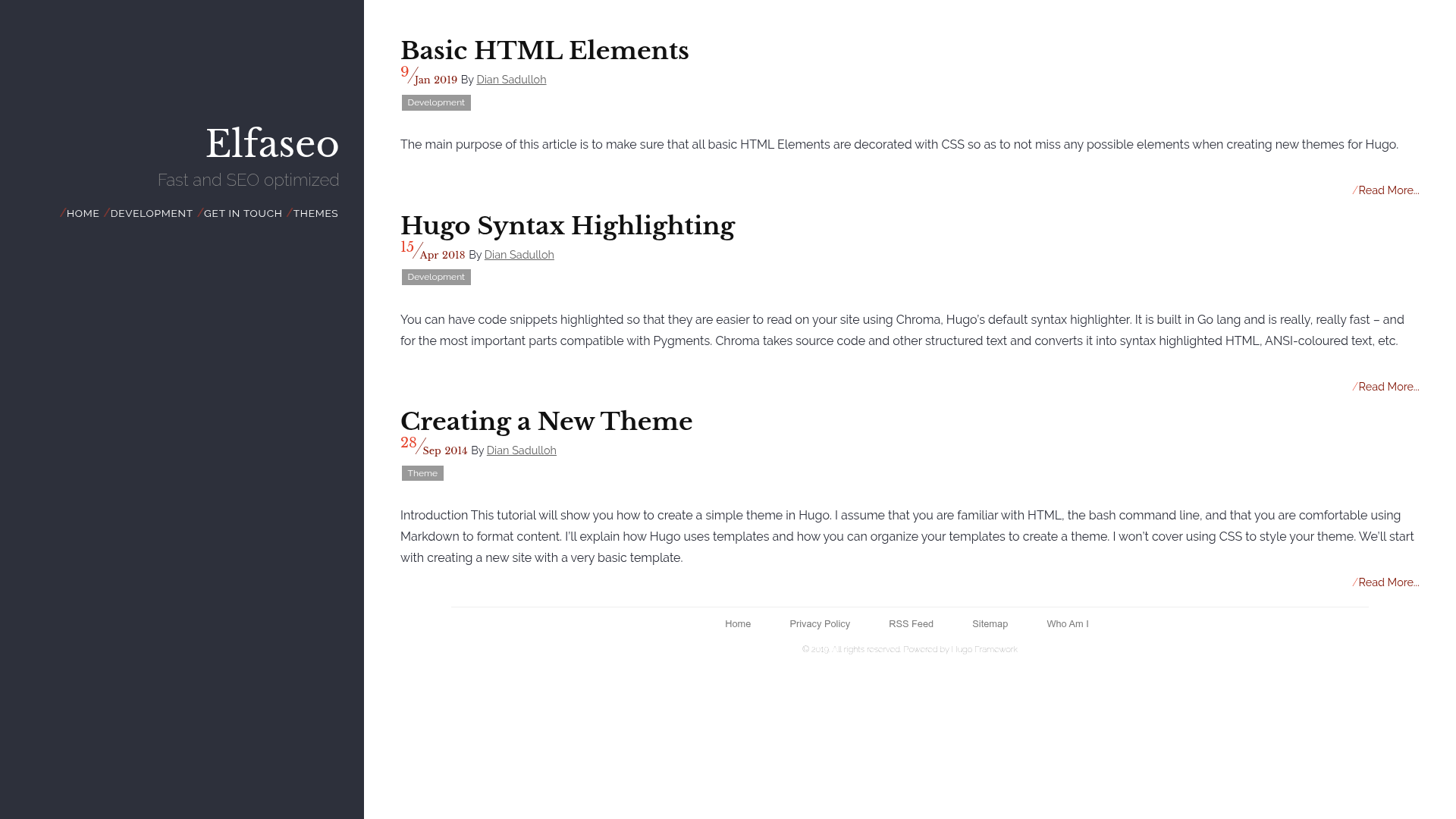
Elfaseo is a fast, SEO-optimized, open-source Hugo theme for blogs and personal sites, ported from hugo-redlounge and styled with Pure.css.
What is Elfaseo?
Elfaseo is a static site theme built for the Hugo generator: you write content in Markdown with front-matter variables and it renders a responsive HTML site with a left sidebar, list pages, and single article pages. The theme was designed by @shift8creative and is a port of the hugo-redlounge theme. It uses Pure.css for the layout, Google web fonts for typography, and Font Awesome for icons, which keeps the base lightweight while still allowing flexible design tweaks.
Key Features
What makes Elfaseo stand out is its combination of a small footprint (no unnecessary JavaScript by default) and deep per-page customization via front-matter flags.
- Pure.css layout — the theme's grid and components come from the lightweight Pure.css framework, with Google Fonts and Font Awesome icons for visual styling.
- Configurable sidebar — set a sidebar title and tagline through the
sidebartitleandsidebartaglinesite params, or place custom HTML via thesidebarheader.htmlpartial. - Three menu positions — main menu (left panel with red separator markers and an always-visible home link), social menu (below main, styled with Font Awesome icons), and footer menu (plain gray text links above the copyright).
- Google Analytics integration — add your tracking ID with the
gaidparam in config.toml and analytics is wired in. - Disqus comments — comments use Disqus via the standard
disqusShortname, and any page can opt out withnocomment = true. - Per-page display flags —
nodate,noauthor,noread,nopaging,notoc,totop, andsocialsharinglet each piece of content hide or show specific elements. - OpenGraph and SEO —
ogimage,ogtitle, andogdescriptionparams generate OpenGraph meta tags for social sharing. - Banner and thumbnail images —
banner,bannerheight,bannerfill,bannerinline, andthumbnailparams control images on both single pages and list views. - Overridable template partials — 13 partials (e.g.,
doctype.html,header.html,meta.html,headend.html,bodyend.html) can be replaced to customize any part of the HTML output without forking the theme. - Optional lightbox — front-matter
lightbox = trueactivates Lightbox (which pulls jQuery from Google's CDN) for image galleries on a page.
Who is it for?
Elfaseo suits Hugo users who want a clean, fast blog theme that can be tuned through configuration rather than editing template code.
- Bloggers can publish Markdown posts and use the category system to display colored tags on list pages (category colors require their own CSS rules like
.post-category-technology). - Developers who want a customizable Hugo theme will appreciate the many front-matter params, three configurable menus, and overridable partials for head, sidebar, and footer sections.
- SEO-conscious site owners can benefit from built-in Google Analytics support, OpenGraph tags, and the theme's performance orientation (the README includes a GTmetrix screenshot).
What can you do with Elfaseo?
- Personal blogs: set a sidebar tagline, add social icons, and rely on the default list and single layouts to present posts cleanly.
- Tech or tutorial sites: use categories to group posts with custom CSS colors, and take advantage of
notoc/totopflags to control table of contents and navigation on long articles. - Portfolio or author sites: use the
bannerandthumbnailparams to add imagery, author social links (authortwitter,authorlinkedin, etc.), and thesocialsharingflag for sharing buttons.
How does Elfaseo work?
Setting up Elfaseo involves cloning the theme into a Hugo site, adding theme = "Elfaseo" to config.toml, and defining theme params like sidebartitle, gaid, and menus under [[menu.main]], [[menu.social]], and [[menu.footer]]. Individual pages then set front-matter flags such as nocomment, banner, or lightbox to customize output. Running the standard Hugo build command produces a static site ready to deploy.
Pricing
Elfaseo is free and open source (it is a port of hugo-redlounge, which is also open source). The repository is public and can be used or modified freely.
FAQ
Is Elfaseo free?
Yes, it is an open-source Hugo theme. The GitHub repository hosts the source code and you can use it in personal or commercial projects without license fees.
How do I add Google Analytics?
Set the gaid param in your config.toml, for example gaid = "UA-XXXXXXXX-X". The theme will handle the analytics snippet automatically.
How do I hide comments on a specific post?
Add nocomment = true to the page's front-matter. Comments (Disqus) will then be hidden for that page while remaining active elsewhere.
Can I add a lightbox to my images?
Yes: set lightbox = true in the page front-matter and add links that include a data-lightbox attribute, such as the HTML example in the README. This also loads jQuery from Google's CDN for that page.
Why do category labels look gray?
By default all category labels have the class post-category post-category-{category} and are gray with white text. To change colors, create your own CSS file (for example using the categoriescss param) and define background colors for each category class.