Template details
Just the Docs
A responsive Jekyll theme for documentation with built-in search, designed for GitHub Pages.
About this template
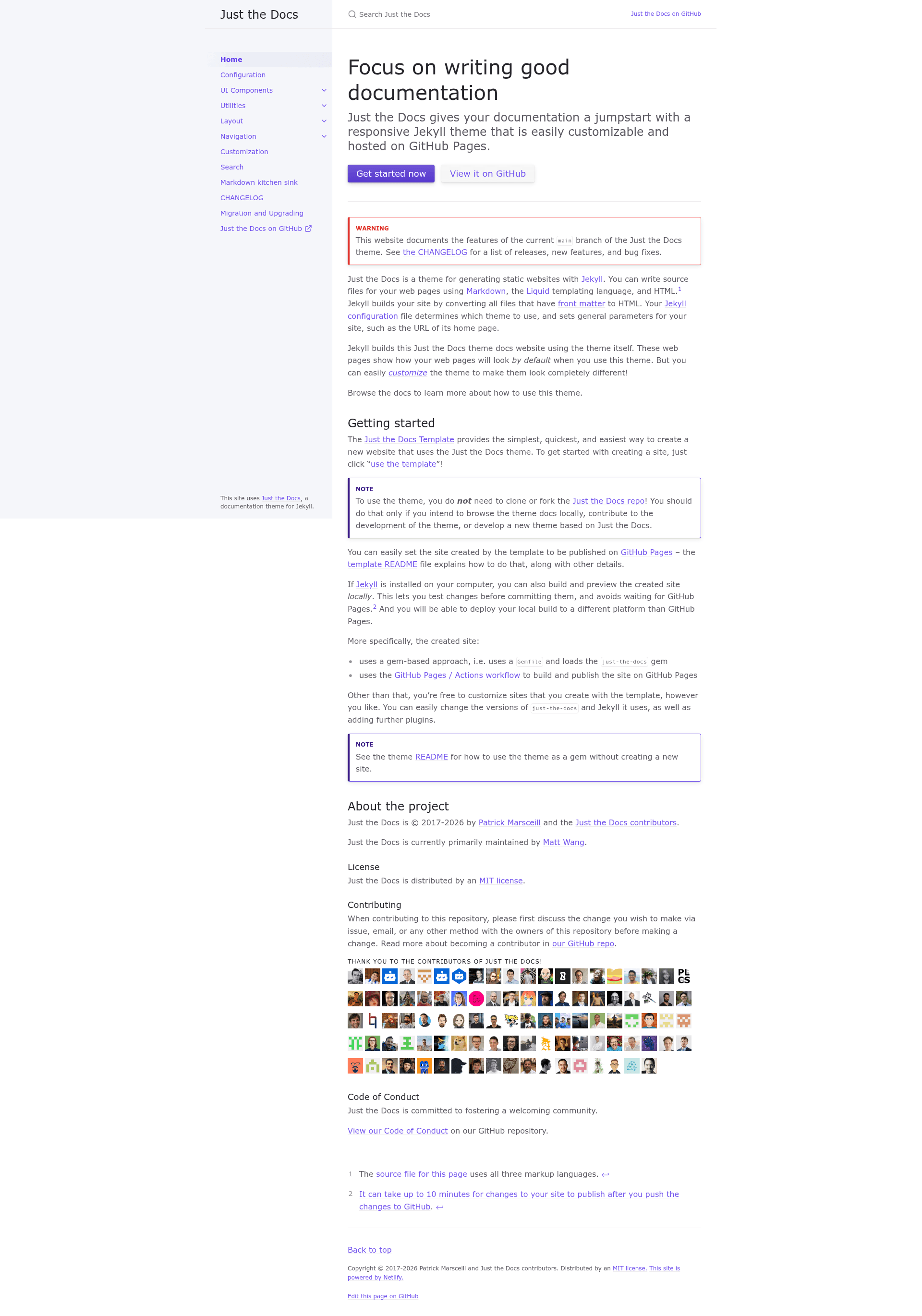
Just the Docs is a Jekyll theme for creating documentation websites, with built-in search and a responsive layout designed to be hosted on GitHub Pages.
What is Just the Docs?
Just the Docs is a Jekyll theme for building documentation websites. It takes Jekyll site content written in Markdown and produces a static HTML site with a built-in search index, a responsive layout, and sidebar navigation. The theme is distributed as a Ruby Gem and the official starter template hosts the output on GitHub Pages with a GitHub Actions workflow.
Key Features
- Built-in search — A client-side search feature that indexes the documentation pages, with no external search service required.
- Responsive layout — A mobile-first design that adapts the sidebar and navigation for first-class mobile experience, as stated in the theme's design principles.
- Few dependencies — Designed to work with as few dependencies as possible and no build script, relying only on Jekyll and the gem itself.
- GitHub Pages integration — The template uses the GitHub Pages / Actions workflow to build and publish automatically, and the theme can also be built locally with Jekyll.
- High customizability — The theme can be customized via
_config.ymland supports adding further Jekyll plugins, changing theme versions, and normal Jekyll content structures. - Open source — Released under the MIT License, with an active GitHub repository, a Contributor Covenant code of conduct, and CI tests that must pass for contributions.
Who should use Just the Docs?
- Open source project maintainers — Present API docs, user guides, and contribution guidelines in a clean, navigable layout, hosted free on GitHub Pages.
- Technical writers — Write documentation in Markdown and use the built-in search to let readers find topics quickly.
- Teams building internal documentation hubs — Create a static company wiki or knowledge base without setting up a CMS or database, since everything is plain files in a Git repository.
What can you do with Just the Docs?
- Project documentation: Publish user manuals, tutorials, and reference docs for a software project by pushing Markdown files to a GitHub repository and letting GitHub Pages serve the built site.
- Local preview and testing: Run
bundle exec jekyll serveon your computer to preview the site locally and see changes live in the browser before committing, avoiding the wait for GitHub Pages to rebuild. - Customize the site structure: Add pages, documents, and data files like a normal Jekyll site, and customize the theme's
_layouts,_includes, and_sassfiles when building a fork.
How does Just the Docs work?
The template approach uses a Gemfile that loads the just-the-docs gem, and a GitHub Actions workflow builds and publishes the site on GitHub Pages. Alternatively, you can add gem "just-the-docs" to a Jekyll site's Gemfile, set the theme to just-the-docs in _config.yml, and run bundle to install dependencies.
Pricing
Just the Docs is free and open source, released under the MIT License. There are no paid tiers or hosted plans; the theme is a set of files you use with your own Jekyll setup.
Alternatives
- Docusaurus
- MkDocs
FAQ
Is Just the Docs free?
Yes, Just the Docs is available as open source under the MIT License, so you can use it for free in personal and commercial projects without paying licensing fees.
How do I install Just the Docs?
You can use the official Just the Docs Template by clicking "use the template" on GitHub, which creates a new site repository with the theme preconfigured. Alternatively, install the ruby gem by adding gem "just-the-docs" to your Gemfile and setting theme: just-the-docs in _config.yml.
Does Just the Docs work with GitHub Pages?
Yes, the template sets up a GitHub Pages site using the GitHub Pages / Actions workflow. You don't need to clone or fork the theme repository itself; the template and the gem handle everything. It can take up to 10 minutes for changes to publish after you push.
Do I need to clone or fork the Just the Docs repository?
No. The README explicitly states you only need to clone or fork the repo if you want to browse the theme docs locally, contribute to the theme's development, or build a new theme based on Just the Docs. For creating a documentation site, use the template or the gem.
What are the design and development principles of Just the Docs?
The theme is built around four principles: as few dependencies as possible, no build script needed, first-class mobile experience, and making the content shine. This keeps the theme lightweight and focused on documentation.