Template details
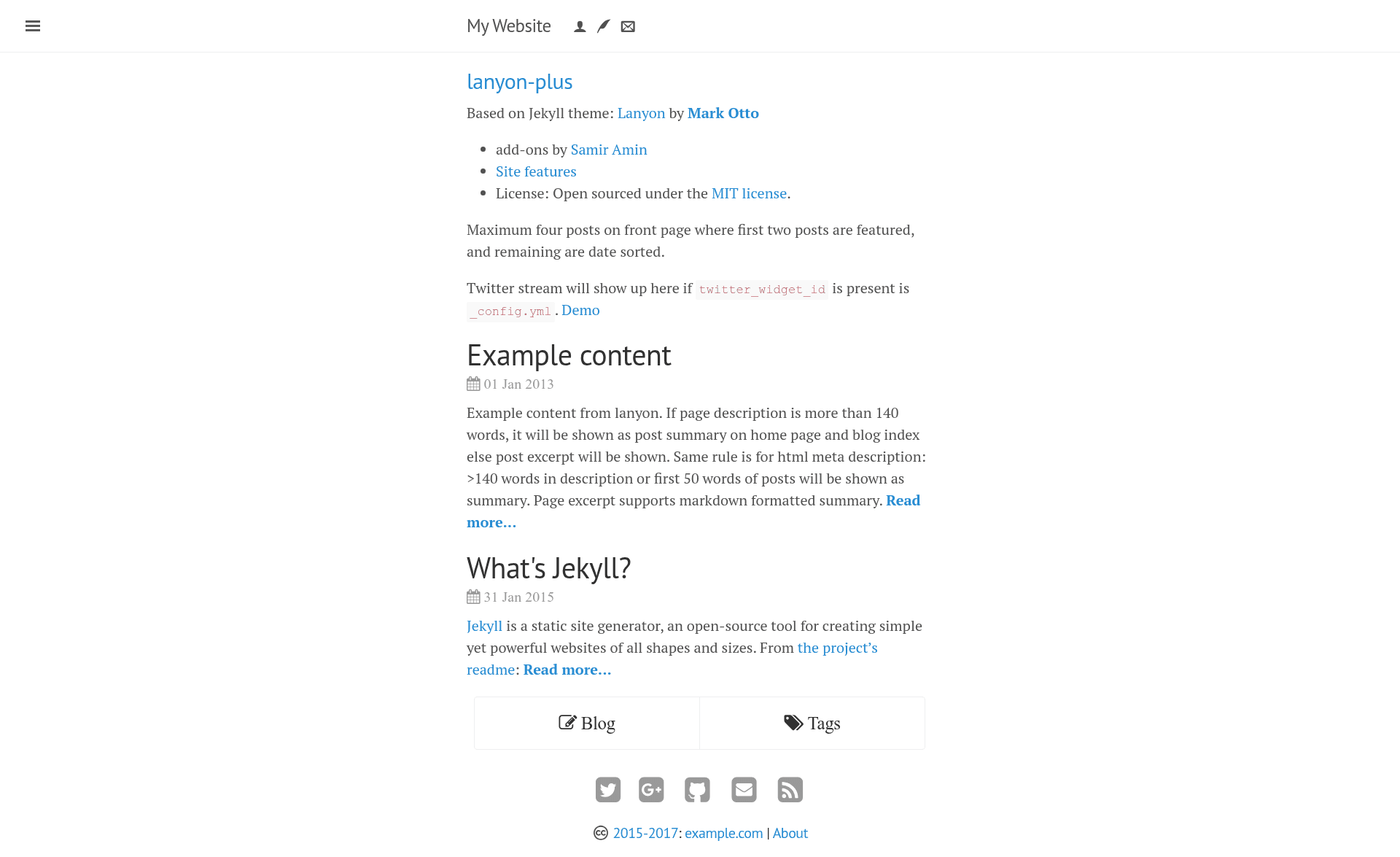
lanyon-plus
A content-first Jekyll theme with sliding sidebar, publication, CV, and search features.
About this template
lanyon-plus is a Jekyll theme for academic and personal websites, forked from Mark Otto's Lanyon sliding-sidebar theme and extended with publication, CV, search, and analytics features by maintainer Samir Amin.
What is lanyon-plus?
lanyon-plus is a static-site theme built on Jekyll that turns Markdown posts, YAML configuration, and HTML includes into a blog-style website with a sliding sidebar. It inherits Lanyon's two-column design with a collapsible sidebar and adds academic-oriented pages for publications, CV, contact, and disclosure. The theme is distributed on GitHub under the MIT license and is designed to deploy directly to GitHub Pages, with Travis CI support for automated builds. It includes a demo site and a downloadable v1.1.1 release.
What makes lanyon-plus stand out?
- Academic publication workflow — the publications page displays references from a BibTeX file (
/files/mypubs.bib) or an HTML include generated by the zot_bib_web tool, and can alternatively render dynamic bibliographies through BibBase. - CV page with PDF support — a dedicated CV layout that links to a PDF at
cv/cv.pdfand pulls author profile links (Twitter, Google+, LinkedIn, Google Scholar, ORCID) from_config.yml. - Sliding sidebar UI — the signature Lanyon interaction: a sidebar that slides in and out, with sidebar content and social links configured through
ownerandsidebarYAML variables. - Integrated search and comments — optional Google Custom Search (needs a CSE API key), Disqus comments, and Google Analytics are all enabled by uncommenting keys in
_config.yml. - GitHub Pages deployment kit — includes
CNAME.samplefor custom domains,_prose.ymlfor Prose.io content editing,.travis.ymlfor Travis CI builds, androbots.txtwith anexample.complaceholder. - Blog post conventions — posts in
_posts/use theyyyy-mm-dd-title.mdfilename format and a YAML front matter with layout, title, and date; the date tag overrides the filename date. - Predefined icon set —
images/icons/expects a specific set of favicon and touch icons (72x72, 114x114, 144x144, 180x180, Android 192x192) with exact filenames. - Custom pages included — about, contact, cv, publications, disclosure, and syspages (search, tags) are already scaffolded with YAML front matter to edit.
Who should use lanyon-plus?
- Academics and researchers who want a personal website with a publications list and CV that can be updated from BibTeX.
- Jekyll users on GitHub Pages who need a content-first blog theme with a sidebar and custom-domain support.
- Scientific bloggers who write in Markdown and want a clean reading layout with post meta, tags, and related content.
- People who like Lanyon's design but want extra pages and integrations without building them from scratch.
What can you do with lanyon-plus?
- Publish a research profile: maintain a CV page, publications page, and about page from Markdown and BibTeX files.
- Run a blog on GitHub Pages: write posts, enable Disqus for comments, add Google Analytics, and search through Google CSE.
- Host under a custom domain: rename
CNAME.sampletoCNAMEand set your domain in_config.ymland_prose.yml. - Set up continuous deployment: use the provided
.travis.ymlto build and test the Jekyll site with Travis CI.
How does lanyon-plus work?
Setup follows a defined checklist: edit _config.yml to replace foo placeholders and add owner/sidebar details; copy CNAME.sample to CNAME if using a custom domain; edit robots.txt and _prose.yml with your URL; then customize includes, layouts, and page front matter. The site is built with Jekyll and can be served locally or pushed to GitHub Pages.
FAQ
Is lanyon-plus free?
Yes, lanyon-plus is open-sourced under the MIT license, so you can use, modify, and redistribute it freely.
What files must I edit before deploying?
The required edits are in _config.yml (replace foo strings, add author and owner info), CNAME (for custom domains), robots.txt (replace example.com), and _prose.yml (domain and categories). Post-specific edits are listed per page.
Does lanyon-plus support custom domains on GitHub Pages?
Yes. Read the GitHub Pages documentation on custom domains, rename CNAME.sample to CNAME, and add your domain. If you stay on github.io, set site.url to your GitHub Pages URL.
Can I use lanyon-plus with BibBase?
Yes, for the publications page you can export a BibTeX file to /files/ and it can be parsed dynamically using BibBase, since GitHub Pages cannot run zot_bib_web dynamically.
Is the tag system production-ready?
The tag generation in the syspages is described as experimental; dynamic size for the tag box may need adjustment if you have many posts, and loop operations increase build time.