Template details
larke-admin
larke-admin is a Laravel-based backend admin API using JWT authentication and RBAC authorization for separated front-end and back-end projects.
About this template
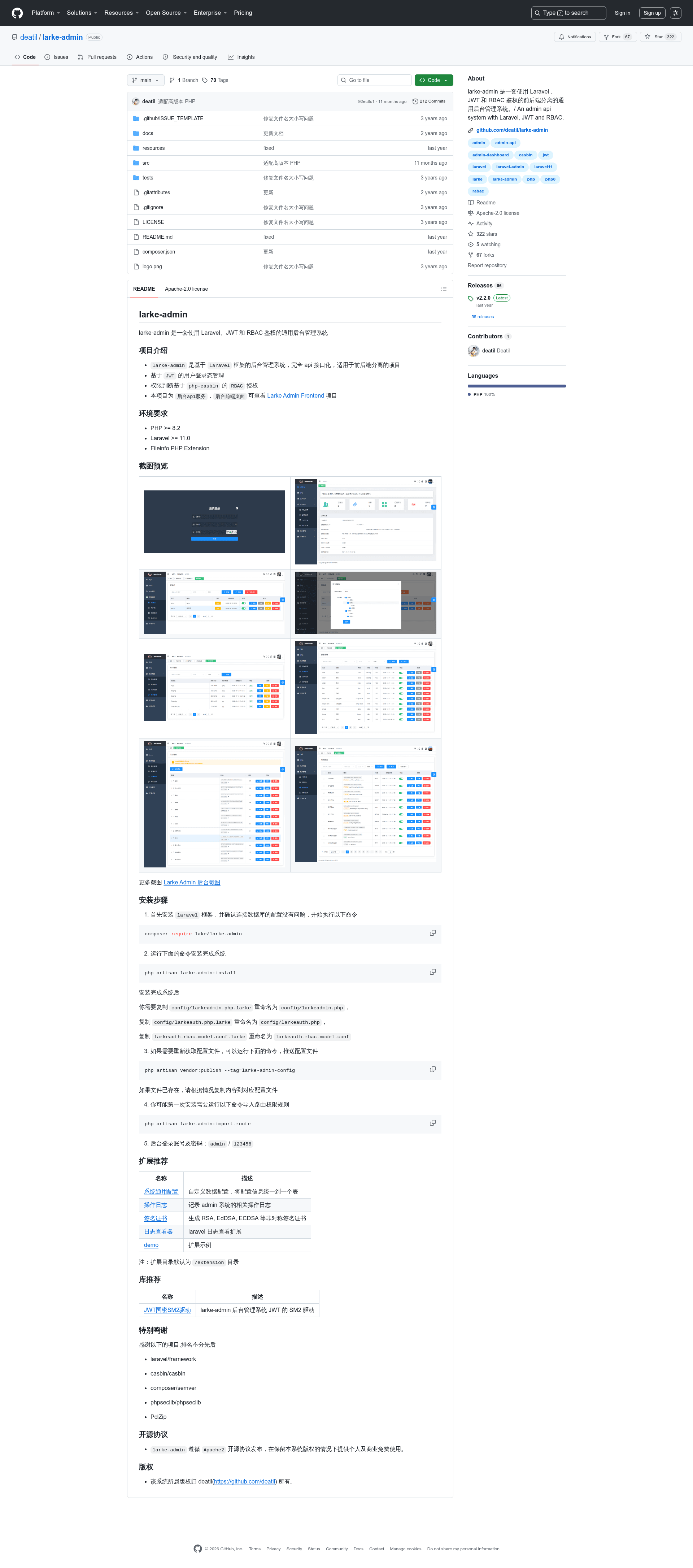
larke-admin is an open-source, API-only admin backend built on Laravel 11 that uses JWT for authentication and php-casbin for RBAC authorization, designed for front-end/back-end separated projects.
What is larke-admin?
larke-admin is a backend administration system built on the Laravel framework (version 11.0 or later) that exposes all functionality through a JSON API rather than server-rendered pages. It manages user login state with JSON Web Tokens and handles permission checks with php-casbin's RBAC model. The project is maintained by deatil and released under the Apache-2.0 license, allowing free personal and commercial use as long as the original copyright is retained. The repository contains only the API service; the front-end UI is a separate project called Larke Admin Frontend.
Key Features
- API-first design — every action is delivered through API endpoints, so the system never renders HTML and integrates naturally with any front-end framework like Vue, React, or the official Larke Admin Frontend.
- JWT authentication — user login is token-based; the package includes support for custom JWT drivers, including an SM2 cryptographic driver for Chinese national standard algorithms.
- RBAC authorization via php-casbin — permissions are defined using casbin models, and a dedicated
larkeauth-rbac-model.conffile stores the access control rules. - Current framework requirements — requires PHP 8.2 or newer and Laravel 11.0 or newer, plus the Fileinfo PHP extension.
- Command-line setup — installation runs through
composer require lake/larke-admin, thenphp artisan larke-admin:install; config files are published withphp artisan vendor:publish --tag=larke-admin-config. - Route permission import — run
php artisan larke-admin:import-routeto load route rules into the permission system. - Official extensions — additional packages add system-wide configuration storage, admin operation logging, RSA/EdDSA/ECDSA signature certificate generation, a Laravel log viewer, and a demo implementation.
Who is it for?
- Backend developers building admin dashboards for separated front-end projects who need a ready-made auth and permission API instead of writing one from scratch.
- Laravel teams that already standardize on Laravel 11+ and want an admin backend that matches their framework version and PHP 8.2 runtime.
- Security-conscious projects requiring RBAC with casbin and optional SM2-based JWT signing for compliance with Chinese cryptographic standards.
- API product owners who want to expose a complete management backend (users, roles, rules, attachments, configs) over HTTP to any client.
What can you do with larke-admin?
- Stand up an admin API quickly: Install the package into a Laravel app and run the artisan install command to get a working backend with a default admin account (admin / 123456).
- Control access by role: Define roles and route permissions, then import them with the provided artisan command; casbin enforces the rules on every request.
- Extend with official packages: Plug in configuration management, operation logs, certificate generation, and log viewing without writing custom code.
- Authenticate with JWT (including SM2): Use the standard JWT flow or switch to the SM2 driver for national-spec signing, keeping the login state secure across API calls.
How does larke-admin work?
Installation follows a clear sequence: require the package with Composer, run php artisan larke-admin:install, rename the provided .larke config files to their active names, publish configs with vendor:publish, and finally import route rules with larke-admin:import-route. After that, the admin can log in at the API with the default credentials admin / 123456.
Pricing
larke-admin is free and open source under the Apache-2.0 license. Both personal and commercial use are allowed free of charge, provided the copyright notice is retained.
FAQ
What is larke-admin?
larke-admin is a Laravel-based admin backend API that provides JWT authentication and php-casbin RBAC permissions. It is designed for projects where the front-end and back-end are separated, so the API can power any client interface.
How do I install larke-admin?
Install via Composer by requiring the package lake/larke-admin, then run php artisan larke-admin:install. You also need to copy several .larke files (config, auth model) to their active names, publish the config, and import route permissions. A default admin account is created with the username admin and password 123456.
What are the requirements for larke-admin?
The system needs PHP version 8.2 or higher, Laravel version 11.0 or higher, and the Fileinfo PHP extension. These are listed as the minimum environment for the API to run.
Is larke-admin free?
Yes, larke-admin is released under the Apache-2.0 license, which permits free personal and commercial use. The only condition is that the original copyright must be kept.
Does larke-admin include a front-end?
No. This repository is the back-end API only. The front-end is a separate project called Larke Admin Frontend, which you can find on GitHub under deatil/larke-admin-frontend.