Template details
macOS User-friendly Portfolio
Interactive macOS-inspired portfolio template with Astro, React, and Tailwind CSS, featuring an AI terminal, Spotlight search, and admin dashboard.
About this template
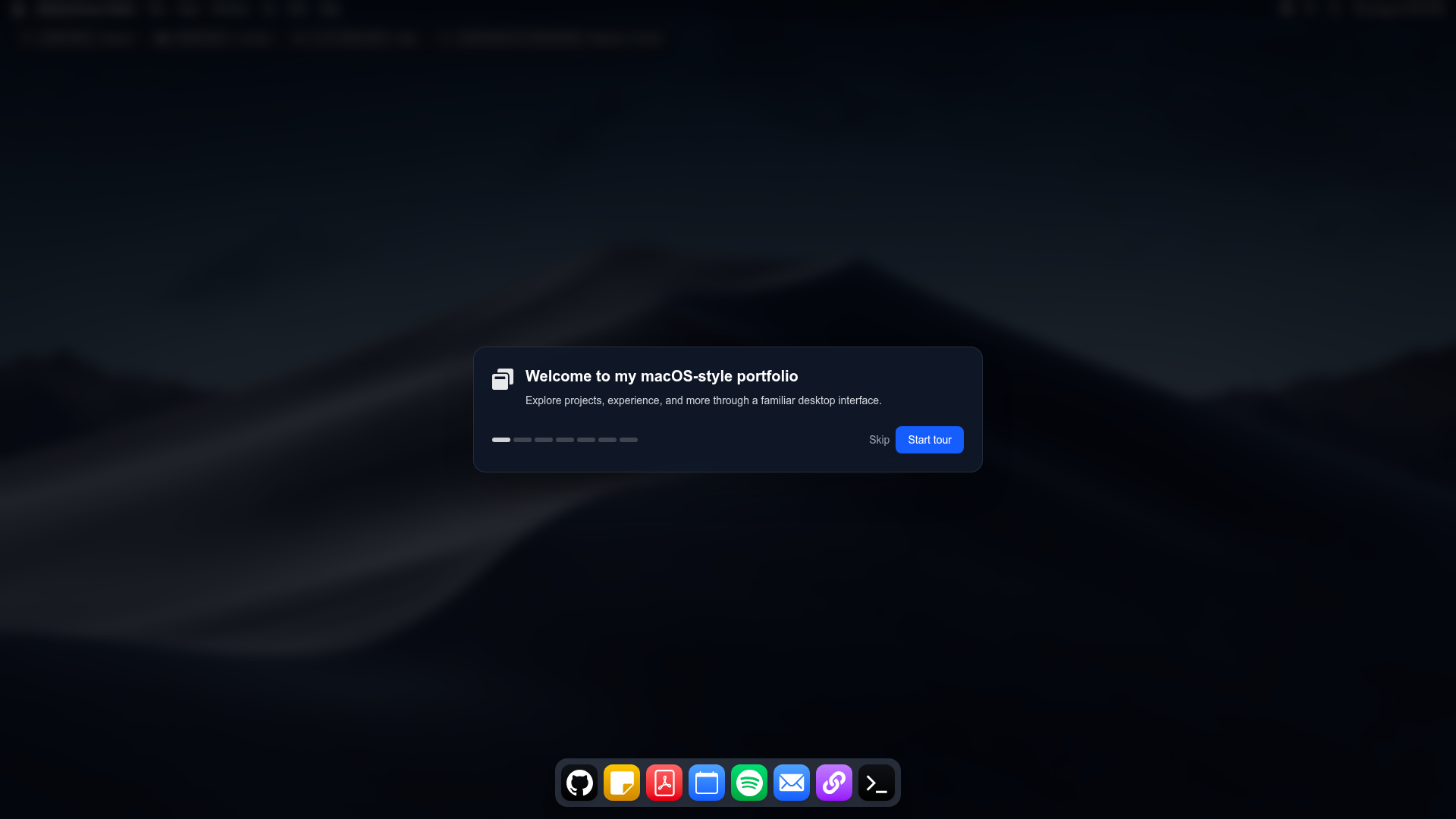
macOS User-friendly Portfolio is an open-source, macOS-inspired portfolio template built on Astro 5, React, and Tailwind CSS that presents a developer’s resume and projects inside a desktop-like interface with draggable windows and an AI-powered terminal.
What is macOS User-friendly Portfolio?
macOS User-friendly Portfolio is a portfolio site template that mimics a macOS desktop using a menubar, a dock, draggable app windows, a Notes app, and a GitHub project viewer. It takes content from TypeScript config files in src/config/ — covering personal info, social links, contact details, education, experience, skills, projects, and SEO — and outputs a fully interactive single-page site with a Spotlight global search, Mission Control window switcher, and an admin dashboard at /admin. The project runs on Astro 5 and is configured for deployment on Vercel. It is a modified version by aabdoo23 of an original macOS-inspired portfolio by Johnny Culbreth, and is released under the MIT License.
Key Features
- macOS-style UI — A dock with activity badges and magnification, a top menubar, draggable windows, a Notes app, and a GitHub project viewer; window state is managed by a React reducer in
AppLayout.tsx. - Spotlight search — Global fuzzy search powered by Fuse.js with grouped results, power commands, and deep-linking to Notes sections and Projects; triggered with Cmd/Ctrl+K.
- Mission Control — A grid of open windows for quick switching, accessible via Ctrl/Cmd+Up Arrow or the F3 key.
- AI Terminal — A chat interface backed by a serverless API route at
src/pages/api/chat.tsthat calls Groq; requires aGROQ_API_KEYenvironment variable. - Contact form with Supabase — A modal form that saves name, email, message, time on page, IP, and user agent to a
contact_messagestable in Supabase Postgres; the table uses Row Level Security and is only accessed server-side via the service role key. - Admin Dashboard — A dedicated
/adminroute with username/password login fromADMIN_USERNAMEandADMIN_PASSWORDenvironment variables; it lists messages fetched through a server API protected by a short-lived session token. - Modular configuration — All site content and theme settings live in
src/config/files (personal.ts,social.ts,contact.ts,education.ts,experience.ts,skills.ts,projects.ts,apps.ts,site.ts) with shared types insrc/types, so updates require no code changes. - SEO and performance —
@astrolib/seohandles meta descriptions, Twitter cards, openGraph with a fallback image, JSON-LD for WebSite and Person, and a canonical URL derived fromPUBLIC_SITE_URL; images useastro:assetswith lazy loading.
Who is it for?
- Frontend developers who want to showcase their skills with a portfolio that is itself a demonstration of React, Astro, and Tailwind CSS.
- Tech job seekers who need a memorable personal site with interactive elements like Spotlight search and an AI terminal to engage recruiters and visitors.
- Developers who like tinkering who want an open-source, MIT-licensed template they can fork, extend, and deploy to Vercel with serverless API routes.
What can you do with macOS User-friendly Portfolio?
- Present your career history: fill in
education.ts,experience.ts, andskills.tsand the site renders a resume-like macOS window set with a Notes app and GitHub project viewer. - Add an AI assistant to your site: set
GROQ_API_KEYso visitors can chat with a Groq-powered terminal directly on your portfolio page. - Collect and manage inquiries: use the contact modal, which writes submissions to Supabase Postgres, and review them via the password-protected
/admindashboard. - Launch a searchable project showcase: use Spotlight's fuzzy matching to let visitors quickly jump between your projects, notes, and app windows.
How does it work?
To set up the template, clone the repository, run npm install, and copy .env.example to .env with values for GROQ_API_KEY, SUPABASE_URL, SUPABASE_SERVICE_ROLE_KEY, ADMIN_USERNAME, and ADMIN_PASSWORD. You also create the contact_messages table by running the provided SQL in the Supabase editor. Then npm run dev starts the development server at http://localhost:4321, and npm run build creates a production build.
Pros and cons
- Open source and free — The entire project is MIT-licensed, so you can use and modify it without cost.
- Fast, modern stack — Astro 5 static generation with React islands and Tailwind CSS keeps the site lightweight and easy to style.
- Known Vercel deployment bug — The README notes that direct GitHub auto-deployment has an unresolved issue, so it recommends deploying with
npx vercel deployafter runningnpm run build.
FAQ
Is macOS User-friendly Portfolio free?
Yes, the project is open source under the MIT License, so you can use, modify, and deploy it freely. The only external costs are for the services it integrates with: a Groq API key for the AI terminal and a Supabase project for the contact form.
What do I need to configure the AI terminal?
You need a Groq API key. Set it as GROQ_API_KEY in your environment variables (for Vercel, add it in Project Settings → Environment Variables). The chat endpoint is implemented in src/pages/api/chat.ts and requires no additional database setup.
How do I change my portfolio content?
Edit the TypeScript files in src/config/. For example, update personal.ts for your name and role, projects.ts for portfolio items, and experience.ts for job history. All configuration types are defined in src/types and aggregated as userConfig in src/config/index.ts.
Can I deploy this template anywhere besides Vercel?
The template is described as Vercel-ready, but because it is built on Astro with serverless API routes, you can deploy it to any host that supports Astro and serverless functions, such as Netlify or Cloudflare Pages, if you configure the environment variables and API routes accordingly.
Does the contact form require Supabase?
Yes, the contact modal saves submissions to a Supabase Postgres table named contact_messages. The README provides the SQL to create the table with Row Level Security enabled, and the server uses the service role key to write and read messages.