Template details
Material for MkDocs
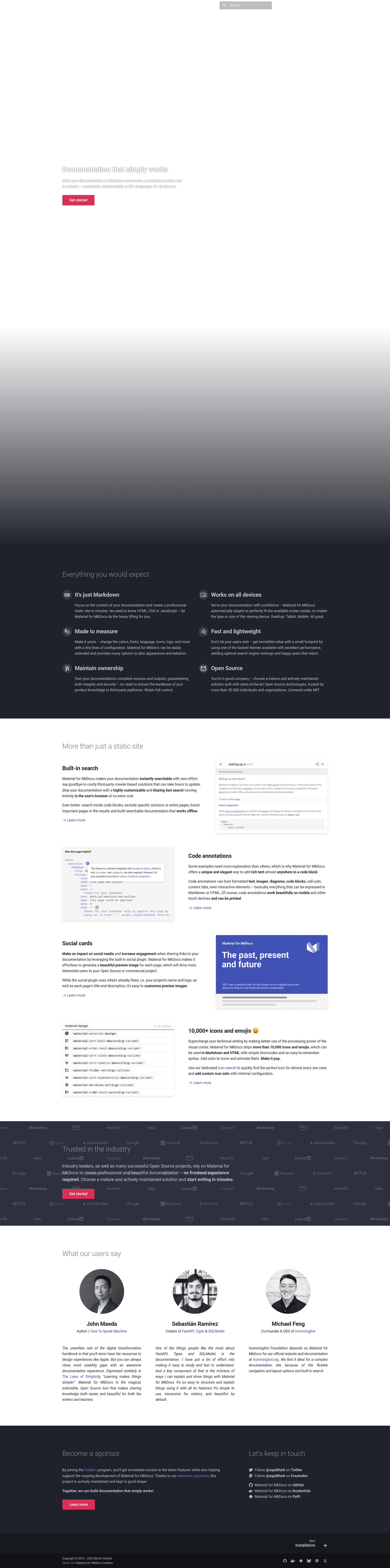
Material for MkDocs is a documentation framework on top of MkDocs that turns Markdown into a professional static site.
About this template
Material for MkDocs is a documentation framework built on top of MkDocs that converts Markdown files into a professional, searchable static site.
What is Material for MkDocs?
Material for MkDocs is a theme and documentation framework that runs on the Python-based static site generator MkDocs. It takes Markdown files and produces a static HTML site that is searchable, customizable, and responsive across devices. The project is maintained by Martin Donath (GitHub user squidfunk) and released under the MIT License. With more than 27,000 GitHub stars, it is one of the most widely used MkDocs themes.
Key Features
- Markdown-only authoring — you write content in Markdown and the theme handles the rest; no HTML, CSS, or JavaScript knowledge is required.
- Responsive layout — the generated site automatically adapts to desktop, tablet, and mobile screens.
- Customizable appearance — colors, fonts, language, icons, and logo are changed through a few lines in the mkdocs.yml configuration file.
- Built-in search — sites include client-side search with no extra setup, supporting more than 60 languages.
- Fast performance — the theme is one of the fastest available for MkDocs, contributing to better search engine rankings.
- Full ownership — you keep all source and output files, avoiding third-party platform lock-in.
- Open source and MIT-licensed — an actively maintained project trusted by more than 50,000 individuals and organizations.
Who should use Material for MkDocs?
- Open source maintainers — publish project documentation as a static site, as done by FastAPI, Polars, PyPI, and Arduino.
- Engineering teams — create internal engineering playbooks and API documentation; Microsoft and LinkedIn use it for their engineering handbooks.
- Product and documentation teams — build customer-facing documentation portals with custom branding, like those from Atlassian, Bloomberg, and HSBC.
- Technical writers — maintain documentation in Markdown with a low-friction workflow and a professional-looking output.
What can you do with Material for MkDocs?
- Ship project docs fast: turn a folder of Markdown files into a deployable static site in minutes, after running pip install mkdocs-material and adding the theme name to mkdocs.yml.
- Create a branded docs portal: customize colors, fonts, icons, and logo so the site matches your product identity.
- Publish multi-language documentation: write content in any of the more than 60 supported languages and let users search in their own language.
- Deploy anywhere: because the output is static HTML, it can be hosted on any web server, CDN, or static hosting service.
How does Material for MkDocs work?
Install the theme with pip install mkdocs-material, then add theme: name: material to your mkdocs.yml file. Write Markdown pages in the docs directory and run mkdocs serve for local preview or mkdocs build to generate the static site for deployment.
Pricing
Material for MkDocs is free and open source under the MIT License. No paid tiers or commercial licensing fees are mentioned.
Alternatives
- Docusaurus, a React-powered static site generator focused on documentation.
- GitBook, a hosted documentation platform.
FAQ
Is Material for MkDocs free?
Yes, Material for MkDocs is free and open source, released under the MIT License. You can use it for personal, open source, and commercial projects without paying a license fee.
How do I install Material for MkDocs?
Install it with pip: pip install mkdocs-material. Then add theme: name: material to your mkdocs.yml configuration and run mkdocs to build or serve your documentation site.
What type of projects use Material for MkDocs?
It is used by industry leaders such as AWS, Google, Microsoft, Netflix, and OpenAI, as well as open source projects including FastAPI, Polars, PyPI, and Arduino. The README lists more than 25 industry leaders and 50+ open source projects.
Does Material for MkDocs support multiple languages?
Yes, it supports more than 60 languages for both the interface and search functionality, making it suitable for multilingual documentation sites.
Do I need to know HTML or CSS to use it?
No, you write your documentation in Markdown. The theme generates the HTML and styles for you. Advanced customization via CSS is possible but not required for a professional result.