Template details
SupportGenix Docs
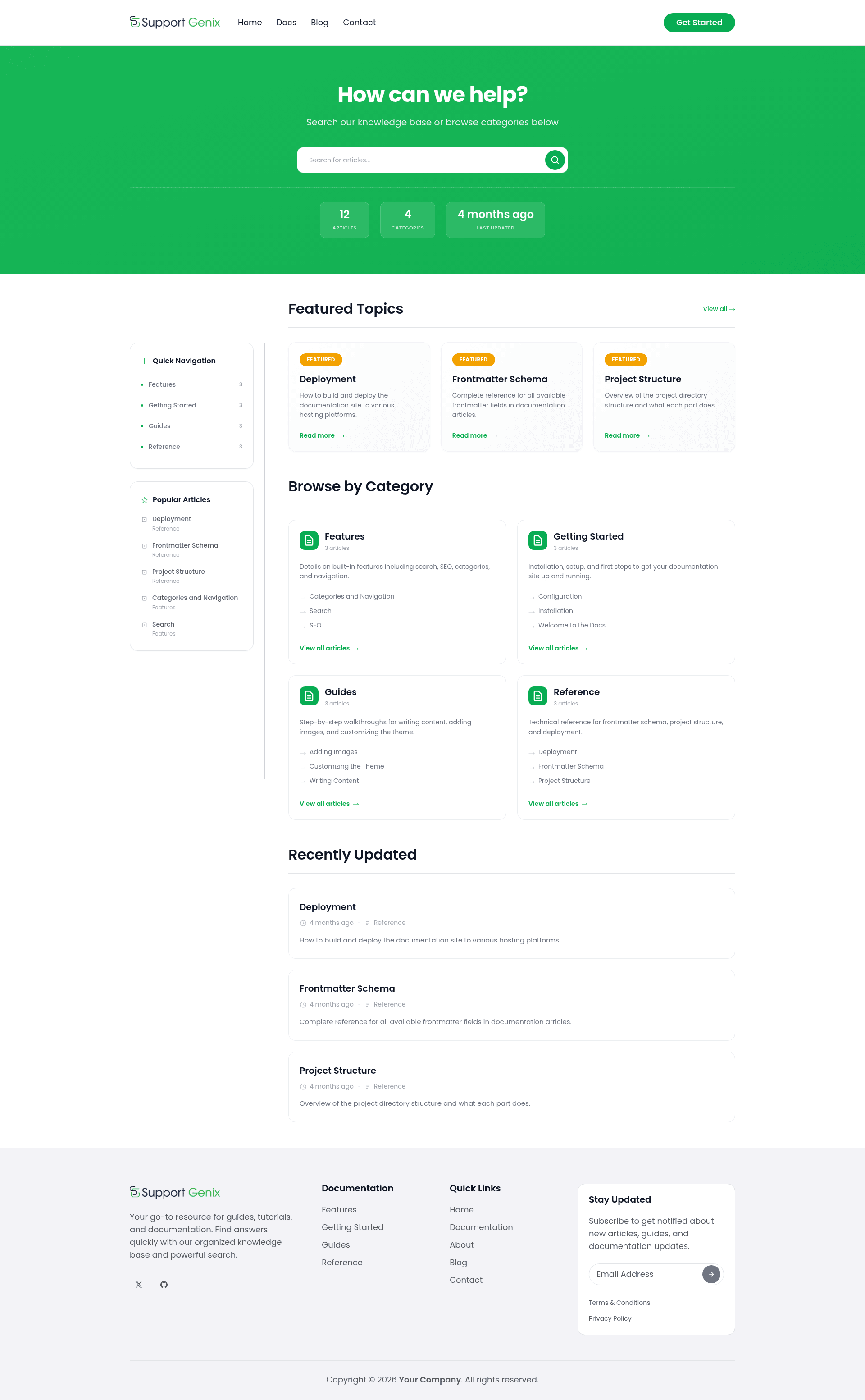
A free, production-ready Astro theme for documentation sites, help centers, and knowledge bases. Static, fast, and fully customizable.
About this template
SupportGenix Docs is a free, production-ready Astro theme for building static documentation sites, help centers, and knowledge bases with MDX content, Pagefind search, and Tailwind CSS styling.
What is SupportGenix Docs?
SupportGenix Docs is an Astro 6 template that takes MDX articles stored in content collections and compiles them into a fully static, SEO-ready documentation website with built-in search, category pages, and article feedback. It is the free static-site companion to SupportGenix, a WordPress support ticket and knowledge base plugin, and is released under the ISC license. The theme is config-driven: all brand, navigation, and social links live in a single TypeScript config file, and layouts and components are namespaced under src/supportgenix-docs/ when installed via its CLI.
Key Features
SupportGenix Docs comes with a specific, useful feature set out of the box.
- Astro 6 static output — Deploys as plain HTML to any static host; supported hosts include Cloudflare Pages, Netlify, Vercel, GitHub Pages, and S3 plus a CDN.
- MDX content collections — Articles live in src/content/docs with schema validation in content.config.ts; frontmatter fields include title, description, category, order, publishedDate, lastUpdated, tags, author, and tableOfContents, with only title, description, and category required.
- Dual-mode search — Pagefind full-text search is generated at build time, with an automatic JSON fallback endpoint (src/pages/search-index.json.ts) for development mode and hosts without Pagefind support.
- Tailwind CSS 4 with design tokens — The theme's styling system is Tailwind CSS 4 using custom theme tokens; self-hosted Poppins fonts come via @fontsource/poppins so no external font requests are made.
- Alpine.js interactivity — Lightweight Alpine.js powers the mobile menu, search UI, and the "Was this helpful?" feedback widget, which stores votes in localStorage and needs no backend.
- SEO and metadata baked in — Every page gets canonical URLs, Open Graph tags, Twitter cards, JSON-LD structured data, and a generated sitemap; robots.txt confirms the sitemap URL.
- One-command installer — Run npm create supportgenix-docs@latest to scaffold a full docs area into an existing Astro 6+ project, with options for a custom path, sample articles, and a dry-run preview.
Who is it for?
The template is aimed at anyone who needs a documentation site without running a hosted docs service. Developers already using Astro 6 can add a complete knowledge base to their site with a single CLI command. Product teams can build a help center with full-text search and reader feedback for their SaaS. Open-source maintainers can deploy project documentation to GitHub Pages or another free static host. SupportGenix plugin users get a static companion that pairs with their WordPress ticket system.
What can you do with it?
The template's features translate into several concrete tasks.
- Write and organize docs in MDX — Create articles under src/content/docs with any category structure; category pages, related articles, and pagination are generated automatically from file paths and frontmatter order.
- Deploy a help center to any static host — Build with npm run build to produce a dist folder with a full Pagefind index; deploy to Netlify, Vercel, Cloudflare Pages, GitHub Pages, or S3 plus CDN.
- Get instant full-text search without a backend — The production site uses Pagefind's prebuilt index, while development uses a JSON fallback, so search works locally and in edge environments.
- Collect reader feedback — The built-in "Was this helpful?" widget saves responses in localStorage and requires no server, letting you gauge article usefulness without analytics infrastructure.
How does it work?
SupportGenix Docs offers two setup paths. The recommended path runs npm create supportgenix-docs@latest inside an existing Astro 6+ project; the CLI copies docs pages, namespaced components, styles, an empty content/docs folder, and dual-mode search, then writes the astro.config.mjs and content.config.ts snippets it cannot auto-merge to a file named supportgenix-docs-install.md. The alternative is to clone the repository directly, install dependencies with npm install, and run npm run dev; Node.js 22.12+ and npm 9.6+ are required. After setup, edit src/lib/site-config.ts to set your brand name, organization, site URL, and link destinations, then add MDX files with a simple frontmatter block.
FAQ
Does Pagefind search work during development?
No. The documentation states that Pagefind search only works after a full production build (npm run build). During development, the automatic JSON fallback search endpoint is used instead, so search still functions locally.
What are the required frontmatter fields?
Only three fields are mandatory: title, description, and category. All other supported fields — order, publishedDate, lastUpdated, tags, author, and tableOfContents — are optional.
Can I add SupportGenix Docs to an existing Astro project?
Yes. The recommended install method is the CLI command npm create supportgenix-docs@latest, which scaffolds the docs theme into an existing Astro 6+ project. It also provides flags such as --path /docs, --with-examples, and --dry-run for previewing the installation.
What static hosts can I deploy to?
The build output is a static dist folder, so it works with any static hosting. The documentation explicitly lists Cloudflare Pages, Netlify, Vercel with static output, GitHub Pages, and S3 plus a CDN as supported deployment targets.
Is SupportGenix Docs free?
Yes. The theme is released under the ISC license, and the repository description states it is free. The related WordPress plugin SupportGenix is a separate commercial product.