Template details
MatJek
A responsive Jekyll theme based on Materialize.css for Material Design-style static sites.
About this template
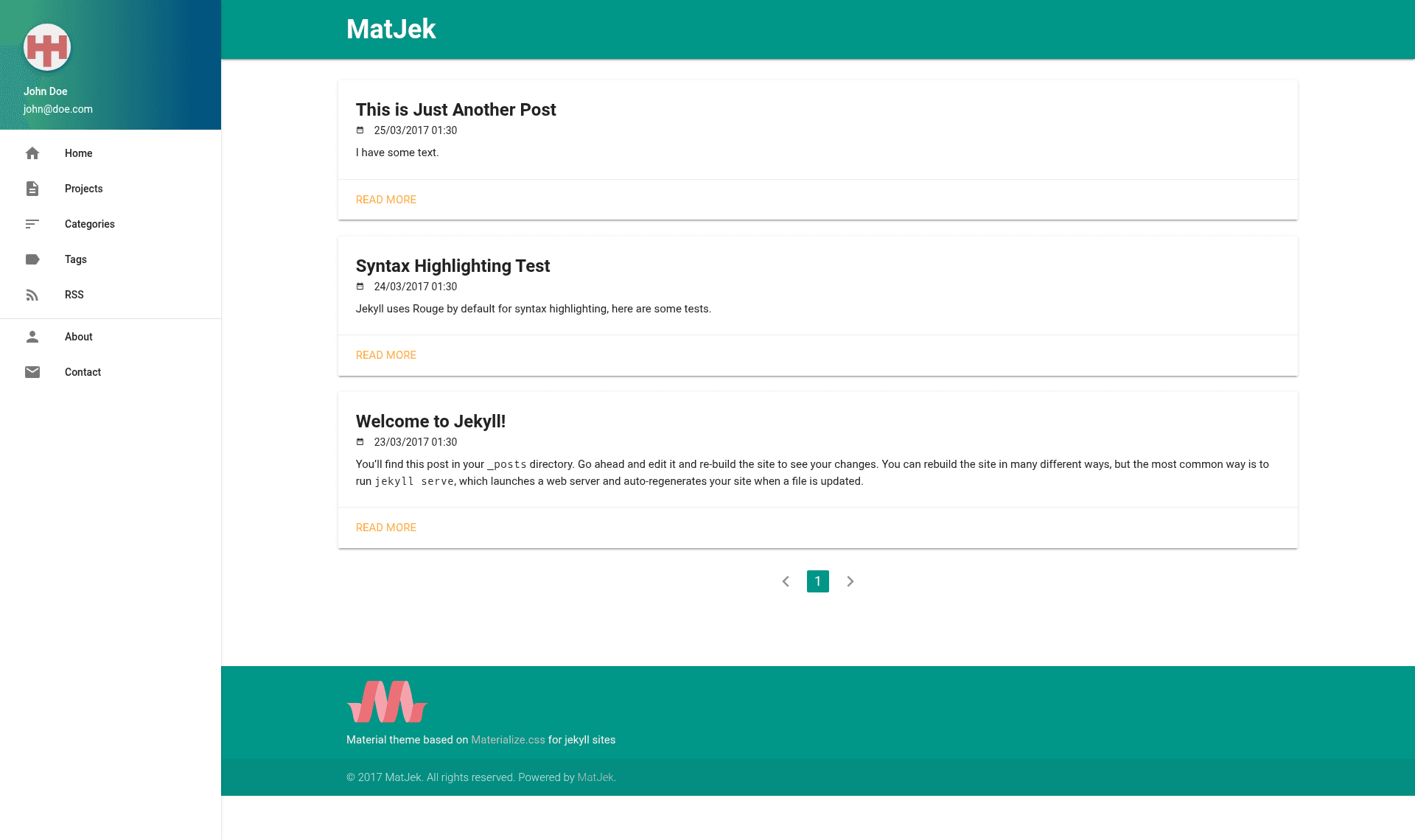
MatJek is a responsive Jekyll theme that brings Google's Material Design to GitHub Pages via the Materialize.css framework, aimed at bloggers and developers who want a modern, card-based layout.
What is MatJek?
MatJek is an open-source Jekyll theme styled with Materialize.css, a Material Design CSS framework, designed to run on GitHub Pages. It takes standard Jekyll content — posts with YAML front matter — and renders a static site with a sidebar profile, tag and category archive pages, and optional Disqus comments. The theme is maintained on GitHub by Shawn Teoh and released under the GPL v3 license.
Key Features
- Materialize.css base — The theme is built on Materialize.css, giving you Material Design components, colors, and a responsive grid system out of the box.
- Google Analytics — Set
google_tracking_idin_config.ymlto enable Google Analytics tracking across your entire site. - Disqus comments — Configure
disqus_shortnamein_config.ymland addcomments: 1to a post's front matter to display Disqus threads on individual posts. - Tag and category archives — Dedicated archive pages at
/tags/and/categories/aggregate posts by the tags and categories you declare in front matter, with multiple values separated by spaces. - Sidebar profile block — Personalize the sidebar with
github_profile,user,user_email, andcontact_urlfields in_config.yml, linking to your GitHub account and a Google Form contact page. - Modular CSS and JS includes — The theme splits styles and scripts into modular include files, as shown in the
projects.mdexample, making it easier to override and extend specific parts. - GitHub Pages ready — The demo site is hosted from the
gh-pagesbranch, and the theme works with GitHub Pages' built-in Jekyll environment. - Bundled libraries — Includes GeoPattern for generated background patterns, Animate.css for CSS animations, and Morphtext for text rotation effects.
Who should use MatJek?
- Jekyll bloggers who want a Material Design look without hand-writing CSS, along with built-in analytics and comment support.
- Developers hosting project pages on GitHub Pages — the theme includes a dedicated projects page and sidebar links to your GitHub profile.
- Portfolio site owners who need a clean layout with a fancy About page (linked in the demo) and a contact form via
contact_url.
What can you do with MatJek?
- Personal blogs: Write posts in Markdown, assign tags and categories, enable Disqus for reader engagement, and track visits with Google Analytics.
- Open-source project sites: Use the GitHub project page template to present your repo, and add a contact link for feedback.
- Portfolio showcases: Highlight your projects on the projects page and use the About page to share your background, with customizable images in
assets/res.
How do you set up MatJek?
Clone or fork the repository from GitHub, then edit _config.yml with your profile, analytics, and Disqus settings. For local development, run bundle install and then bundle exec jekyll serve, and preview the site at http://localhost:4000/matjek/. The site regenerates on changes, so you can see updates in the browser after a refresh.
FAQ
Is MatJek free?
Yes, MatJek is open-source and released under the GPL v3 license, so you can use, modify, and distribute it freely as long as you comply with the license terms.
How do I enable comments on a post?
Add disqus_shortname to your _config.yml file, then include comments: 1 in the front matter of any post where you want Disqus comments to appear. Removing the line disables comments for that post.
Does MatJek work with GitHub Pages?
Yes, the theme is designed for GitHub Pages and the demo runs from the gh-pages branch. You can use it with a user or project site by pushing your content to the appropriate branch.
What configuration is required?
Most settings live in _config.yml. The theme-specific keys are github_profile, user, user_email, contact_url, google_tracking_id, and disqus_shortname. Omit any optional keys you don't need, such as google_tracking_id or disqus_shortname, by removing them entirely.