Template details
Metalsmith
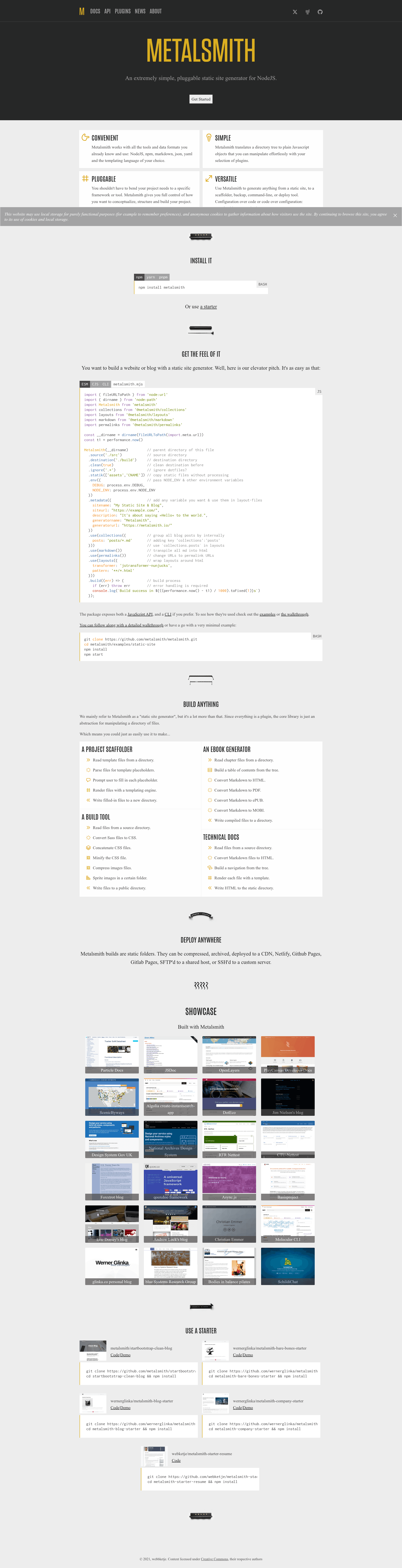
An extremely simple, pluggable static site generator for Node.js.
About this template
Metalsmith is an extremely simple, pluggable static site generator for Node.js that turns a source directory of files into a static site by running them through a chain of plugins.
What is Metalsmith?
Metalsmith is an extremely simple, pluggable static site generator for Node.js. It reads all files in a source directory, invokes a series of plugins that manipulate the files, and writes the results to a destination directory. The core library contains no built-in templating or file processing logic; everything is handled by plugins, which are JavaScript functions that can transform file contents and metadata. Metalsmith is open-source software on GitHub, licensed under MIT.
Key Features
- Pluggable architecture — All functionality is provided by plugins; the core only reads files, invokes plugins, and writes output.
- YAML front-matter — Each file can include YAML front-matter that is parsed into an object with
contentsand arbitrary metadata. - CLI and JavaScript API — Use the API directly or configure a
metalsmith.jsonfile for the CLI, which supports building sites similar to Jekyll or Hexo. - Plugin ecosystem — Official core plugins include
@metalsmith/markdown,@metalsmith/layouts,@metalsmith/collections,@metalsmith/permalinks, and@metalsmith/drafts; a full registry is at metalsmith.io/plugins. - Environment and metadata — Pass environment variables via
.env()and set global template variables via.metadata(). - Clean builds — The
cleanoption ensures the destination directory is emptied before each build. - Flexible beyond static sites — The repository's own examples include a project scaffolder and a build tool for Sass files, not just HTML sites.
- Node version support — Metalsmith 2.7.x requires Node.js 16.0.0 or higher; the current release line supports all common operating systems.
Who is it for?
Static site developers — Build blogs and marketing sites using Markdown content and layout templates, with collections for grouping posts and permalinks for clean URLs.
Developers wanting a Jekyll-like workflow — Define source, destination, and plugin configuration in a metalsmith.json file and run the metalsmith CLI without writing custom JavaScript.
Power users who need full control — Write your own plugins as plain JavaScript functions to transform any part of the file tree, since the plugin API is exactly a function taking files, the Metalsmith instance, and a callback.
Project scaffolders — The documented examples use Metalsmith to generate project directories from templates, so it works beyond static websites.
What can you do with Metalsmith?
- Blog authors: Write posts as Markdown files with YAML front-matter for title and date, then generate a blog with draft filtering, collections, permalinks, and layout wrapping using the official plugins.
- Static site developers: Combine markdown, layout, and permalink plugins in a short Node.js script to produce a complete HTML site in one build step.
- Build tool users: Use Metalsmith's plugin pipeline to process any file type — for example, compiling Sass files into CSS, as shown in the project's build-tool example.
How does Metalsmith work?
Metalsmith works in three steps: first it reads all files in the configured source directory, then it runs each registered plugin in sequence over the file list, and finally it writes the resulting files to the destination directory. Each file can have YAML front-matter that gets attached as metadata (for example, title and date), and the file contents are stored as a Buffer in the contents property. Plugins can inspect and mutate this data however they need.
Alternatives
- Jekyll
- Hexo
FAQ
Is Metalsmith free?
Yes, Metalsmith is free and open-source software. It is released under the MIT license, so you can use, modify, and distribute it freely.
How do I debug a Metalsmith build?
Set the DEBUG environment variable for Metalsmith's built-in debugger by calling metalsmith.env('DEBUG', '*metalsmith*') in your script. For plugins that use the debug package directly, run the build with DEBUG=metalsmith-*,@metalsmith/* (on Linux) or the equivalent Windows set command.
What Node.js version do I need?
Metalsmith 2.7.x supports Node.js versions 16.0.0 and higher. Earlier releases support older Node versions, with 2.3.0 and below supporting Node 0.12 and up. The project follows the oldest supported LTS releases for future versions.
Can I use Metalsmith without plugins?
Yes, but without plugins Metalsmith just copies files from the source directory to the destination directory. All actual processing — markdown conversion, templating, collections, permalinks — comes from plugins.
Does Metalsmith work on Windows, Linux, and macOS?
Yes, Metalsmith is supported on all common operating systems, as stated in its compatibility policy.