Template details
Middleman + Netlify CMS Starter
A boilerplate website using Middleman and Netlify CMS, deployable to Netlify with one click.
About this template
Middleman + Netlify CMS Starter is a boilerplate website that combines the Ruby-based Middleman static site generator with Netlify CMS, giving non-technical editors a browser-based interface for publishing content to a static site deployed on Netlify.
What is the Middleman + Netlify CMS Starter?
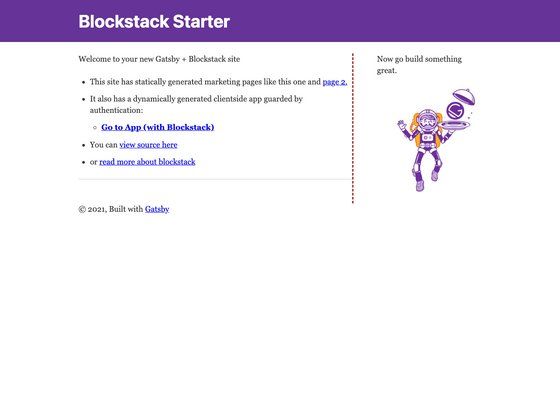
This starter is an example website built with Middleman and Netlify CMS, designed and developed by Tom Rutgers. It takes a Middleman project (Ruby-based static site generator) and pairs it with Netlify CMS, a content management system for static site generators. The output is a static website that can be deployed to Netlify, with content edits managed through the CMS. The repository includes the source code, configuration files, and a live example at https://middleman-netlify-cms.netlify.com/.
Key Features
- Middleman static site generation — The template uses Middleman, a Ruby-based static site generator that provides modern web development shortcuts, layouts, partials, and a built-in development server.
- Netlify CMS integration — Non-technical users get a simple interface to edit and add content; the CMS works with any static site generator and is preconfigured in this starter.
- One-click deploy to Netlify — A deploy button copies the repository to your GitHub account, builds the site, and deploys it on Netlify automatically.
- Docker support — A docker-compose.yml file is included so you can run the project in a container with
docker-compose buildanddocker-compose run --service-ports web middleman server. - Local development workflow — Without Docker, you can clone the repository, run
bundle install, and start a local server withmiddleman server. - Netlify Identity and Git Gateway setup — The README explains how to enable Netlify Identity to authorize users and Git Gateway to manage content changes as commits.
- Community support link — A Gitter chat channel for Netlify CMS is linked for troubleshooting.
Who is it for?
- Developers — Use the starter to quickly build a client site with a content management backend, then customize the Middleman templates and layouts.
- Non-technical content editors — Use Netlify CMS to edit page content and publish via a web interface without touching code or running Git commands.
- Teams wanting git-based workflows — Content updates made in Netlify CMS are committed to the GitHub repository, maintaining version control and an audit trail.
What can you do with the Middleman + Netlify CMS Starter?
- Deploy a preconfigured CMS-backed site — Click the Deploy to Netlify button, authenticate with GitHub, and get a live site plus a CMS endpoint without manual setup.
- Extend the asset pipeline — The related repository (middleman-webpack-netlify-cms) demonstrates adding an external asset pipeline with ES6, Webpack, and Babel to the same stack.
- Run locally with Docker or Ruby — Use the included docker-compose configuration to spin up a Middleman server, or follow the standard bundle install and middleman server commands.
How does the Middleman + Netlify CMS Starter work?
Deployment starts with the Deploy to Netlify button, which copies the repository to your GitHub account and creates a new Netlify site. After the build completes, you enable Netlify Identity to authorize user logins and turn on Git Gateway so CMS edits become commits in your repository. For local development, either use the Docker commands or install Ruby dependencies with bundler and run middleman server.
Pros and cons
- Pros: Fast setup with one-click deploy; git-based versioning for all content changes; no cost for the template itself; clear setup instructions for both Docker and native environments.
- Cons: The starter does not include the external asset pipeline (ES6, Webpack, Babel) — that lives in a separate companion repository; CMS authentication requires manually enabling Netlify Identity and Git Gateway.
Alternatives
Other static site generator plus Netlify CMS starter templates exist for Jekyll, Hugo, and Gatsby, giving users similar content editing workflows with different SSG tooling.
FAQ
Is the Middleman + Netlify CMS Starter free?
The starter repository is open source and free to use. You will need a GitHub account and a Netlify account; Netlify offers a free tier for static sites, though you may incur costs for additional bandwidth or users depending on your plan.
What do I need to get started?
You need a GitHub account for authentication when using the Deploy to Netlify button, and a Netlify account. For local development, install Ruby and bundle, or use Docker with the provided docker-compose.yml file.
Do I need to know Ruby to use this template?
You don't need to know Ruby to use the CMS interface, because Netlify CMS provides a browser-based editor. However, local development and customization of the Middleman templates require some familiarity with Ruby and the Middleman configuration.
How does content editing work?
Netlify CMS presents a simple editing interface. When a user saves a change, Git Gateway commits the updated Markdown files to the connected GitHub repository, triggering a rebuild on Netlify.
Can I use this starter without Netlify?
Netlify CMS can run in any frontend web environment, but this starter is tuned for Netlify's hosting and identity services. The one-click deploy and Git Gateway setup are Netlify specific; using another host would require additional configuration.