Template details
Virex
A production-ready SaaS theme for Astro with marketing pages, documentation, and a dashboard UI.
About this template
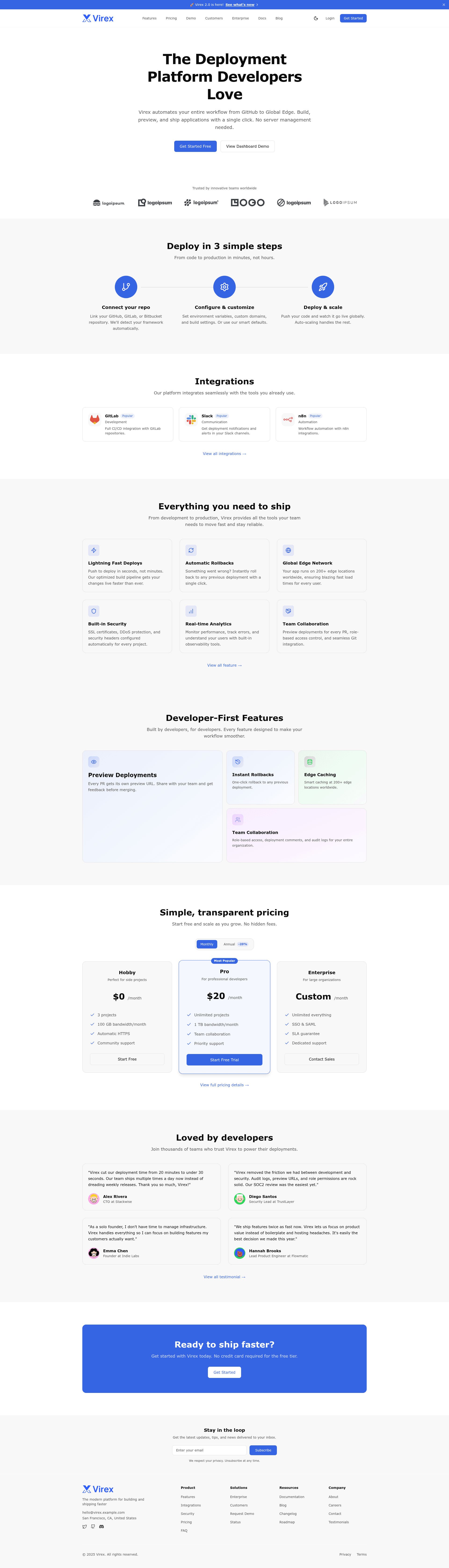
Virex is a production-ready SaaS theme for Astro that packages marketing pages, documentation, and a dashboard UI into a single template, giving you a defined path from landing page to MVP without reworking the design system.
What is Virex?
Virex is an MIT-licensed Astro theme built with TypeScript and Tailwind CSS v4. It scaffolds a complete SaaS site that includes landing pages, a blog, documentation, a changelog, testimonials, and a dashboard with example pages for Overview, Settings (Profile, Team, Billing), and Projects. The theme is initiated with the command npm create astro@latest -- --template erlandv/virex and configured through src/config/site.ts and src/styles/global.css. A live demo is available at virex.erland.me.
What makes Virex stand out?
- Dashboard UI included — Unlike typical Astro themes that stop at marketing pages, Virex ships a structured dashboard with reusable StatCard, DataTable, Chart, Modal, and Toast components, plus routes for
/dashboard,/dashboard/settings, and/dashboard/projects. - Astro + TypeScript + Tailwind CSS v4 — The stack uses path aliases like
@dashboard/*and@ui/*to keep imports clean, and ESLint and Prettier are preconfigured for code quality. - OKLCH design tokens — Theming is handled through design tokens in
src/styles/global.css, with dark mode support that persists via localStorage. - 200,000+ icons — Icon support through astro-icon pulls from Lucide and Simple Icons, covering a broad range of UI needs.
- Conversion-focused marketing pages — Hero sections, feature grids, pricing tables, testimonials, contact forms with validation and multiple backend options, team pages, case studies, and integrations showcases are all included.
- SEO and accessibility built in — Pages ship with meta tags, Open Graph, JSON-LD, semantic HTML, and WCAG-compliant markup.
- Content collections in Markdown/MDX — Blog posts support pagination and tag filtering, the documentation sidebar is auto-generated, the changelog offers version history, and testimonials support featured and ordered placements.
Who should use Virex?
- SaaS founders and indie hackers — Launch a landing page with pricing, testimonials, and legal pages, then extend the included dashboard to a working MVP.
- Agencies and freelancers — Reuse the same marketing and documentation set across client projects while keeping consistent theming through OKLCH tokens.
- Developers new to Astro — Get a production-ready project structure with path aliases, ESLint, Prettier, and content collections already set up.
- Product teams shipping docs — Use the documentation collection with auto sidebar and the changelog to publish product docs alongside the site.
What can you do with Virex?
- Launch a SaaS marketing site — Assemble hero sections, feature grids, pricing tables, testimonials, a validated contact form, and legal pages with SEO meta tags and JSON-LD.
- Prototype an MVP dashboard — Use the dashboard routes and components (StatCard, DataTable, Chart) with sample data to visualize the authenticated app; authentication is intentionally left to you.
- Publish a blog and changelog — Write Markdown or MDX posts with tag filtering and reading time, and keep a versioned changelog for product updates.
- Document your product — The documentation collection auto-generates a sidebar with section grouping so you can ship structured docs quickly.
FAQ
Is Virex free?
Yes. Virex is released under the MIT License and is free for personal and commercial use. Attribution is not required, though a link back to the repository is appreciated.
How do I create a new project with Virex?
Run npm create astro@latest -- --template erlandv/virex, then cd your-project-name and npm run dev. The site will be available at http://localhost:4321. Next update src/config/site.ts and src/styles/global.css to match your branding.
Does Virex include authentication for the dashboard?
No. The dashboard pages are starter templates with sample data, and authentication is intentionally left to the user. The repository's docs folder includes a guide (08-authentication.md) to help you add your own.
What content collections does Virex provide?
Virex has four Markdown/MDX content collections: blog (paginated with tag filtering and reading time), documentation (auto-generated sidebar with section grouping), changelog (version history), and testimonials (featured and ordering support).