Template details
Miri UI
Free Bootstrap 5 UI kit with 4 HTML pages, UI components, and landing, profile, and login page designs.
About this template
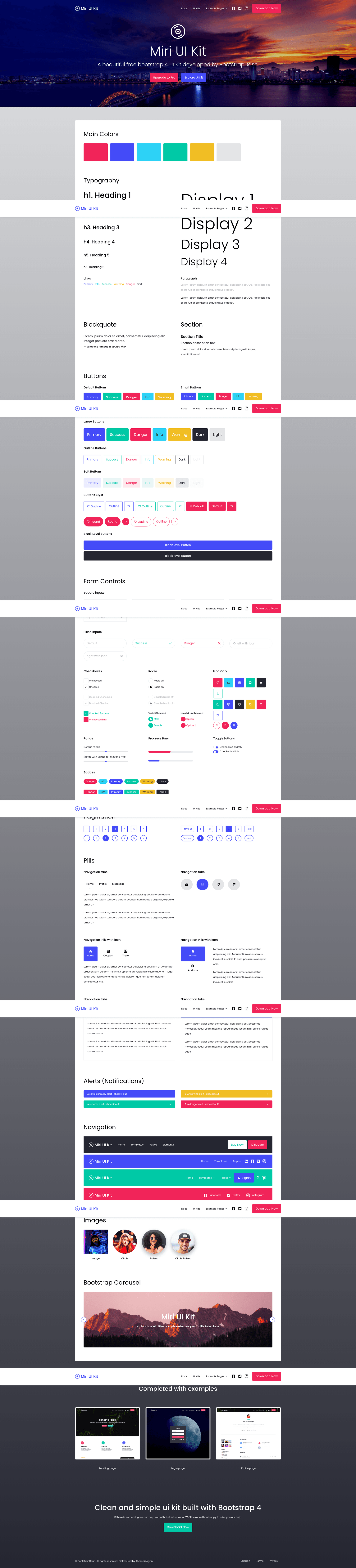
Miri UI is a free Bootstrap 5 UI kit template for building responsive websites, published on ThemeWagon and created by Bootstrap Dash. It ships as static HTML, CSS, and JavaScript files that run directly in any modern browser, with four complete pages and a library of pre-styled UI components such as buttons, forms, progress bars, carousels, and navigation bars.
What is Miri UI?
Miri UI is a free, open-source UI kit and design system built on Bootstrap 5. It provides ready-to-use HTML pages and UI components that developers and designers can copy into their projects or customize using SCSS source files. The download includes 4 HTML pages (landing, profile, login, and a components showcase), all demo images, HTML/CSS files, JavaScript source files, and library/plugin files, so it works as a complete starting point for a website.
Key Features
- Bootstrap 5 framework — Uses Bootstrap 5 with HTML5 and CSS3, plus SCSS source files for variable-driven styling.
- Gulp-based workflow — A Gulp build automates SCSS compilation and asset processing, making customization faster.
- Fully responsive — Layouts are 100% responsive and tested in Chrome, Edge, Firefox, Mobile, Opera, and Safari.
- Multipage structure — Four HTML pages cover landing, profile, login, and a component demo page, with a dropdown menu and sticky navigation.
- Extensive component set — Includes buttons in multiple colors/sizes, form inputs, checkboxes, radio buttons, progress bars, pagination, alerts, carousels, and badges.
- Typography and icons — Font Awesome icons and Google Fonts are included for visual polish.
- Easy to customize — Clean, structured code and on-hover effects allow quick theming; an extensive documentation file helps with setup and troubleshooting.
Who is it for?
- Web developers who need a fast, dependency-light Bootstrap 5 starter kit for building marketing or portfolio sites.
- UI/UX designers who want a consistent set of styled components to prototype interfaces or hand off to developers.
- Freelancers and small businesses that need a professional landing page, profile page, or login page without hiring a designer from scratch.
What can you do with Miri UI?
- Launch a marketing site — Use the landing page and hero header to set up a product or business website in minutes.
- Create a user profile area — Customize the profile page and form components to build dashboards or account pages.
- Build login and signup flows — Use the login page, form inputs, checkboxes, and radio buttons to create authentication screens.
Alternatives
- Lazy Kits — a free responsive Bootstrap 4 UI kit with similar component coverage.
- Now UI Kit — a Bootstrap 4 UI kit from the same ecosystem with a different visual style.
- Shards — a free Bootstrap 4 UI kit with a lighter design.
FAQ
Is Miri UI really free?
Yes. Miri UI is a free download from ThemeWagon, licensed for open-source use and commercial projects, and it comes with lifetime free updates.
What do I get in the download?
The package includes 4 HTML pages, all demo images, all HTML and CSS files, JavaScript source files, and library/plugin files. The page uses Bootstrap 5, Font Awesome, and Google Fonts.
Does it work on mobile?
Yes, the template is 100% responsive and has been tested on mobile browsers, along with Chrome, Edge, Firefox, Opera, and Safari.
Can I use it commercially?
Yes. The license allows commercial use and open-source use with lifetime free updates.
Do I need a build tool to use it?
No. The static HTML/CSS/JS files can be opened directly in a browser. The Gulp-based workflow and SCSS files are optional and intended for developers who want to compile custom styles.