Template details
MonaKit
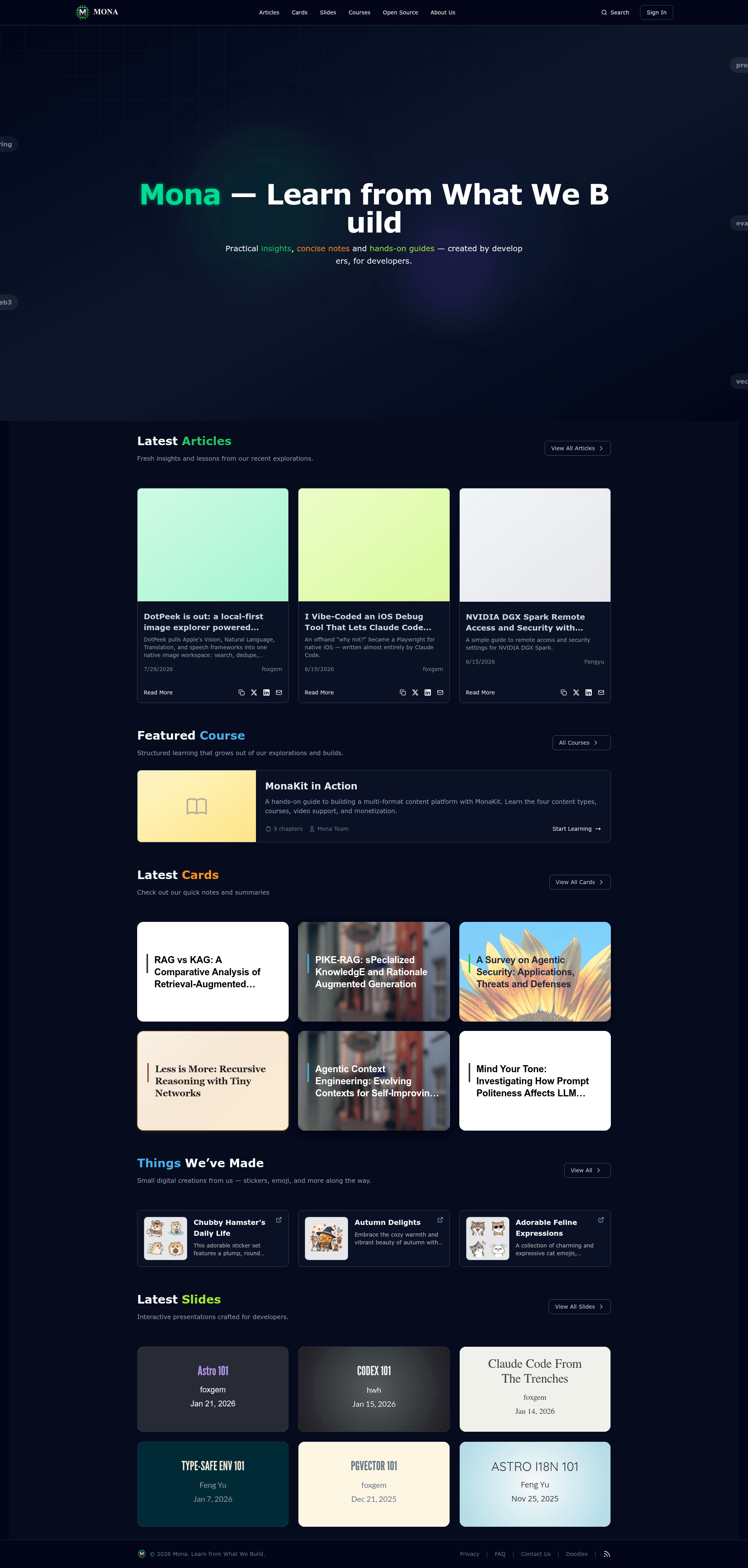
Multi-format content platform built with Astro featuring knowledge cards, articles, slide presentations, and courses.
About this template
MonaKit is an Astro 6 template for building a multi-format content platform that turns Markdown/MDX files into knowledge cards, articles, slide presentations, announcements, and courses. It runs as a server-side-rendered Astro site with a Vercel adapter, styled with TailwindCSS 4, and ships with Pagefind full-text search, RSS feeds, and dynamic Open Graph images.
What is MonaKit?
MonaKit is a multi-format content platform built on Astro 6 that takes Markdown/MDX files organized in src/content and outputs five content types: knowledge cards, blog articles, slide presentations, doodles (announcements), and structured courses. It uses the Vercel adapter for server-side rendering, React 19 for interactive islands, TailwindCSS 4 for styling, and Biome for linting and formatting. The template is scaffolded via npm create astro@latest my-astro-project -- --template monakit/monakit and has 53 stars on GitHub.
Key Features
- Knowledge Cards — research summaries with customizable themes.
- Articles — long-form blog content that flows into the RSS feed and Pagefind search.
- Slide Presentations — reveal.js-based slides with Mermaid and math support, authored as Markdown/MDX.
- Doodles — release logs and announcements with their own content type.
- Courses — structured learning via
toc.md, numbered chapter files, and optional slide chapters that embed reveal.js decks. - Video — course trailers and chapter videos via Cloudflare Stream, using a signing key pair generated by a script.
- Search — full-text search with Pagefind; the build script auto-generates the search index.
- Creations — a showcase section for products and links, defined in
src/assets/creations.json. - RSS & Sitemap — auto-generated RSS feeds for blogs and a sitemap for SEO.
- OG Images — dynamic Open Graph images generated from content.
Who is it for?
- Educators — build structured courses with chapters, slide decks, and optional Cloudflare Stream video.
- Content creators — publish articles and knowledge cards with built-in search, RSS, and sitemap.
- Product teams — announce releases as doodles and showcase products in the Creations section.
- Developers — use the template as a foundation for a docs or portfolio site, extending content collections with Astro's content layer.
What can you do with MonaKit?
- Course authors: organize course content with
toc.mdand numbered chapter files, mix text chapters with reveal.js slide chapters, and embed standalone slide resources with the<Slide id="slug" />component. - Researchers: publish research summaries as knowledge cards, each with a customizable theme.
- Release managers: share changelogs and announcements as doodles.
- Bloggers: write long-form articles and get auto-generated RSS and Pagefind search without manual configuration.
How does MonaKit work?
Content lives in src/content under cards/, blogs/, slides/, doodles/, and courses/. Courses use a toc.md for metadata and chapter order; chapter files are numbered (NN-slug.md) and can be marked as slides with a theme: frontmatter field. Run pnpm dev to develop locally, pnpm build for a production build (which also builds the search index), and pnpm preview to test the output. The quick-start command scaffolds a new project in one line.
FAQ
How do I start a new MonaKit project?
Use npm create astro@latest my-astro-project -- --template monakit/monakit, then install dependencies with pnpm install, copy .env.example to .env, and run pnpm dev.
What content types does MonaKit support?
MonaKit supports knowledge cards, blog articles, slide presentations, doodles (announcements), and courses. Courses can include chapters, slide chapters, and optional video via Cloudflare Stream.
Does MonaKit include search?
Yes, Pagefind is integrated for full-text search. The production build automatically builds the search index, and you can rebuild it manually with pnpm build:search-index.
How do I add video to a course?
Set Cloudflare Stream environment variables (account ID, API token, customer code, key ID, private key) in .env. Generate the signing key pair once with npx tsx scripts/generate-stream-key.ts, then reference the video in course chapter frontmatter.
What stack does MonaKit use?
Astro 6 with the Vercel adapter for SSR, React 19 for interactive components, TailwindCSS 4 for styling, reveal.js for slides, Pagefind for search, and Biome for linting and formatting.