Template details
Navfolio
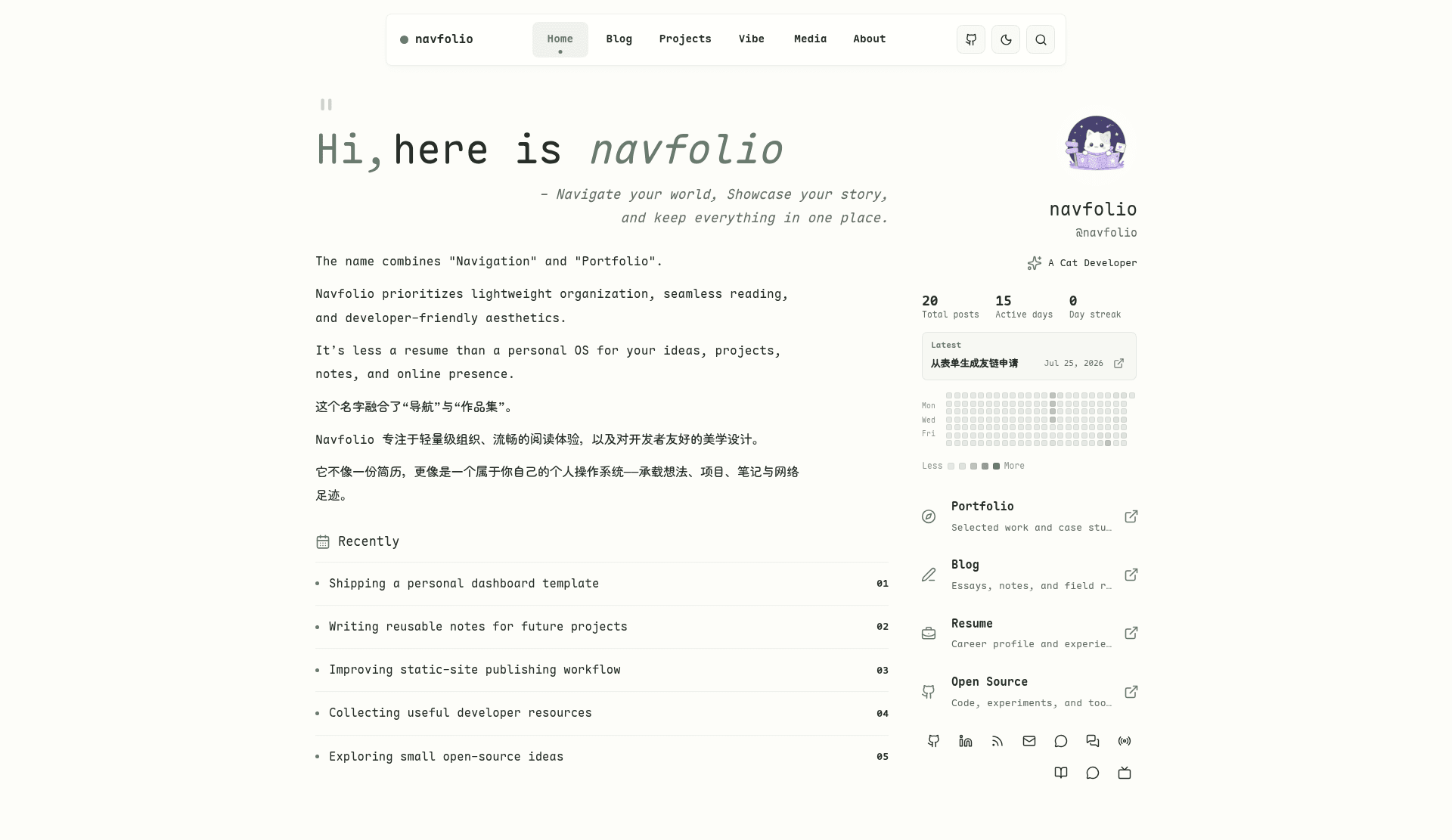
Navfolio is a serene Astro theme for personal publishing—bringing your homepage, blog, portfolio, and digital garden together.
About this template
Navfolio is a portfolio-first Astro starter that merges a personal homepage, blog, project documentation, short-form Vibe notes, full-text search, and comment systems into a single static site.
What is Navfolio?
Navfolio is a static-site starter built on Astro that combines a personal navigation page, portfolio, blog, project docs, and a lightweight digital garden in one repository. It takes Markdown and MDX content plus a TOML site configuration as input and produces a static dist folder ready for deployment to any static host. The project is maintained by dodolalorc on GitHub under the name astro-navfolio, and a live preview is available at https://astro.navfolio.site/.
Key Features
Navfolio's core features keep a personal publishing site lightweight and self-contained. The following capabilities are all included in the starter:
- Multi-section content model — Blog, Projects, Vibe, and About content types share one article schema with frontmatter fields for title, description, date, draft, hero image, tags, comments, and a sidebar control block for TOC and related posts.
- Pagefind full-text search — Each build generates a static search index into
dist/pagefind; the search modal opens from the top navigation or via the Ctrl+K / Cmd+K shortcut, with configurable placeholder and max results insite.toml. - Configurable comment systems — Global support for giscus, utterances, waline, or none, set in
[config.comments], with per-article opt-out by settingcomments: falsein frontmatter. - CJK font subsetting —
bun run buildautomatically generates WOFF2 subsets for Chinese, Japanese, and Korean characters using Python 3, FontTools, and Brotli, keeping font payloads small without manual font preparation. - Content creation scripts —
bun run post:new,project:new,vibe:new, andmedia:newscaffold new content with safe filenames, default frontmatter copied from editable templates, and optional--mdxflags. - TOML site configuration — Site title, profile, navigation, theme palettes, search, comments, Vibe behavior, and homepage modules all live in a single
src/config/site.tomlvalidated by a Zod schema at build time. - Static deployment targets — The build outputs pure static files, so the site runs on GitHub Pages, Vercel, Netlify, or Cloudflare Pages;
astro.config.mjshandles the project-pagebaseautomatically in GitHub Actions.
Who should use Navfolio?
Navfolio suits developers, creators, and writers who want a single static site for their homepage, portfolio, blog, and project documentation. It is especially useful for developers who prefer managing content as Markdown and MDX files rather than through a visual editor. For people publishing in Chinese or other CJK languages, the built-in font subsetting keeps the static site lightweight without manually preparing web fonts.
Use cases
Here are concrete ways Navfolio's sections are used:
- Personal homepages: Introduce yourself, what you are currently working on, and where readers can find you, using the dashboard-style
/page configured insite.toml. - Blogging and tutorials: Publish long-form Markdown or MDX posts under
/blog, with optional sidebars for TOC and related articles, and an RSS feed at/rss.xml. - Project documentation: Maintain per-project detail pages under
/projects, each with hero images, tags, and optional sidebar settings, suitable for open-source project pages or case studies. - Short-form sharing: Post quick vibe notes, life snippets, or development logs to the
/vibetimeline without writing a full article, usingbun run vibe:newto scaffold entries.
How does Navfolio work?
Navfolio is developed locally with Bun and Astro, then built into static files with automated font subsetting and search indexing. After creating a Python 3 virtual environment with FontTools and Brotli installed, you run bun install and bun run dev to start a local server. You edit src/config/site.toml and add content files under src/content/, using CLI scripts to scaffold new posts, projects, vibe notes, and media entries. When you run bun run build, the pipeline first builds the Astro site, generates WOFF2 font subsets for CJK characters, and produces a Pagefind search index inside dist, which you can preview with bun run preview.
Pros and cons
Navfolio's strengths and limitations are documented directly in the README:
Pros:
- Five content sections (home, blog, projects, vibe, about) are unified in one Markdown/MDX content folder.
- Pure static output with no server dependencies means the site deploys to any static host.
- Font subsetting and Pagefind search are automated into the build, so there is no separate indexing step.
Cons:
- Production builds fail unless Python 3, FontTools, and Brotli are available, which adds environment requirements beyond typical Node-only tooling.
- There is no visual admin panel; content management happens through files and command-line scripts, which may feel unfamiliar to non-developers.
Pricing
Navfolio is free and open source. The starter is distributed through its public GitHub repository at https://github.com/dodolalorc/astro-navfolio, and the author asks for a star if the template is useful.
Alternatives
AstroPaper is an alternative Astro blog theme focused primarily on articles, without the portfolio, projects, and Vibe sections that Navfolio adds.
FAQ
Does Navfolio require Python to build?
Yes. Production builds hard-depend on Python 3, FontTools, and Brotli to generate WOFF2 font subsets for CJK characters. Without those tools, bun run build fails. The README recommends creating a .venv virtual environment; the build scripts automatically prefer it if present.
What comment systems does Navfolio support?
Navfolio supports giscus, utterances, waline, and none. You set the provider globally in src/config/site.toml under [config.comments] with enabled, provider, and show_on_posts keys, and you can disable comments on a single article by adding comments: false to its frontmatter.
How do I create a new blog post?
Run bun run post:new my-first-post from the project root. The script creates a Markdown file with default frontmatter in src/content/blog/. Add the --mdx flag or use a .mdx filename to author the post in MDX instead. The default template lives in scripts/templates/post.md and is editable without changing TypeScript.
What is the Vibe section?
Vibe is a short-form timeline for life snippets, quick updates, and development notes, stored as Markdown files in src/content/vibe/. You scaffold new entries with bun run vibe:new and control its display behavior through the [config.vibe] section in site.toml.
Can I deploy Navfolio to GitHub Pages?
Yes. The build outputs a static dist folder, and the repository includes a GitHub Actions workflow for GitHub Pages project sites. astro.config.mjs automatically sets the correct base in GitHub Actions environments; you can also override the site URL and base manually with the SITE_URL and SITE_BASE environment variables during bun run build.