Template details
NexTemplate
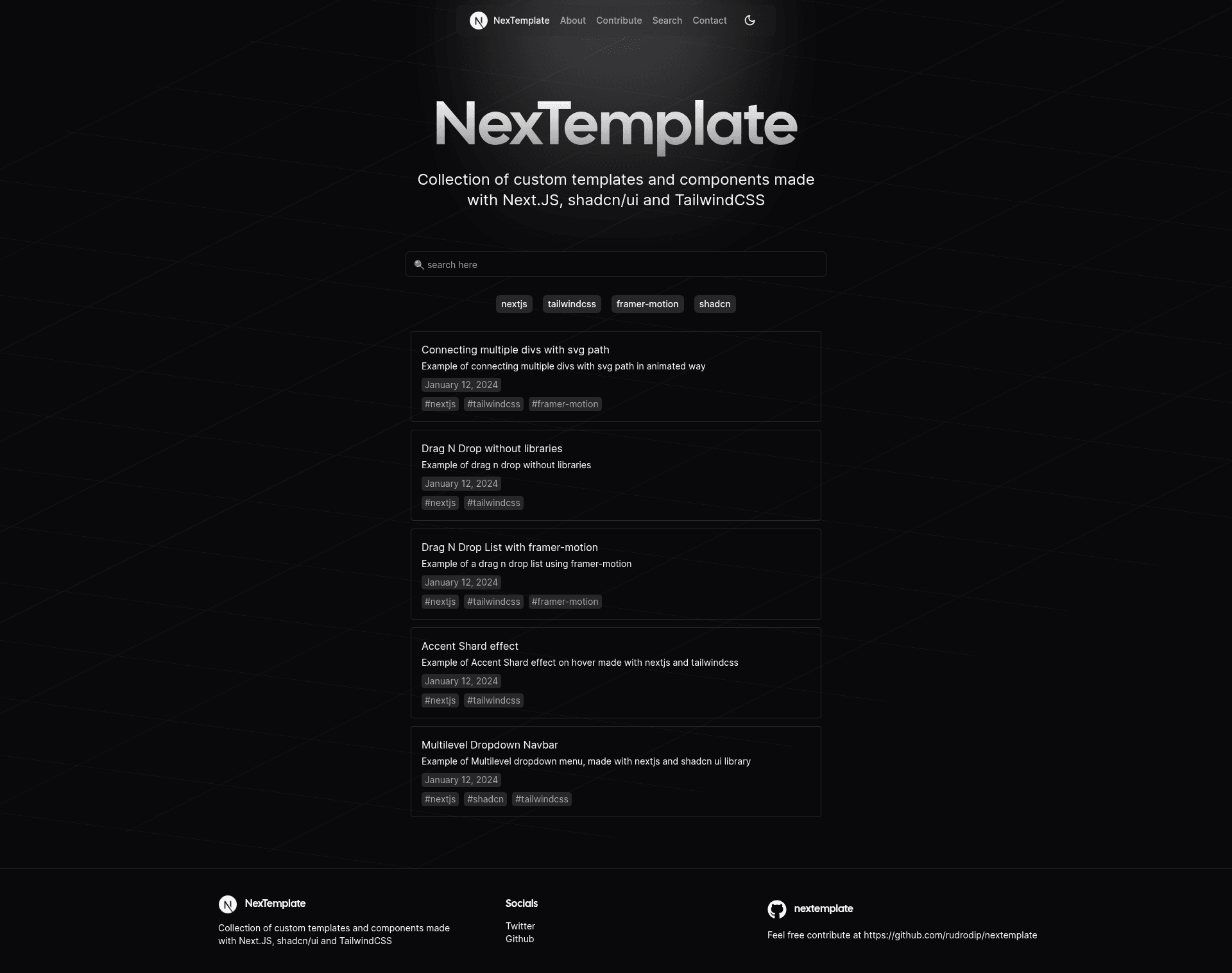
Collection of custom templates and components made with Next.JS, shadcn/ui and TailwindCSS
About this template
NexTemplate is an open-source collection of reusable React templates and components built on Next.js 14 with shadcn/ui and TailwindCSS, made for developers who want to copy working code into their own projects.
What is NexTemplate?
NexTemplate is a free, open-source project by developer rudrodip that gathers custom templates and components crafted with Next.js, shadcn/ui, and TailwindCSS. The live site at nextemplate.vercel.app presents each component as a single-page demo with its source code exposed. Inputs are the individual component folders stored in the GitHub repository, and outputs are the visible demos plus copyable TypeScript, CSS, and Tailwind snippets. The project runs on Next.js 14 and uses Contentlayer, as indicated by its repository topics.
Key Features
- Diverse collection — The repository includes a variety of reusable templates and components; the author notes they are works in progress but have been used in real projects.
- Search functionality — A search feature lets you quickly filter the collection to find specific components without browsing through every demo.
- Live demos with code snippets — Every component is shown in action with code samples in TypeScript, CSS, and Tailwind, so you can see exactly how it behaves and how it is styled.
- Organized code structure — Components are split into individual files under
src/components/templates/<component_folder>, following a convention that keeps each part separate. - Easy copy-paste integration — Code snippets can be copied directly from the demo page and pasted into your own Next.js project, with no package installation required.
- Fully open sourced — The entire codebase is public on GitHub, licensed for anyone to modify, extend, and reuse, and contributions are accepted.
Who is it for?
- Next.js developers who need small, focused UI components or template patterns and want to see the working code before copying it.
- Solo indie hackers looking to speed up front-end work by pasting tested Tailwind/shadcn components instead of writing everything from scratch.
- Open-source contributors who want a low-friction project to practice on: the contribution guide lists exact steps from forking to pull request and targets the
devbranch.
What can you do with NexTemplate?
- Rapidly prototype pages: Pick a prebuilt component, copy its code, and drop it into your Next.js app to get a styled UI element in minutes.
- Learn concrete implementation patterns: Each demo exposes the exact TypeScript, CSS, and Tailwind code behind a component, making it a practical reference for how shadcn/ui components are wired up.
- Publish your own components: Follow the contribution guidelines to add a new component folder with
component-details.jsonmetadata and amain.tsxdefault export, then submit a PR against thedevbranch.
How does NexTemplate work?
NexTemplate's site is a Next.js app that renders the component collection from the repository. Visitors can browse or search the library, open any component to see a live demo and its code, then copy the snippet into their project. For contributors, the workflow is explicit: fork the repo, clone it, create a branch, add a component folder containing component-details.json and main.tsx (exporting the component as default), test with npm run dev, and open a pull request against the dev branch.
FAQ
Is NexTemplate free?
Yes, NexTemplate is fully open source. The entire codebase is public on GitHub, and there are no paid tiers or licensing fees mentioned on the page.
What tech stack does NexTemplate use?
NexTemplate is built with Next.js 14, shadcn/ui, and TailwindCSS, with Contentlayer listed in the repository topics. The demos include code snippets written in TypeScript, CSS, and Tailwind.
How do I contribute a new component?
From the GitHub guide: fork the repository, clone it, create a branch, and add your component under src/components/templates/<component_folder>. That folder must contain a component-details.json file and a main.tsx file that exports the component as default. Then commit, push, and open a pull request targeting the dev branch.
Can I deploy my own copy of NexTemplate?
Yes. You can build the project with npm run build (or yarn/pnpm/bun equivalents) and deploy it. The page notes that if you use Vercel, connecting your GitHub repository handles deployment; for other platforms you upload the contents of the out/ directory.
Is NexTemplate in active development?
The author describes it as a personal indie project and a work in progress, not "perfect," and welcomes improvements through GitHub issues or direct contact on Discord and Twitter.