Template details
React Router SaaS Template
Create B2B and B2C SaaS apps with React Router.
About this template
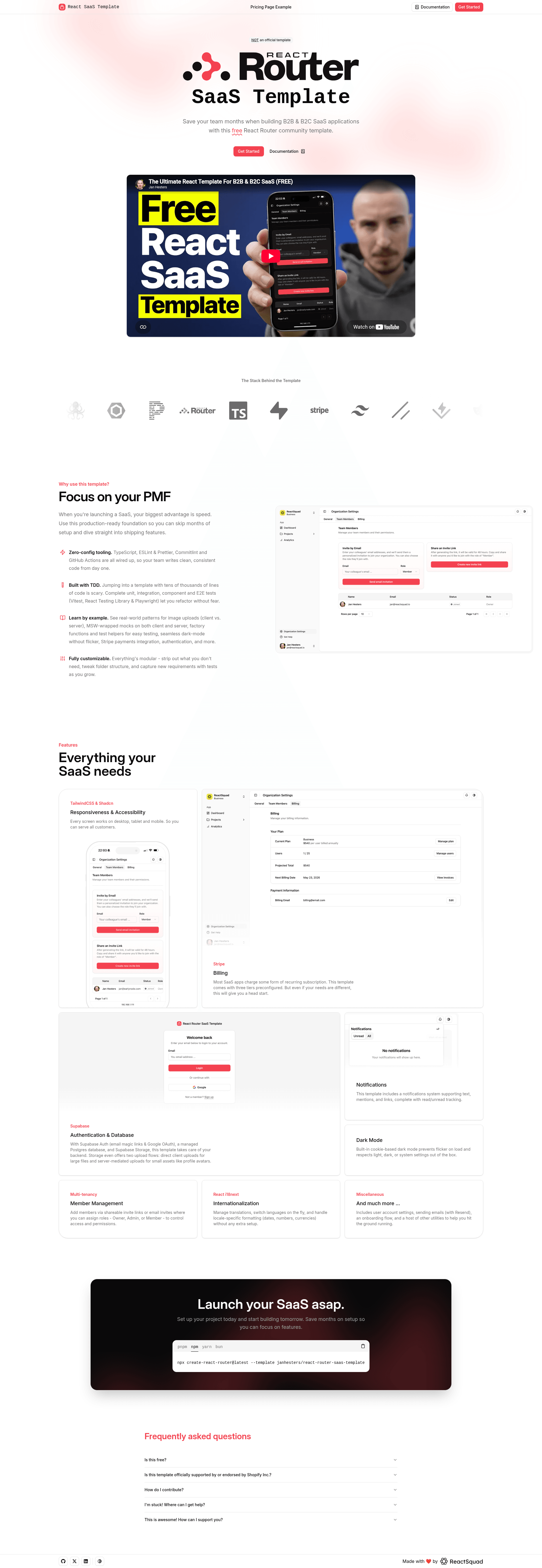
React Router SaaS Template is a production-ready full-stack SaaS boilerplate built on React Router v7, TypeScript, TailwindCSS, and shadcn/ui, pre-configured with authentication, multi-tenant organizations, Stripe billing, file storage, and email.
What is the React Router SaaS Template?
The React Router SaaS Template is a full-stack, production-ready boilerplate for building B2B and B2C SaaS applications on React Router v7. It takes environment variables, a Postgres database, and API keys for Supabase, Stripe, and Resend, and outputs a working SaaS app with authentication, multi-tenant organizations, and subscription billing. The template is maintained by ReactSquad, a senior React consulting agency, and draws some code from Kent C. Dodds' Epic Stack.
Key Features
- Authentication — Supabase Auth with Email Magic Link, Google OAuth, and role-based memberships within multi-tenant organizations.
- Billing — Stripe integration with three pre-configured paid tiers (Hobby, Startup, Business) with seat limits of 1, 10, and 25, plus 14-day free trials and monthly or annual billing. Product and price data syncs via webhooks.
- Database layer — Postgres with Supabase and Prisma, including migration scripts, a seed script that creates demo organizations, and Prisma Studio for browsing data.
- File storage — Supabase Storage with both S3-compatible server-side uploads and direct client-side uploads into private image buckets.
- UI — TailwindCSS and shadcn/ui components, dark mode, flash-session toast notifications, and Content Security Policy with nonces for XSS protection.
- Testing — Vitest for unit and integration tests, Playwright for end-to-end tests with @axe-core/playwright accessibility scanning, and MSW mocks for local development without external services.
- Developer experience — Biome for linting and formatting, Commitizen, Commitlint, and Husky for commit conventions, remix-i18next for internationalization, and an AI-driven workflow with Cursor commands and SudoLang pseudocode.
- Deployment — Dockerfiles for npm, pnpm, and bun, plus support for AWS ECS, Google Cloud Run, Azure Container Apps, Digital Ocean, Fly.io, and Railway.
Who is it for?
- Solo founders and indie hackers building a subscription MVP can use the mock mode to prototype the full auth and billing flow without setting up Stripe or Supabase until launch.
- Startup engineering teams can use the tested, typed codebase as the foundation for a multi-tenant product, with seat-based pricing and CI-ready E2E tests.
- Dev shops and agencies can white-label the template for client SaaS projects, and use the AI-driven Cursor commands to generate tests, documentation, and React components.
- Developers learning React Router can study a large, well-organized project that uses flat routes, type-safe route generation, and server utilities.
What can you do with it?
- Launch a subscription SaaS product: create Stripe products and prices in the dashboard, set the max_seats metadata, and the app's webhook handlers keep the database in sync automatically.
- Build a multi-tenant team workspace: invite users to organizations, assign roles, and manage seats across the three pre-configured plans.
- Develop locally without external dependencies: run npm run quickstart to copy the .env.example file, set up Prisma, seed demo data, and start a dev server with MSW mocks.
- Ship a Dockerized deployment: build the included Dockerfiles for npm, pnpm, or bun and deploy to any container platform.
How does the template work?
The template is a React Router (framework mode) application with server-side code for authentication, billing, email, and file uploads. You start by copying .env.example to .env and filling in variables for DATABASE_URL, Supabase, Stripe, and Resend. For local development, npm run quickstart seeds a demo database and enables MSW mocks so you can log in with demo accounts like hobby@example.com.
Then run npm run dev for HMR at localhost:3000. Stripe webhooks are forwarded with stripe listen, and products/prices created in the Stripe dashboard are replayed into the local database with npm run stripe:resend-events.
Pros and cons
Pros:
- Ships with working auth, billing, storage, and email integrations, so you don't have to wire them up yourself.
- Strong test setup: Vitest for units and Playwright for E2E, with accessibility scanning via Axe.
- Flexible deployment with three Dockerfiles and support for multiple clouds.
Cons:
- The README notes the default theme violates color contrast, so you'll want to swap it for an accessible palette.
- Only seat-based subscription billing is pre-configured; freemium, one-time payments, or other pricing models require custom code.
- The template's actual app has no free tier — the free tier on the public pricing page is just a UI example.
Pricing
The template itself is a public starter installed via npx create-react-router. It ships with three pre-configured paid subscription tiers — Hobby, Startup, and Business — plus an enterprise/custom tier. All paid tiers include a 14-day free trial for the highest plan, and pricing is billed per seat per month or per year. All connected services (Supabase, Stripe, Resend) offer free tiers for getting started.
Alternatives
- Epic Stack — another opinionated full-stack starter by Kent C. Dodds with different defaults; some of this template's code was taken from or inspired by it.
FAQ
Is the React Router SaaS Template free?
The template is a public GitHub project that you install with npx create-react-router@latest --template janhesters/react-router-saas-template. The services it relies on — Supabase, Stripe, and Resend — all have generous free tiers, so you can start building without paying for infrastructure.
Can I develop without setting up Stripe and Supabase?
Yes. Run npm run quickstart and the template copies .env.example, sets up Prisma, seeds demo organizations, and starts the dev server with MSW mocks. You can log in with demo accounts such as hobby@example.com, startup@example.com, and business@example.com without any external service credentials.
What are the default subscription tiers?
The template comes with three paid plans: Hobby (1 seat), Startup (10 seats), and Business (25 seats), each with monthly and annual billing options and a 14-day free trial. There is also a custom enterprise tier. The actual app has no free tier.
How do I change the pricing plans?
Create or edit products and prices in the Stripe dashboard, set the max_seats metadata value, and write the matching lookup keys in the priceLookupKeysByTierAndInterval constant. The app listens for product and price webhooks and updates the database automatically.
Does the template support Google login?
Yes, authentication is handled by Supabase with Email Magic Link and Google OAuth. The README includes a detailed walkthrough for configuring a Google Cloud OAuth client and connecting it to Supabase.