Template details
Next.js AssistLoop Template
MIT-licensed Next.js 15 starter for AI-powered customer support with AssistLoop agents. Add your Agent ID and deploy to Vercel.
About this template
The Next.js AssistLoop Template is an MIT-licensed starter repository for building AI-powered customer support with AssistLoop agents, pre-configured for one-click deployment on Vercel via a single environment variable.
What is the Next.js AssistLoop Template?
The Next.js AssistLoop Template is a Next.js 15 starter that connects a website to an AssistLoop AI agent, turning a copy of the repo into a customer-support chat widget trained on your own content. It takes an AssistLoop Agent ID from the NEXT_PUBLIC_ASSISTLOOP_AGENT_ID environment variable as its input and produces a deployable web app with a live chat interface backed by AssistLoop's conversational AI. AssistLoop maintains the template and publishes setup documentation at assistloop.ai/docs/integrations/vercel.
Key Features
The template comes with a set of features focused on making an AI agent genuinely useful for customer support.
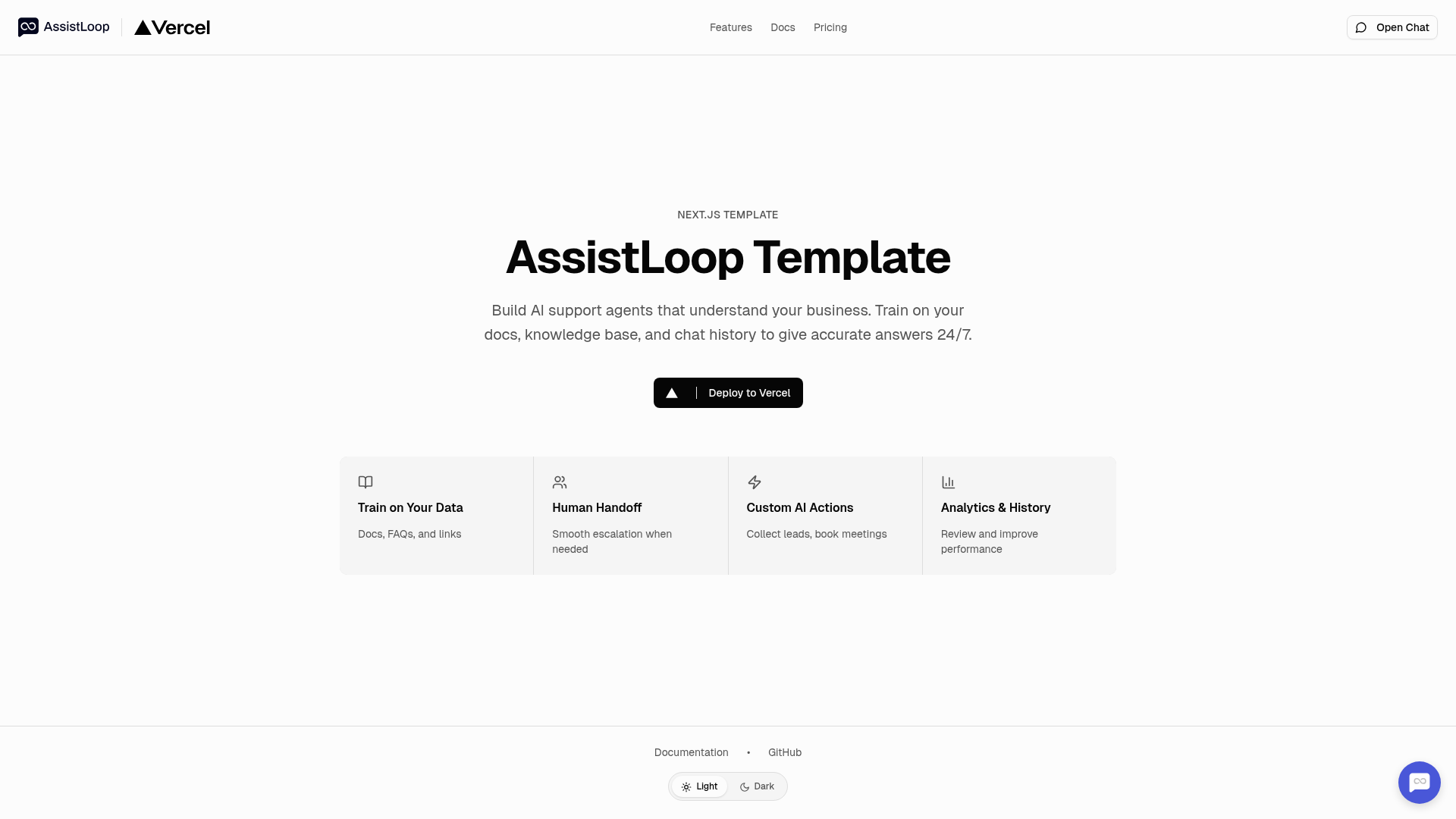
- Train on Your Data — Upload documentation, FAQs, and knowledge-base articles; crawl website content; or import past chat history to shape the agent's answers.
- Human Handoff — Escalate conversations to live agents when the AI cannot resolve a request.
- Custom AI Actions — Configure the agent to collect leads, book meetings, and automate follow-up tasks.
- Analytics & History — Review past conversations and track support performance from the AssistLoop dashboard.
- Brand Customization — Adjust the chat widget's appearance to match your site's branding.
- Multiple AI Models — Choose among different LLM providers when configuring your agent.
- Single-Variable Setup — Only one environment variable (
NEXT_PUBLIC_ASSISTLOOP_AGENT_ID) is required to connect the front end to your agent. - One-Click Vercel Deploy — The repository includes a "Deploy with Vercel" button that clones the repo and prompts for the Agent ID and AssistLoop integration.
The tech stack is Next.js 15 with pnpm as the package manager, and the source is MIT-licensed.
Who is it for?
The template is best suited for developers and teams that want a working AI support experience without building the chat integration from scratch.
- SaaS founders — Stand up an AI support channel in minutes by cloning the template and plugging in a trained AssistLoop agent.
- Next.js developers — Use the template as a reference implementation for wiring an AI agent into a React app, including environment-variable handling and Vercel deployment.
- Support teams — Add a self-service chatbot that can escalate to human agents and take actions like booking meetings.
What can you do with the Next.js AssistLoop Template?
Use the template to launch real customer-support automation without writing a custom integration.
- Startups launching early support: Deploy a branded chat widget before writing a full support backend, using the template's pre-built integration and one-click deploy.
- Content-heavy product teams: Train the agent on website content and FAQs so it answers common questions from your docs automatically.
- Growth teams: Use custom actions to collect leads or schedule meetings directly inside the chat conversation, without building those flows from scratch.
How does the Next.js AssistLoop Template work?
Setup follows four steps.
- Create an AssistLoop account at assistloop.ai and set up an AI agent.
- Copy the Agent ID from the dashboard under Settings > Integration.
- Set the
NEXT_PUBLIC_ASSISTLOOP_AGENT_IDenvironment variable locally (viavercel env pull .env.localor a manual.env.localfile) or provide it during the Vercel deploy. - Train the agent by uploading docs, crawling your site, or importing chat history; then run
pnpm installandpnpm devto start developing.
FAQ
Here are answers to common setup questions.
What environment variables does the template need?
The template requires exactly one environment variable: NEXT_PUBLIC_ASSISTLOOP_AGENT_ID, which holds the Agent ID from your AssistLoop dashboard. It is public-facing because it is used in the browser to connect to the AssistLoop chat widget.
Is the Next.js AssistLoop Template free?
The template source code is MIT-licensed, so it is free to use and modify. AssistLoop itself has paid plans; see the pricing page at assistloop.ai/pricing for current tiers. The template repo includes no built-in payment or licensing restrictions.
How do I deploy the template?
You can deploy with the provided Vercel button, which clones the repository and guides you through setting the environment variable and connecting the AssistLoop integration. Alternatively, push the repo to Vercel and set NEXT_PUBLIC_ASSISTLOOP_AGENT_ID in your project settings.
Can I use this template with other AI providers?
The template is specifically pre-configured for AssistLoop. AssistLoop supports multiple AI models behind the scenes, but the chat widget integration itself is tied to your AssistLoop agent; replacing it with another AI vendor would require changing the front-end integration code.