Template details
AI SDK Computer Use Demo
Open-source AI agent demonstrating Claude Sonnet 4.5 computer use with Next.js, Vercel Sandboxes, and the AI SDK.
About this template
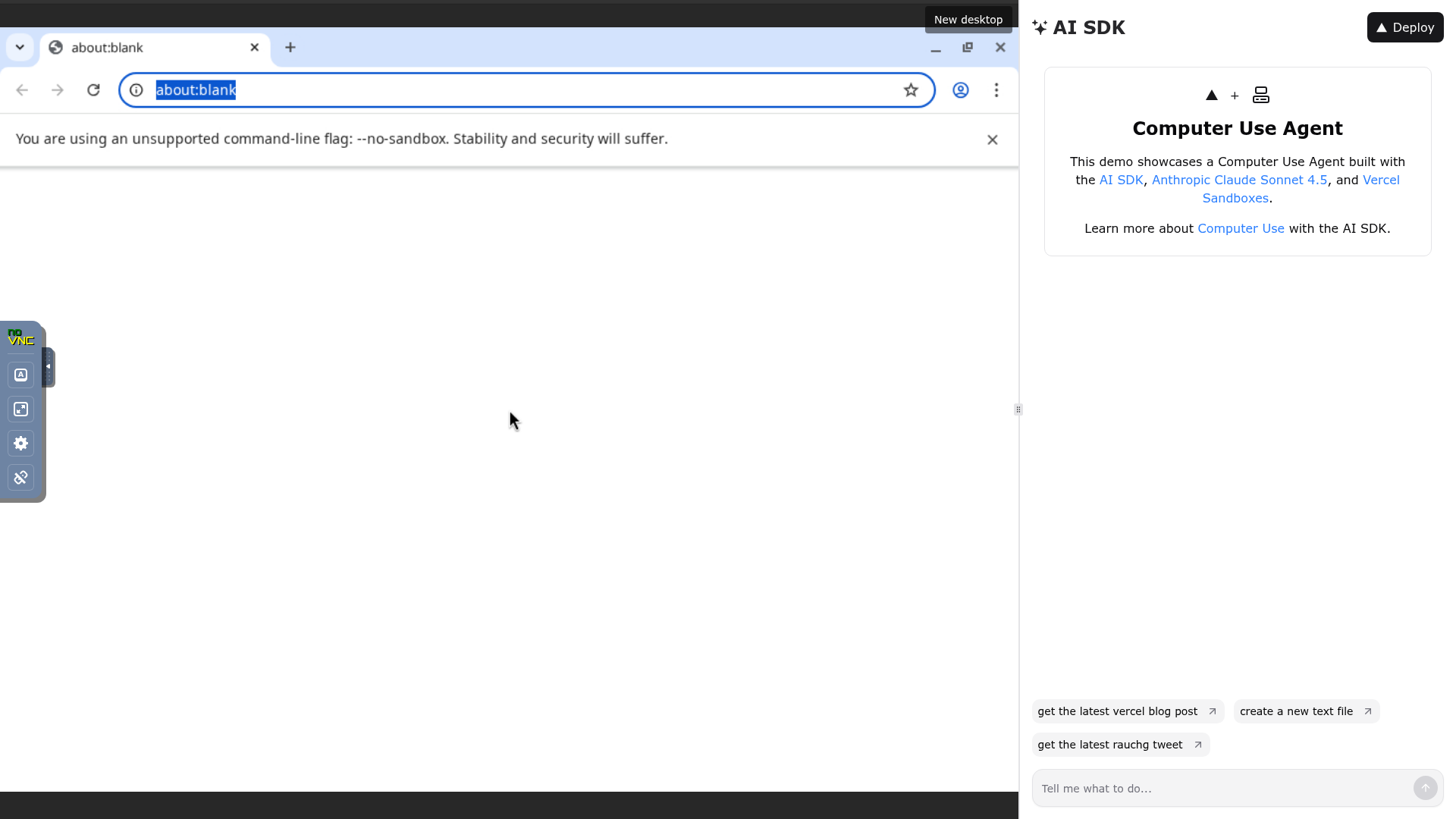
AI SDK Computer Use Demo is an open-source reference app from Vercel Labs that pairs the AI SDK with Anthropic Claude Sonnet 4.5 to create a chatbot that can control a real Linux desktop inside a Vercel Sandbox. It takes natural-language chat messages as input and returns streaming text responses while Claude uses a computer tool and a bash tool to perform actions such as clicking, typing, scrolling, and running shell commands in the remote environment.
What is the AI SDK Computer Use Demo?
This template is a full-stack Next.js application built with the App Router, Tailwind CSS, and shadcn/ui. It runs on Vercel and uses a pre-built Sandbox snapshot containing Xvnc, openbox, noVNC, websockify, Google Chrome, xdotool, and ImageMagick, so the model can see and interact with a desktop streamed to the browser. The project is publicly available on GitHub under the vercel-labs organization.
Key Features
- Streaming chat responses — Powered by the AI SDK, messages stream text to the browser as Claude generates them.
- Claude Sonnet 4.5 computer use — The model uses a computer tool for screenshot, click, type, and scroll actions, plus a bash tool for arbitrary shell commands inside the sandbox.
- Vercel Sandbox remote desktop — Sandboxes boot from a snapshot with Chrome, a window manager, and VNC pre-installed, ready in seconds.
- Live noVNC viewer — The desktop is streamed to the UI through noVNC over WebSocket and displayed in a resizable iframe beside the chat.
- Modern UI stack — Built with Next.js App Router, Tailwind CSS, and shadcn/ui components for a responsive interface.
- One-click deploy — The repository includes a Vercel deploy button that pre-configures the required environment variables.
Who is it for?
- AI developers — want a working reference for building computer-using agents with the AI SDK, including the full tool-calling loop and sandbox integration.
- Agent product teams — need a starting point to prototype browser automation or desktop automation features using natural language.
- Vercel customers — want to learn how to use Vercel Sandboxes and the Vercel CLI to provision temporary virtual environments from code.
What can you do with it?
- Prototype a computer-using assistant: send a message like 'open a website and take a screenshot' and watch Claude operate Chrome in the sandbox.
- Test bash automation in an isolated VM: use the bash tool to install packages, edit files, or run commands without affecting your local machine.
- Build a custom agent UI: reuse the shadcn/ui chat interface and AI SDK data stream to build your own agent front end on a different model or toolset.
How does it work?
When a user sends a message, the Next.js chat UI streams the prompt to Claude Sonnet 4.5 through the AI SDK. Claude calls the computer tool to take screenshots, move the mouse, type, and scroll, and the bash tool to run shell commands inside the Vercel Sandbox. The sandbox's Xvnc display is captured and forwarded through websockify to noVNC, which renders the desktop in a resizable iframe in the browser.
FAQ
Is the AI SDK Computer Use Demo free?
The template is open-source and free to use, but running it requires a Vercel account for Sandbox access and an Anthropic API key, both of which are paid services beyond any free tier.
What do I need to run it locally?
Node.js 18 or later, the Vercel CLI, a Vercel account, and an Anthropic API key. After installing dependencies with pnpm, you create a Sandbox snapshot using npx tsx lib/sandbox/create-snapshot.ts, which takes about 10 minutes, then set the ANTHROPIC_API_KEY and SANDBOX_SNAPSHOT_ID variables.
Does it work without Vercel?
No. The remote desktop environment is a Vercel Sandbox, and authentication relies on either a VERCEL_OIDC_TOKEN generated by the Vercel CLI or a VERCEL_TOKEN, VERCEL_TEAM_ID, and VERCEL_PROJECT_ID set manually.