Template details
Vectr
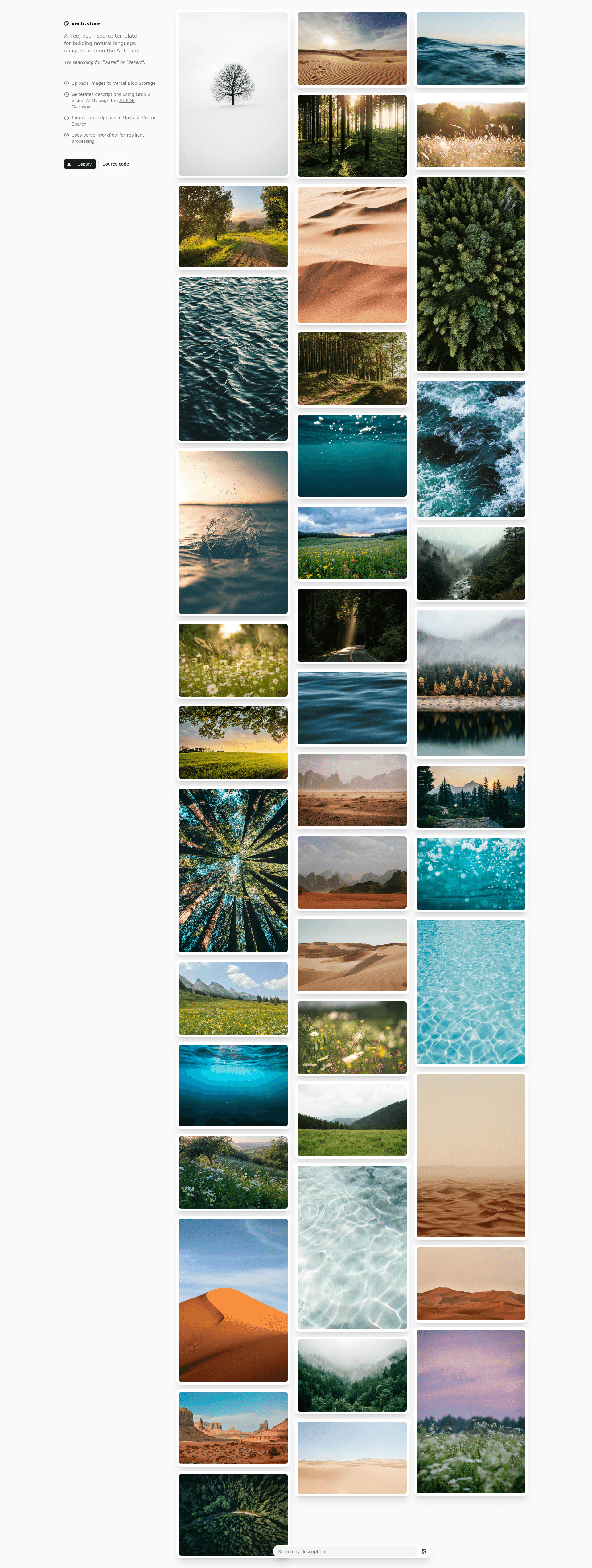
A free, open-source template for building natural language image search on the AI Cloud.
About this template
Vectr is an open-source Next.js template for building natural language image search on the AI Cloud: it automatically generates a description for every uploaded image using Grok 2 Vision and indexes both description and metadata in Upstash Vector Search so users can find images by describing what they remember.
What is Vectr?
Vectr is a free, MIT-licensed starter template created by Vercel that demonstrates a full AI-powered image search pipeline. It takes an image upload as input and produces a searchable index of AI-generated descriptions plus storage metadata, surfaced through a semantic search interface. The template runs on Next.js 15 with the App Router and React 19, and its deployment path is built around Vercel's AI Cloud services: Vercel Blob Storage for images, Upstash Vector Search for indexing, Vercel Workflow for orchestration, and the Vercel AI SDK to call Grok 2 Vision.
Key Features
- Drag-and-drop uploads — Users upload images through a UI built with shadcn/ui and Tailwind CSS 4; files are stored in Vercel Blob Storage.
- AI-generated descriptions — The template calls Grok 2 Vision (via xAI, using an XAI_API_KEY) to produce a natural language description of each image.
- Semantic search with metadata — Upstash Vector Search indexes the description along with blob metadata (URL, size, contentType), and the search returns results with that metadata attached.
- Resilient workflow processing — Vercel Workflow runs three isolated steps (upload, describe, index) on separate serverless functions, with automatic retries: up to 3 attempts for upload (1-minute delays), and up to 5 attempts for description and indexing (1- to 5-minute delays for rate limits).
- Explicit error handling — The code distinguishes RetryableError from FatalError, returning HTTP 400 for fatal input errors and 500 for retryable failures, with attempt counts and timestamps tracked per step.
- No database required — All state lives in Upstash Vector Search and Vercel Blob, so the template needs no separate SQL/NoSQL database.
- Type safety and validation — The codebase is written in TypeScript with Zod schema validation for inputs and environment configuration.
- Observability logging — Logs are tagged with [WORKFLOW], [stepId], and [API] prefixes and include timestamps, attempt counts, and duration metrics.
Who is it for?
This template targets developers who want a working reference for combining AI vision with vector search on Vercel. It suits Next.js developers learning how to structure multi-step serverless workflows with retries, teams prototyping a photo or asset search product that needs natural language queries, and open-source contributors looking for a small, readable codebase (roughly five route/step files under app/api/upload/ and a few components).
What can you do with Vectr?
- Photo library search: Upload personal or stock photos and later find them by typing a natural language query such as "sunset over the ocean."
- Asset management prototype: Use the stored metadata (file size, content type, URL) to build a searchable media pipeline without standing up a database.
- AI Cloud reference architecture: Study how Vercel Workflow, Vercel Blob, Upstash, and the Vercel AI SDK fit together in a production-style template, then adapt the pattern to other AI indexing tasks.
How does Vectr work?
When a user uploads a file, the Next.js app sends FormData to POST /api/upload, which starts a Vercel Workflow. Step 1 uploads the image to Vercel Blob Storage and returns a URL plus metadata; Step 2 sends the blob URL to Grok 2 Vision through the Vercel AI SDK to generate a description; Step 3 indexes both the description and the blob metadata in Upstash Vector Search. The UI then runs server actions against Upstash to perform semantic queries and render matching images with their metadata.
FAQ
Is Vectr free?
Yes — the template itself is MIT-licensed and open source. The dependent services (Upstash Vector Search and Vercel Blob Storage) each offer a generous free tier, and the template is designed to stay within those tiers for small demo workloads. When you deploy through the Vercel marketplace, those services are provisioned automatically.
What AI model does Vectr use for image descriptions?
Vectr uses Grok 2 Vision from xAI, called through the Vercel AI SDK. You must provide an XAI_API_KEY in your environment variables either locally or on Vercel.
Does Vectr require a database?
No. All indexed data is stored as vectors plus metadata in Upstash Vector Search, and the image files themselves live in Vercel Blob Storage. There is no SQL or NoSQL database in the stack.
What do I need for local development?
You need Node.js 18 or newer, pnpm, and four environment variables: UPSTASH_SEARCH_URL and UPSTASH_SEARCH_TOKEN from Upstash, VERCEL_OIDC_TOKEN plus BLOB_STORE_ID for Vercel Blob (auto-injected on Vercel via vercel env pull), and XAI_API_KEY for Grok Vision. The README provides a sample .env.local template.
What happens when a service is rate-limited?
Each workflow step handles rate limiting with retryable errors and delayed retries: the upload step retries up to 3 times with 1-minute delays, while the description and indexing steps retry up to 5 times with 1- to 5-minute delays depending on the step. Quota-exceeded uploads and invalid files are treated as fatal errors that stop the workflow.