Template details
Realtime AI Chat with AI Elements
A realtime, multiplayer AI chat example built with Liveblocks Feeds, Next.js, and AI Elements, with presence and server-streamed AI replies.
About this template
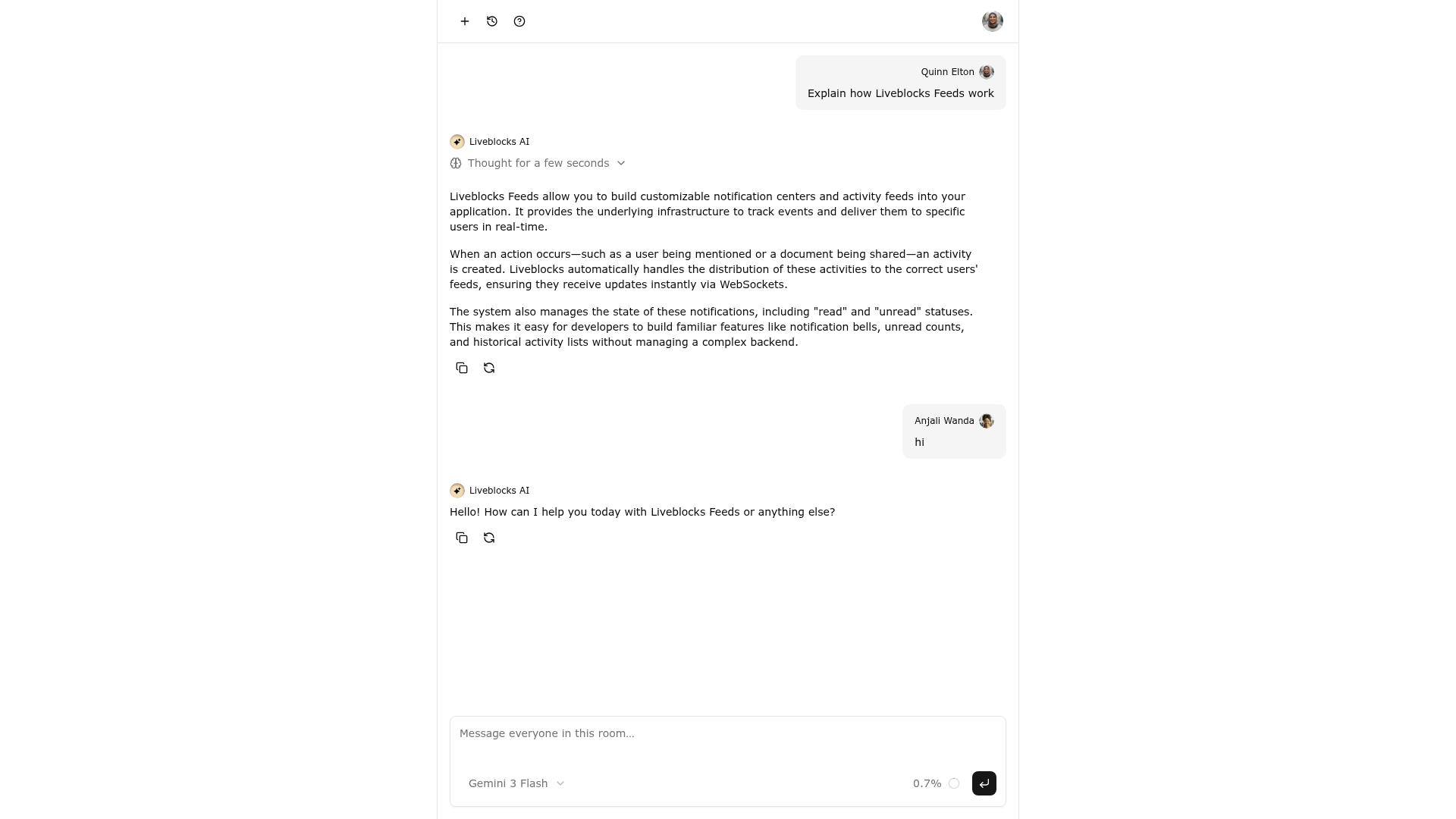
Realtime AI chat with AI Elements is a Liveblocks starter example that combines Liveblocks Feeds, Next.js, and the AI Elements library from ai-sdk.dev to build a multiplayer AI chat where messages and AI replies sync instantly across clients.
What is Realtime AI chat with AI Elements?
Realtime AI chat with AI Elements is a starter example from Liveblocks that runs on Next.js and uses Liveblocks Feeds for the chat backend. Each chat is a feed inside a Liveblocks room, and the app takes a user message as input and produces a server-generated AI reply that is streamed back into the same feed with @liveblocks/node, using createFeedMessage and updateFeedMessage. It is maintained by Liveblocks and is part of the liveblocks/liveblocks GitHub repository, with a live preview, CodeSandbox fork, and Vercel deployment flow documented on the page.
What makes it stand out?
- Feed-based chat architecture — Each chat is a feed inside a Liveblocks room, so messages sync immediately to every connected client without extra state management.
- Shared presence — The room shows an avatar stack and a live "AI is thinking…" status so all users see who is present and when the assistant is working.
- Server-side AI streaming — AI replies are generated on the server and streamed into the feed with
@liveblocks/node, then rendered live through theuseFeedMessageshook. - AI Elements rendering — The UI uses AI Elements from ai-sdk.dev to display reasoning, chain of thought, tool calls, sources, and token usage in the chat.
- One-command setup —
npx create-liveblocks-app@latest --example nextjs-ai-elements-realtime --api-keydownloads the example and can open your browser to fetch an API key. - Optional AI gateway — Set
AI_GATEWAY_API_KEYfrom Vercel AI Gateway for real model responses; without it, a built-in mock assistant keeps the example running end to end. - Realtime verification — Open http://localhost:3000 in two browser tabs and a message sent in one tab appears instantly in the other with the AI reply.
- Multiple deployment paths — The same create-liveblocks-app command supports a
--vercelflag, and a CodeSandbox template is available for browser-based development.
Who should use it?
- Next.js developers — Get a working realtime chat app with presence and streaming AI replies without wiring WebSocket or CRDT infrastructure yourself.
- AI product teams — Prototype how an LLM response with reasoning, tool calls, and sources renders in a collaborative UI before building a production backend.
- Liveblocks users — Use the example as a reference for integrating Feeds, presence, and AI Elements with the
@liveblocks/nodeAPI.
What can you do with it?
- Indie developers: Run the one-line create-liveblocks-app command and start a local chat where two tabs share messages, presence, and AI responses.
- Prototyping teams: Test the complete multiplayer AI-collaboration flow with the mock assistant, then swap in a Vercel AI Gateway key for real model output.
- Deployment-focused builders: Move from local setup to Vercel with the
--vercelflag, or fork the CodeSandbox and addLIVEBLOCKS_SECRET_KEYas a secret.
How does it work?
- Run
npx create-liveblocks-app@latest --example nextjs-ai-elements-realtime --api-key; the command downloads the app and can open your browser to automatically get an API key from your liveblocks.io account. - Add the secret key as
LIVEBLOCKS_SECRET_KEYin.env.local, and optionally setAI_GATEWAY_API_KEYfrom Vercel AI Gateway. - Run
npm run devand open http://localhost:3000 in two browser tabs. Sending a message in one tab instantly updates the other, complete with presence and the streamed AI reply.
FAQ
Does the example require a model API key?
No. Without AI_GATEWAY_API_KEY the example uses a built-in mock assistant, so the full flow runs end to end. Adding a key from Vercel AI Gateway switches it to real model responses.
What is AI Elements?
AI Elements is a UI library from ai-sdk.dev that renders AI-generated data. In this example it displays the assistant's reasoning, chain of thought, tool calls, sources, and token usage alongside the chat feed.
Can I deploy this to Vercel?
Yes. Run npx create-liveblocks-app@latest --example nextjs-ai-elements-realtime --vercel to download the example and set up a Vercel deployment. The command asks permission to open your browser to authorize the deployment.
How do I verify realtime sync locally?
Run npm run dev and open http://localhost:3000 in two browser tabs. Send a message from one tab and it appears instantly in the other, along with the avatar stack and the live "AI is thinking…" status.