Template details
NextJS Discord Bot Boilerplate
A free Next.js template for building and deploying Discord slash-command bots as a serverless REST API.
About this template
The NextJS Discord Bot Boilerplate is an open-source template that turns a Next.js application into a fully functional Discord slash-command bot, handling command registration and interaction responses through a serverless REST API.
What is the NextJS Discord Bot Boilerplate?
It is a Next.js project that abstracts the setup work of creating a Discord bot so developers can focus on writing commands. You provide Discord application credentials and a registration key, then deploy the project to Vercel; the template exposes an interaction endpoint that receives Discord webhooks and routes them to your commands. Built on Next.js and Discord.js, it runs serverless and requires no dedicated backend.
Key Features
- Easy Command Building — a starter command file at
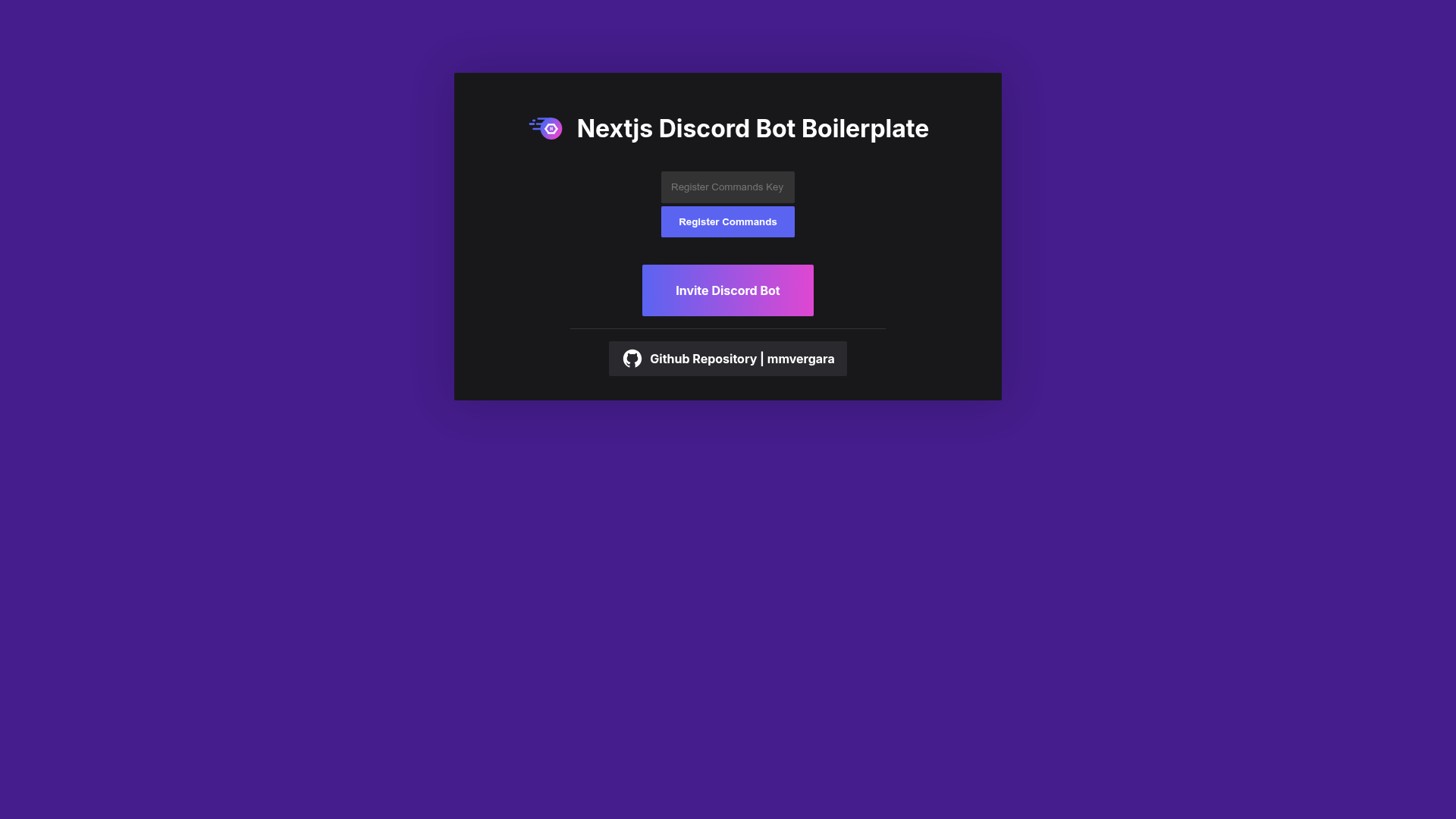
./commands/tutorialhere.tsshows the exact structure for defining new slash commands. - Easy Command Registration — after deployment, visiting your site and submitting the
REGISTER_COMMANDS_KEYregisters commands with Discord automatically. - Easy Deployment — because it is a Next.js app, it can be deployed to Vercel for free, with serverless functions handling the bot logic.
- Interaction Endpoint — the template provides an API route at
/api/discord-bot/interactionsthat you paste into Discord's 'INTERACTIONS ENDPOINT URL' field. - Environment Variable Configuration — uses
NEXT_PUBLIC_APPLICATION_ID,PUBLIC_KEY,BOT_TOKEN, and a customREGISTER_COMMANDS_KEYto secure command registration. - Hosted Invite Link — the deployment website includes an 'Invite Discord Bot' button with the required permissions pre-filled.
Who is it for?
- Discord bot developers who want to skip boilerplate setup and jump straight to writing slash commands.
- Next.js developers who prefer to build bots with the same framework they use for web apps.
- Hackathon teams who need a working Discord bot quickly, deployable to Vercel's free tier.
- Server operators who want a custom bot without managing a separate bot host or always-on process.
Use Cases
- Community mods: build custom moderation commands by editing the command template and redeploying to Vercel.
- Utility bots: create commands that fetch data or trigger webhooks, with everything served through a serverless API.
- Learning projects: study how Discord slash commands and Next.js API routes interact, using the template as a reference.
How does it work?
- Clone the repository and fill in the environment variables from Discord's Developer Application page.
- Add your commands in
./commands/tutorialhere.ts. - Deploy the Next.js project to Vercel.
- Copy the deployment URL and add it to Discord's 'INTERACTIONS ENDPOINT URL' in the Developer Application.
- Open your deployment website, submit your
REGISTER_COMMANDS_KEYto register commands, then invite the bot.
Pricing
The template is free to use and deploy. Vercel offers a free tier that is sufficient for running the serverless bot endpoints.
FAQ
Is the NextJS Discord Bot Boilerplate free?
Yes, the template itself is free, and it is designed to deploy on Vercel's free tier. You only need a Discord application, which is also free to create.
What environment variables are required?
You need NEXT_PUBLIC_APPLICATION_ID, PUBLIC_KEY, and BOT_TOKEN from your Discord application, plus a custom REGISTER_COMMANDS_KEY that protects the command registration endpoint on your site.
How do I register slash commands?
After deploying, open your deployment website, enter the REGISTER_COMMANDS_KEY you set, and submit the form. The template calls Discord's application-command API to register all commands defined in the commands folder.
Do I need to host a separate server?
No. Since the bot logic runs as Next.js API routes, it runs serverless. You only need the Next.js deployment, not a VPS or always-on Node process.