Template details
Next.js Toolbox Template
Netlify reference template for adding Forms, Functions, and Redirects to Next.js apps.
About this template
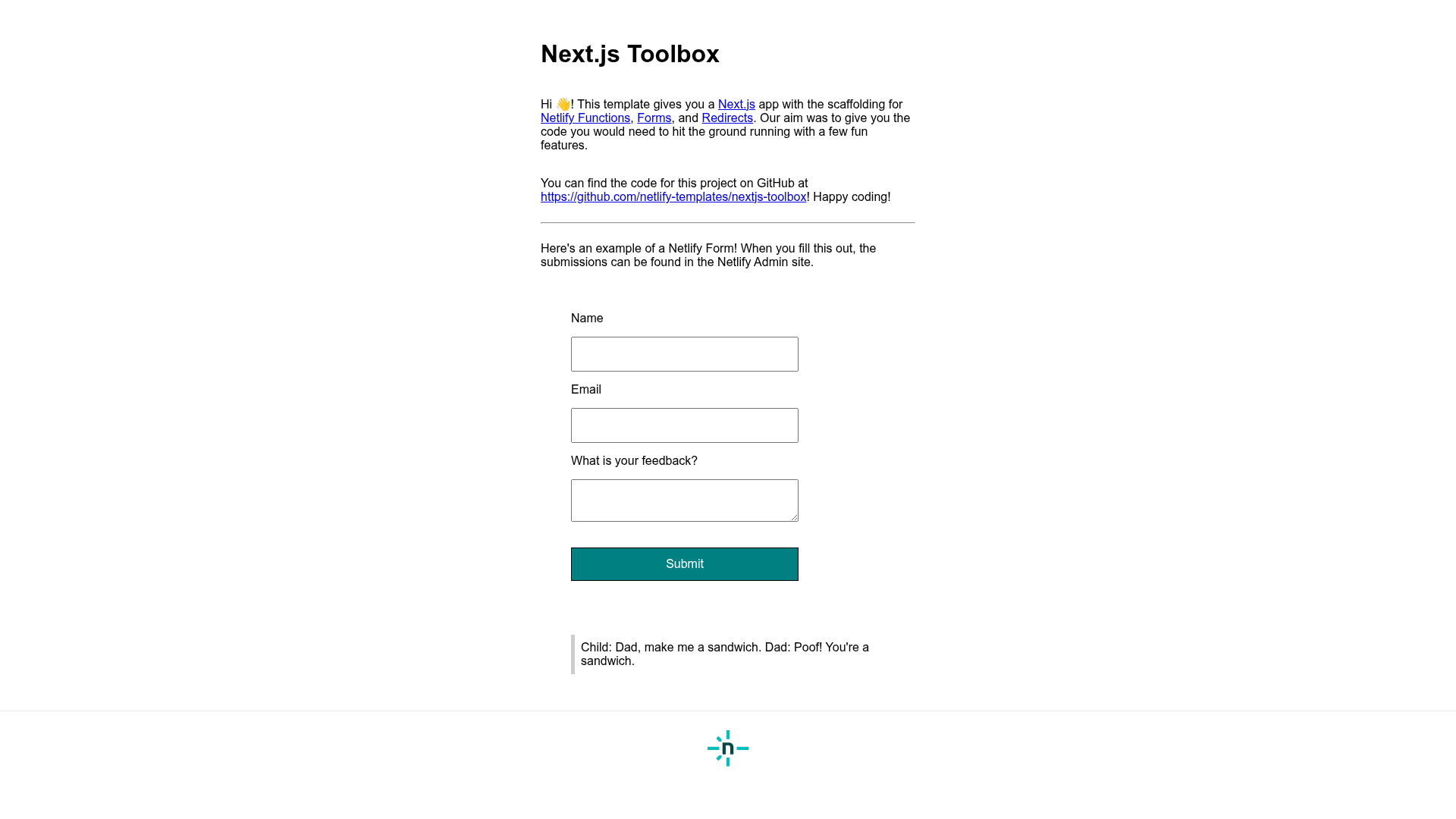
The Next.js Toolbox Template is a Netlify-authored boilerplate for Next.js v14 that shows how to integrate Netlify Forms, Netlify Functions, and Redirect rules into a real application. Built from create-next-app, it gives you a working feedback form, a serverless joke function, and a netlify.toml that you can copy into your own projects.
What is the Next.js Toolbox Template?
The Next.js Toolbox Template is a starter project maintained by Netlify under the netlify-templates GitHub organization. It takes a standard Next.js v14 application and adds concrete examples of Netlify's platform features: a form that posts to Netlify Forms, a JavaScript function served from netlify/functions, and redirect rules configured in netlify.toml. The template is designed as a reference so developers can see exactly how these integrations work together and lift the patterns into their own code.
Key Features
- Netlify Forms feedback form — the FeedbackForm component uses data-netlify="true", a hidden form-name input, and action="/success" so submissions arrive in the Netlify dashboard under a form named "feedback".
- Custom success page — pages/success.js renders a branded thank-you page after submission instead of Netlify's default response page.
- Honeypot spam filtering — the form includes a visually hidden bot-field input and data-netlify-honeypot="bot-field" to block automated bot submissions.
- Netlify Functions example — netlify/functions/joke.js exports a handler that returns a random joke at /.netlify/functions/joke, using esbuild as the bundler set in netlify.toml.
- API redirect — netlify.toml rewrites all requests from /api/* to /.netlify/functions/:splat with a 200 status and force=true, so functions get a shorter URL.
- One-click deploy — a Deploy to Netlify button clones the template into a fresh repository and sets up continuous deployment immediately.
- Local and live development — netlify dev lets you test functions and redirects locally, and netlify dev --live shares a temporary session URL with collaborators.
- Built-in testing tools — the template ships with Cypress end-to-end tests via netlify-plugin-cypress and Renovate for automated dependency updates, both removable.
Who is it for?
- Next.js developers deploying on Netlify — they can use the template as a runnable reference for wiring up forms, functions, and redirects instead of reading separate documentation pages.
- Web agencies and freelancers — they can scaffold client projects quickly using the template's form handling and function setup, then customize the UI and endpoints.
- Developers learning serverless and JAMstack — they can explore the joke function, the honeypot field, and the redirect syntax to see how Netlify's features map onto a Next.js project.
What can you do with it?
- Add a working contact form: copy the FeedbackForm component and its success page into any Next.js page, enable form detection in the Netlify dashboard, and start receiving submissions.
- Expose a serverless API: drop a new JavaScript file into netlify/functions and call it at /api/your-function after deployment thanks to the preconfigured redirect.
- Spin up a Netlify site from the CLI: run netlify sites:create-template to generate a site from this template without leaving the terminal.
How does the template work?
Clone the repository or click the Deploy to Netlify button to get your own copy. Install dependencies with npm install, then run npm run dev for local development or netlify dev to test functions and redirects against the Netlify environment. When you push to a connected repository, Netlify reads netlify.toml to determine build settings and deploys the resulting site to a live URL.
FAQ
Is the Next.js Toolbox Template free?
Yes, the template is open source under the netlify-templates GitHub organization and can be used for any project. The only cost is whatever Netlify charges for hosting your deployed site, which depends on the plan you choose.
What Netlify features does the template demonstrate?
The template demonstrates three Netlify features: Netlify Forms (a feedback form with a custom success route and honeypot), Netlify Functions (a joke endpoint in netlify/functions), and redirect rules in netlify.toml that map /api paths to functions.
How do I deploy this template to Netlify?
Click the Deploy to Netlify button to create a new repository from the template and start deployment automatically. Alternatively, clone the repository, install the Netlify CLI with npm install netlify-cli -g, and run netlify init to set up continuous deployment.
Does the template include automated testing?
Yes, it includes Cypress end-to-end tests that run during the Netlify build via the netlify-plugin-cypress plugin, and Renovate to keep dependencies up to date. Both can be removed by deleting the plugin configuration, the cypress folder, and the Renovate file.