Template details
Next.js Typerite Boilerplate
Next.js boilerplate of the Typerite template, ported from StyleShout's free blog theme with Markdown posts and site config.
About this template
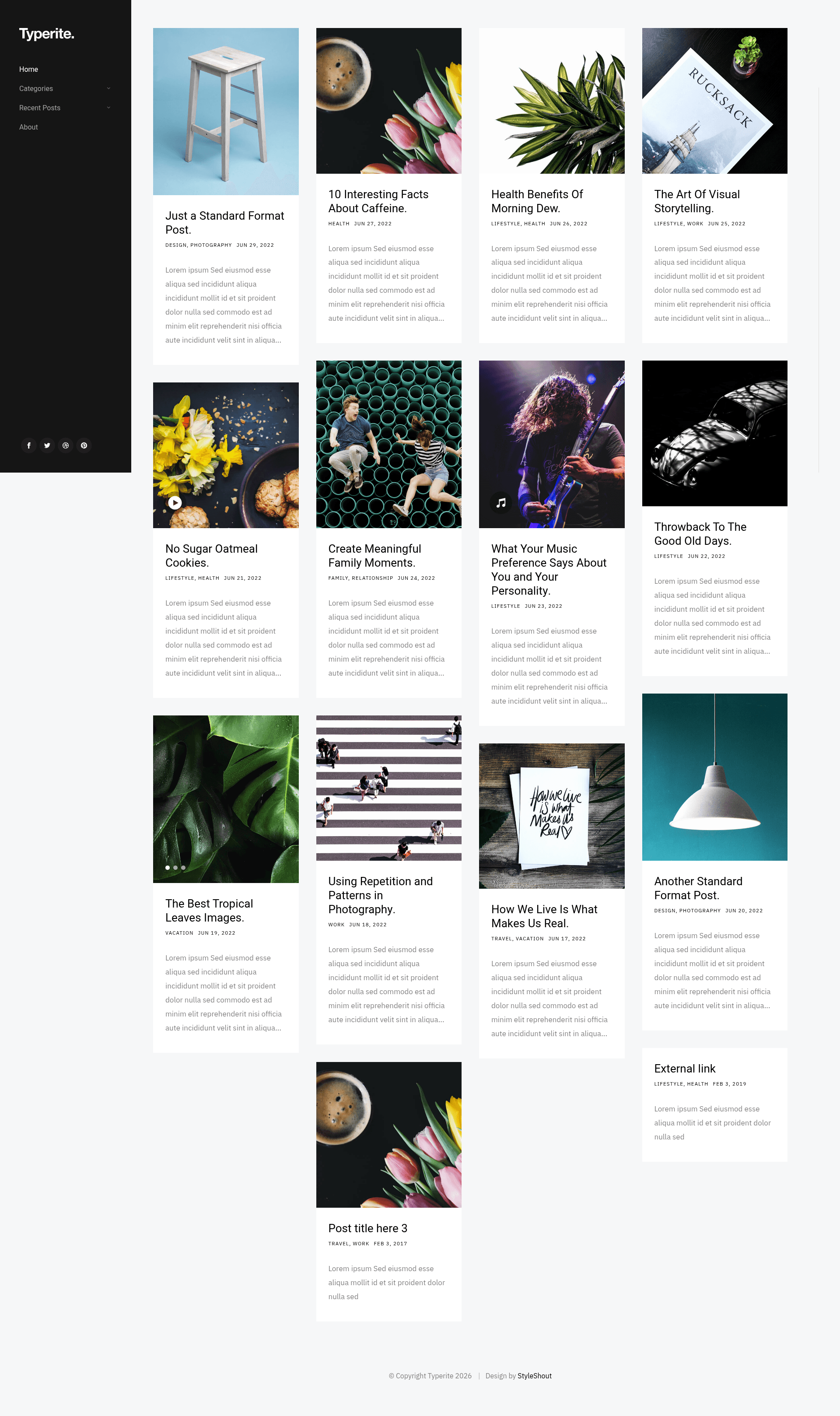
Next.js Typerite Boilerplate is an open-source Next.js boilerplate for building blog websites, ported from the free Typerite theme by StyleShout. It turns Markdown files with front matter into a static blog with listing pages, post detail pages, audio and video embeds, and centralized site configuration, and includes testing and CI workflows.
What is Next.js Typerite Boilerplate?
Next.js Typerite Boilerplate is a starter template that combines the Next.js framework with the Typerite blog design from StyleShout, adapted and maintained by GitHub user curtiscde. It takes Markdown post files with front matter as input and produces a deployable blog site, with a live demo hosted at nextjs-typerite-boilerplate.netlify.app. The project is available under a license file in the repository, and the original Typerite theme is free to use from StyleShout.
Key Features
- Markdown-based posts — Write blog posts as Markdown files; the front matter supports required title, slug, and date fields plus optional description, tags, image, bannerImage, audio, video, and disqusid.
- Flexible media handling — The image and bannerImage fields accept either a single path or an array of paths, enabling image galleries and carousels on post pages.
- Site-wide configuration — A central config file controls the site title, posts per page, navigation links, social links (up to four), Disqus account, and Google Analytics tracking ID.
- Audio and video embeds — The front matter accepts audio and video embed URLs, so posts can display embedded media on listing and detail pages.
- Integrated testing — The repository includes unit test scripts via
npm tand end-to-end tests vianpm run cypress. - CI/CD ready — The README shows GitHub Actions CI, Codecov coverage, and Netlify deployment status badges, indicating automation for checks and deployment.
- Production build — Use
npm run buildto create a production build of the Next.js site, andnpm run devfor local development.
Who is it for?
- Next.js developers who want a pre-built blog structure with Markdown content rather than starting from an empty project.
- Content creators and bloggers who prefer writing in Markdown, with support for images, audio, video, and tags in each post.
- Developers who value automated quality checks — the template includes unit and e2e testing scripts and can integrate with CI services like GitHub Actions and Netlify.
What can you do with Next.js Typerite Boilerplate?
- Launch a personal or project blog: create Markdown posts with tags and media, configure the site title and pagination, and deploy the generated static site to Netlify or another host.
- Add comments and analytics: set the Disqus account in the site configuration and include a disqusid per post to enable comments; add a Google Analytics ID for traffic tracking.
- Customize navigation and social links: define the header navigation links and up to four social links directly from the configuration file without touching component code.
How does the template work?
To start, clone the repository, install dependencies, and run npm run dev for local development. Write posts as Markdown files with the documented front matter, then use npm run build to produce a production build. The project also supports unit testing with npm t and end-to-end testing with npm run cypress.
FAQ
Is Next.js Typerite Boilerplate free?
Yes, the repository is open source and includes a LICENSE file. It is a port of the free Typerite theme from StyleShout, so there are no licensing fees for using the template itself.
What front matter fields are required for a post?
Only title, slug, and date are required in a post's front matter. All other fields — description, tags, image, bannerImage, audio, video, and disqusid — are optional, which keeps media handling flexible.
Can I use audio and video in posts?
Yes, the front matter includes audio and video fields that accept embed URLs, and these are displayed on the post page (and for video, also on the post list). You can link to any hosted media with an embeddable URL.
How does the template handle post images?
The image and bannerImage fields accept either a single path like /images/foo.png or an array of paths, allowing you to display one thumbnail or multiple images in a carousel-style gallery on the post page.
Does the site support comments?
Yes, if you configure the Disqus account username in the main site configuration and add a disqusid to a post, the template will display Disqus comments on that post page.