Template details
Niello
Niello is a dark Hugo blog theme built with TailwindCSS, with multilingual support, search, AdSense, GA4, and Disqus integrations.
About this template
Niello is a dark-themed Hugo blog theme built with TailwindCSS that ships with multilingual support, built-in search, and built-in monetization hooks for AdSense and GA4.
What is Niello?
Niello is an open-source Hugo theme created by guangmean that renders content sites with a dark, high-contrast design. It takes a standard Hugo site structure — content folders, front matter, and a hugo.toml configuration file — and produces a responsive static site with built-in search, multilingual navigation, and ad-slot support. The theme is distributed via GitHub and installed with a simple git clone command.
Key Features
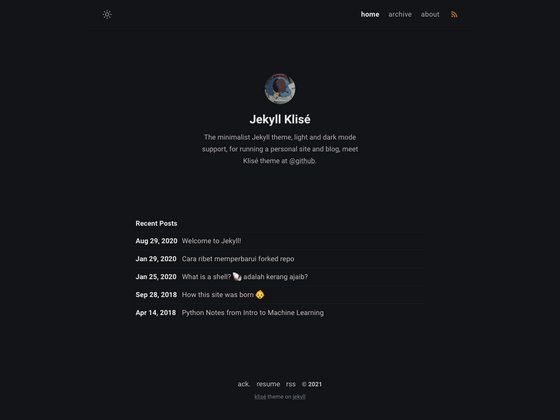
- Dark theme — A dark color scheme that reduces glare and keeps code and long-form content readable; the screenshot on the GitHub page shows a black background with white text.
- TailwindCSS styling — The theme's styles are written with TailwindCSS, and the source includes npm scripts using @tailwindcss/cli to build app.css.
- Multi-language support (i18n) — Includes English and Chinese language files in the demo, with contentDir and menu configuration for each language, plus rules for overriding translation keys via the site's own i18n folder.
- Built-in search — Search works by generating a JSON output of the home page and using a dedicated search layout; after configuration, the query URL looks like /en/search/?q=keywords.
- Monetization hooks — Google AdSense and Google Analytics 4 support via optional google_ad_client and ga4 parameters in the params block; ShareThis integration is also available for social sharing buttons.
- Syntax highlighting — Code blocks are rendered with syntax highlighting, making the theme suitable for technical tutorials and programming blogs.
- Archives page — An optional archives layout displays posts grouped by date; you enable it by adding an archives.md file with the archives layout in the content root.
- Category filtering — The ignore parameter lets you hide posts belonging to specific categories (such as privacy, terms, archives, or cookie) from the site.
Who is Niello for?
- Hugo bloggers — Users who already maintain a Hugo site can drop Niello into themes/ and change theme = "Niello" in hugo.toml to get a new dark design.
- Technical writers — Developers publishing code-heavy posts benefit from syntax highlighting, built-in search, and automatic image extraction from article content.
- Multilingual content teams — Sites that publish in English and Chinese can use the i18n setup and per-language menus shown in the demo configuration.
- Ad-monetized publishers — Site owners who want to add AdSense and Google Analytics to a Hugo blog can do so by filling in the optional google and analytics parameters.
What can you do with Niello?
- Set up a dark personal blog — Install the theme, set baseURL, and write content in the configured content directory; the responsive layout adapts to mobile screens.
- Add search without a third-party service — Create a search/_index.md file with layout = "search" and enable JSON output, giving visitors a keyword search over your posts.
- Monetize existing traffic — Insert your AdSense publisher ID and GA4 measurement ID in the config to serve ads and track engagement on every page.
- Manage a multilingual publication — Configure the languages block to route English content under content/en and Chinese under content/zh, with separate menus per language.
How does Niello work?
Installation is a git clone command: git clone https://github.com/guangmean/Niello.git themes/Niello. Then configure hugo.toml with the theme name, baseURL, language settings, and optional params. The README also documents how to override translation keys, build TailwindCSS with npm install tailwindcss @tailwindcss/cli and the watch command, and add an example site with hugo server --source themes/Niello/exampleSite --themesDir ../.. --theme Niello.
FAQ
Is Niello free to use?
Yes. The theme is published as an open-source Hugo theme on GitHub, and the README links to a ko-fi page for optional tips, indicating there is no license fee for using Niello on your own site.
How do I enable search in Niello?
Add home = ["HTML", "JSON"] to the [outputs] section of your hugo.toml, then create a search folder with an _index.md file that has layout = "search" in its front matter. The search page will be available at /en/search/?q=keywords (or the equivalent path for your default language).
Does Niello support multiple languages?
Yes. The example configuration defines English and Chinese languages with languageCode, contentDir, and a menu for each. You can override theme translation keys by creating an i18n folder in your site's root and adding keys like sitename and siteslogan.
How do I hide certain posts from Niello?
Set the [params.ignore] categories list in hugo.toml to the front-matter categories you want hidden, for example categories = ["privacy", "terms", "archives", "cookie"]. Posts assigned those categories will not appear on the site.
Does Niello include AdSense and analytics support?
Yes. Assign your AdSense client ID to the google_ad_client parameter and your GA4 measurement ID to the ga4 parameter inside the [params] block. The README says both are optional.