Template details
online-shopping-system-advanced
A PHP and MySQL e-commerce demo site with a customer storefront and an advanced admin dashboard for managing products, users, and orders.
About this template
online-shopping-system-advanced is a free, open-source e-commerce demo project written in PHP with a MySQL database that combines a customer storefront with an advanced admin dashboard for managing products, users, and orders.
What is online-shopping-system-advanced?
online-shopping-system-advanced is a PHP and MySQL e-commerce demo site designed to run locally through XAMPP or WAMPP, providing both a customer-facing shopping interface and a separate admin panel. The project, authored by Puneeth Reddy HC, requires a MySQL database named onlineshop, which is created and imported via phpMyAdmin using the provided onlineshop.sql file. It comes with default admin credentials: email admin@gmail.com or username admin, and password 123456789.
Key Features
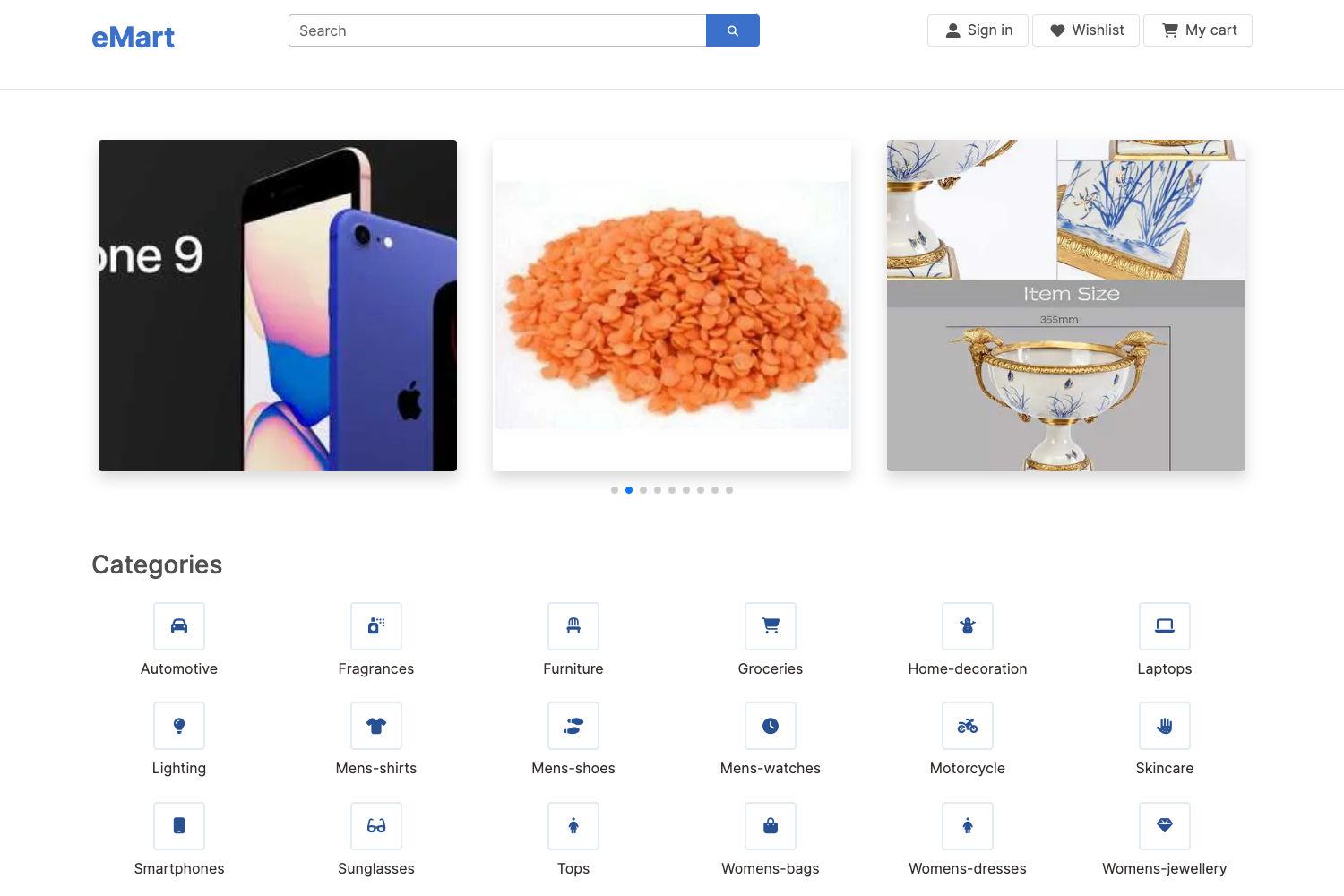
- Customer storefront — Includes a home page, product listing, product detail page with zoom, cart page, and a store page, all served by PHP and styled with HTML and CSS.
- Advanced admin dashboard — Provides admin pages for adding products, viewing product lists, adding users, and managing user accounts through a dedicated admin interface.
- User authentication — Offers login and registration modals on the frontend, with distinct admin login credentials separate from customer accounts.
- Search and filter — Contains a search page and search filter functionality, though the README notes a search bug that is fixed only in the premium version.
- Modular setup — The entire setup runs on XAMPP with Apache and MySQL, using a single SQL import file (onlineshop.sql) to create the database structure.
- Premium upgrade — A paid version adds a wishlist, order listing, product reviews, updated routing, and the search bug fix, as described in the README.
Who is it for?
- Computer science students — Use this as a ready-made DBMS or web technologies project to demonstrate PHP and MySQL skills and to present in academic submissions.
- PHP beginners — Learn how a shopping cart and an admin panel are structured by reading and modifying the working code.
- Hobbyist developers — Quickly spin up a local demo shop with XAMPP to test e-commerce workflows without deploying to a server.
What can you do with online-shopping-system-advanced?
- Students: Import the SQL file, register a customer account, and walk through the complete shopping flow for a database course project.
- Developers: Extend the admin panel with new product fields or user management features using the existing PHP and MySQL patterns.
- Evaluators: Set up the demo in minutes by following the installation steps and log in with the provided admin credentials to inspect the dashboard.
How does online-shopping-system-advanced work?
The README outlines a straightforward setup: install XAMPP, start Apache and MySQL, clone the repository into C:\xampp\htdocs, open phpMyAdmin to create a database named onlineshop, import database/onlineshop.sql, and visit http://localhost/online-shopping-system-with-advanced-admin-page-master. After registering as a customer, you can browse products, add items to the cart, and manage the shop as admin.
Pros and cons
Pros:
- Free and open source on GitHub with a permissive license badge.
- Combines both the customer storefront and an admin panel in one project.
- Local setup is simple with XAMPP and a provided SQL export.
Cons:
- Free version lacks wishlist, order listing, and reviews, which are reserved for the premium version.
- The README acknowledges a search bug that remains unfixed in the free release.
- Not production-ready; it is a demo project intended for local use.
Pricing
The GitHub version of online-shopping-system-advanced is free to download and use. A premium version with additional features such as wishlist, order listings, product reviews, updated routing, and the search fix is available for purchase, though no price is stated in the README.
Alternatives
Other PHP-based e-commerce options include OpenCart, a free open-source shopping cart platform, and WooCommerce, a WordPress e-commerce plugin.
FAQ
How do I install online-shopping-system-advanced?
Install XAMPP and start Apache and MySQL, clone the repository into C:\xampp\htdocs, create a database named onlineshop in phpMyAdmin, and import the onlineshop.sql file from the database folder. Then open http://localhost/online-shopping-system-with-advanced-admin-page-master in your browser.
What are the admin login details?
The default admin account uses email admin@gmail.com or username admin with password 123456789. Customer accounts are created through the registration modal on the storefront.
Is online-shopping-system-advanced free?
Yes, the code on GitHub is free and open source under a standard open-source license. A premium version is offered separately with extra features like wishlist, order listings, and reviews.
Does it use a database?
Yes, the project depends on MySQL. You must create a database called onlineshop and import the provided onlineshop.sql file through phpMyAdmin for the site to function.