Template details
Fur
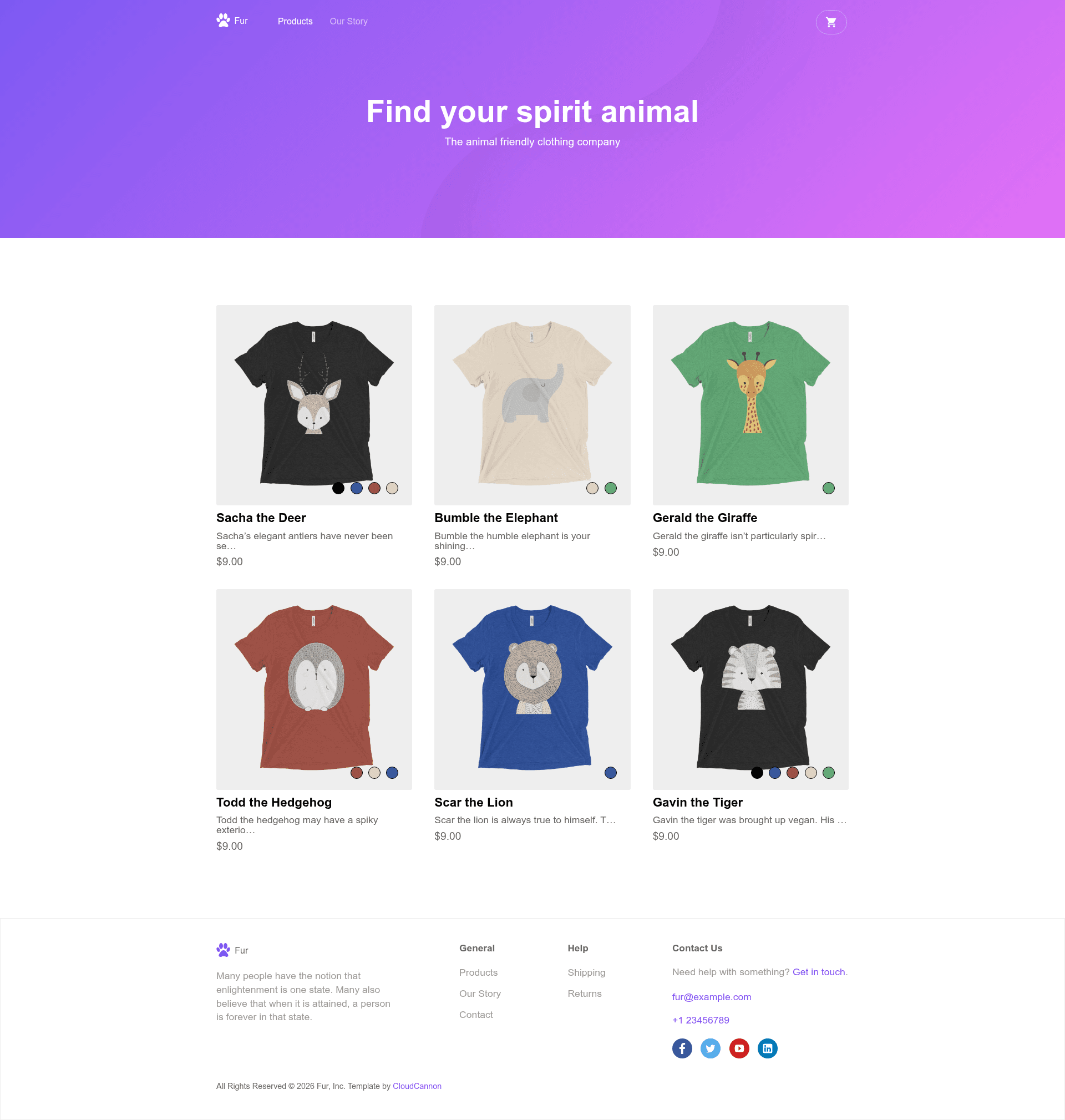
E-commerce template for Jekyll with SnipCart checkout, product variants, contact form, and CloudCannon editing.
About this template
Fur is a Jekyll e-commerce template by CloudCannon that turns product listings into a static storefront with SnipCart-powered checkout. It is designed for merchants who want a lightweight, CMS-friendly store without a heavy platform.
What is Fur?
Fur is an e-commerce template built with Jekyll 4.2.1 by CloudCannon, the Cloud CMS for Jekyll. It takes product information defined in Jekyll data files and generates a static website with a contact form, SEO tags, RSS/Atom feed, and Google Analytics support. Online payments are handled by SnipCart, and the template is optimised for editing directly in CloudCannon, though it also runs locally with Bundler or on any Jekyll host. A live demo is available at turquoise-rook.cloudvent.net.
Key Features
- SnipCart checkout — Accept payments online by adding your SnipCart key to _config.yml; SnipCart manages the cart and payment flow.
- Multi-variant products — List products with multiple colours and sizes so customers can pick options before purchasing.
- Contact form — A built-in contact form lets visitors send inquiries without extra services.
- CloudCannon optimisation — Add, update, and remove products and edit navigation and footer content through CloudCannon's data-file editing interface.
- RSS/Atom feed — Automatically generates a feed for subscribers and content syndication.
- SEO tags — Pre-included meta tags for search engine visibility.
- Google Analytics — Add your Google Analytics key to _config.yml to track site traffic.
- Google Maps — A Google Maps API key can be configured in _config.yml for map display.
Who is it for?
- Small retailers — Set up a store with product variants and SnipCart checkout without backend infrastructure.
- Jekyll developers — Use a familiar static-site workflow with
bundle exec jekyll serveand data-file editing. - Agencies and freelancers — Deploy client sites on CloudCannon so clients can manage their own products and navigation.
- CloudCannon users — Take advantage of the template's CMS-ready structure for hands-off product management.
What can you do with Fur?
- Launch a store — Add your product data, payment key, and analytics, then deploy to any Jekyll host.
- Customise navigation and footer — Edit the navigation and footer data files under the Data section in CloudCannon.
- Collect leads — Use the contact form feature to capture customer questions.
- Publish content — The RSS feed and SEO tags help distribute and index your site's pages.
How does Fur work?
- Clone or fork the Fur repository from GitHub.
- Add your site and author details to _config.yml.
- Enter your Google Analytics, Google Maps API key, and SnipCart key into _config.yml.
- Run
bundle installthenbundle exec jekyll servelocally, or connect your repository to CloudCannon for a hosted editing workflow.
FAQ
Does Fur require CloudCannon to run?
No. Fur is a standard Jekyll template that works locally with Bundler or on any Jekyll-compatible hosting. CloudCannon is an optional CMS layer that provides a visual editing interface for non-technical users.
What payment provider does Fur use?
Fur uses SnipCart for online payments. You add your SnipCart key to _config.yml to enable cart and checkout functionality.
How do I edit the navigation and footer?
Both navigation and footer are exposed as data files. In CloudCannon, you can edit them in the Data section; if you're working locally, modify the corresponding data files in your Jekyll project.
What Jekyll version does Fur support?
Fur was built with Jekyll 4.2.1 and is designed to support newer versions of Jekyll as well.