Template details
OpenManual
A Jekyll theme for publishing open-source software manuals on GitHub Pages with Markdown authoring and PDF-print controls.
About this template
OpenManual is an open-source Jekyll theme for publishing software manuals on GitHub Pages, built around Markdown-authored documentation and PDF-friendly print controls.
What is OpenManual?
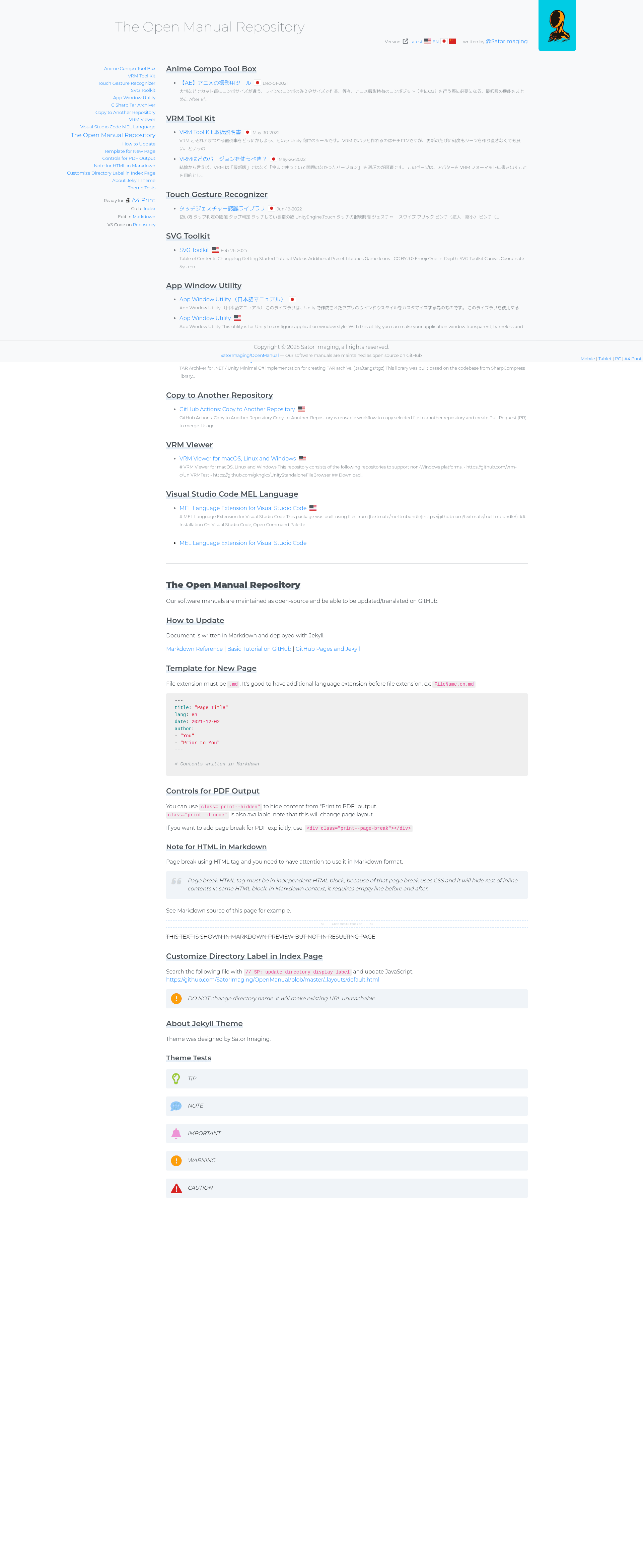
OpenManual is a Jekyll-based repository template for maintaining software manuals as open source on GitHub. It accepts Markdown files with YAML front matter as input and outputs a static documentation website deployed through GitHub Pages, with extra CSS classes that control how pages look when printed or exported to PDF. The theme was designed by Sator Imaging and is available as a public GitHub repository, so anyone can clone it, contribute to it, or reuse it for their own manual project.
Each manual page is a plain Markdown file that starts with YAML front matter containing fields such as title, language code (lang), publication date, and a list of authors. File names may also include a language suffix, for example FileName.en.md, to keep translations grouped together. The repository includes a "Template for New Page" section that shows exactly what front matter fields are expected.
Key Features
- Markdown authoring — Manual pages are written in Markdown with a simple YAML front matter block (title, lang, date, author), so contributors do not need to learn HTML or a custom markup language.
- GitHub Pages deployment — The site is built with Jekyll and can be hosted for free on GitHub Pages; updating the manual is as simple as pushing a commit to the repository.
- Multi-language translations — Language codes are stored both in the front matter and in file names such as FileName.en.md, allowing translated versions to be maintained side by side in the same repository.
- PDF output controls — The theme provides CSS classes for print output: print--hidden hides elements from the printed page, print--d-none also changes layout, and an explicit page break can be inserted using a div element with the class print--page-break.
- Customizable directory labels — The label shown for a directory on the index page can be changed by editing the JavaScript in the _layouts/default.html file, but the documentation warns not to rename the actual directory or existing URLs will break.
- Open-source collaboration — Because the manual repository is public, users can update or translate pages by sending pull requests on GitHub, which is the intended contribution workflow.
Who is it for?
- Software teams that need a simple public manual or user guide and already host their code on GitHub — they can start from this template and replace the sample pages with their own content.
- Documentation maintainers who want to accept community edits and translations through familiar GitHub workflows such as pull requests, issues, and project boards.
- Open-source projects that want to publish product handbooks, API guides, or setup instructions with a clean layout and PDF export for offline reading, without paying for a separate documentation platform.
What can you do with OpenManual?
- Publish product manuals: Write instructions, FAQs, or release notes in Markdown, commit them, and the Jekyll site rebuilds automatically on GitHub Pages.
- Localize documentation: Add translated copies of each page using language codes in the front matter and file names, so users can switch languages without losing the manual structure.
- Create PDF versions for distribution: Use the built-in print classes to remove navigation and web-only content, insert page breaks with a print--page-break div, and then trigger the browser's "Print to PDF" function from the rendered page.
How does OpenManual work?
The repository is a standard Jekyll site. To create a new page, you add a Markdown file with the required YAML front matter and commit it to the repository. GitHub Pages automatically rebuilds the Jekyll site, and the theme applies the layout and styling. For PDF output, the theme's CSS media queries respond to print-specific classes that are placed inside the Markdown content.
FAQ
Is OpenManual free to use?
Yes, OpenManual is open source and published as a public GitHub repository. You can clone it, fork it, and reuse it for your own manuals without paying a license fee.
Can I translate manuals into other languages?
Yes. The front matter includes a lang field, and file names can carry a language suffix such as .en or .ja. This lets you keep multiple translations in one repository and trust the theme to render them as separate pages.
How do I hide a section from the PDF output?
Add the class print--hidden to any HTML element in your Markdown page, and it will be excluded from the printed or PDF view. You can also use print--d-none, but note that this class changes the on-screen page layout as well.
Why should I not rename the docs directory?
The theme's documentation explicitly warns that renaming the directory will make existing URLs unreachable. The index label can be customized via JavaScript, but the directory name must stay the same for all previously published links to keep working.