Template details
opPortfolio
A clean portfolio template made with ReactJS.
About this template
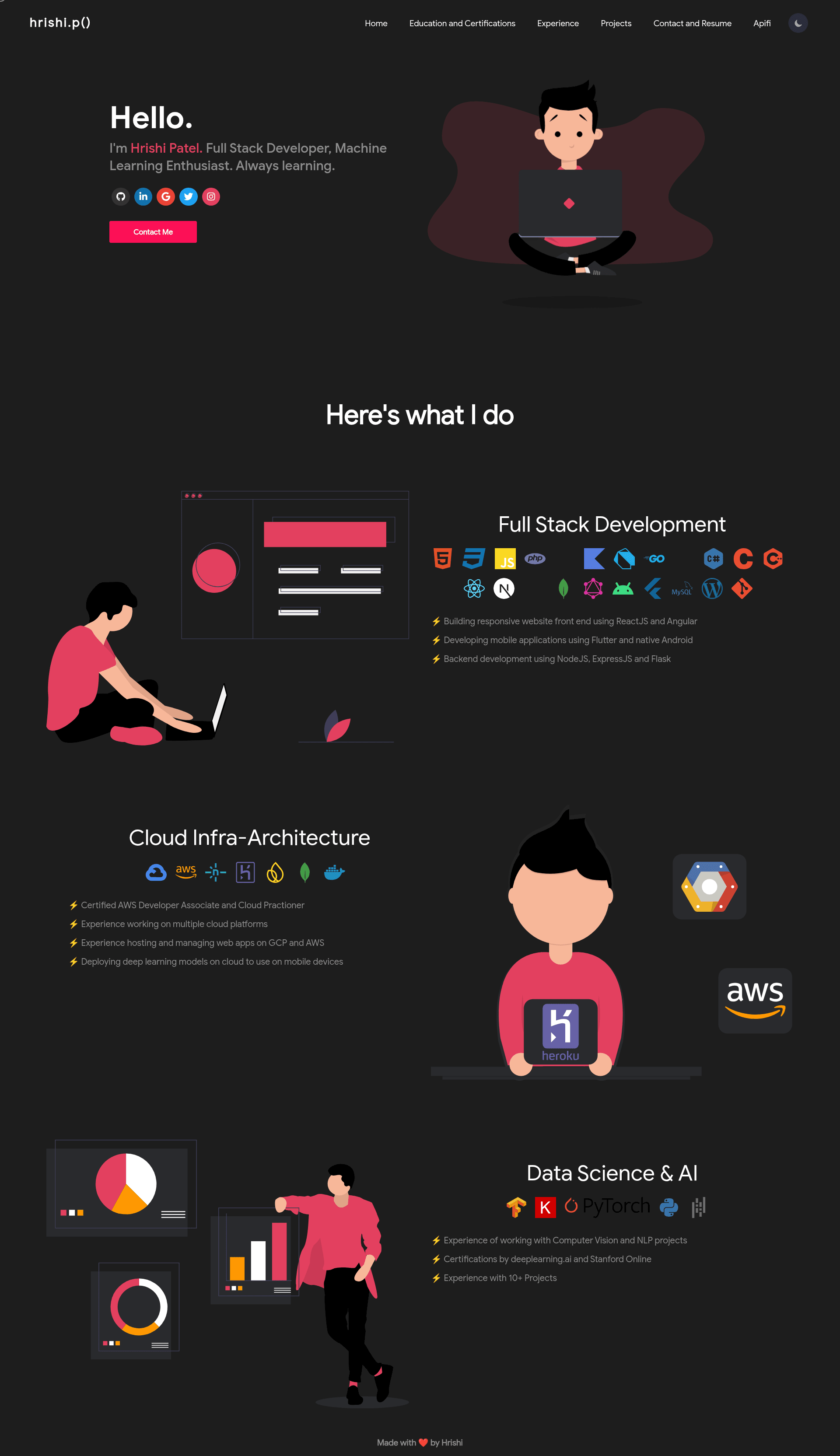
opPortfolio is a clean single-page portfolio template built with ReactJS that turns personal data in one central file into a ready-to-host portfolio site. The template ships with five sections — Home, Education and Certificates, Experience, Projects, and Contact and Resume — and supports deployment to Netlify or GitHub Pages.
What is opPortfolio?
opPortfolio is an open-source React portfolio template created by GitHub user Hrishi1999, originally published as a minimal alternative to its inspirations. It takes personal information defined in src/portfolio.js, applies color and layout styles from src/theme.js, and produces a static portfolio website that runs locally or on any static host. The project is built with Create React App, so it uses React components for each section and can be built into a static site with the standard React build script.
Key Features
- Five ready-made sections — Home, Education and Certificates, Experience, Projects, and Contact and Resume are included as separate React components, so no page routing setup is needed.
- Single-file content editing — All personal details, projects, experience entries, and certificates are stored in
src/portfolio.js, keeping content changes isolated from layout code. - Light/dark theme switch — A theme toggle in the header switches between a light and dark color scheme, with colors defined in
src/theme.js. - GitHub Pages deployment — Run
npm run buildand publish the generated/buildfolder to a GitHub Pages repository. - Netlify-ready — The template is set up for Netlify deployment, and the repository shows a Netlify status badge linked to a live site.
- Illustrations from unDraw — The graphic assets used in the template come from undraw.co, an open-source illustration library.
- Based on proven portfolio templates — opPortfolio's structure is derived from masterPortfolio and developerFolio, both established React portfolio projects.
Who is it for?
- Developers looking for a simple portfolio — clone the repo, edit one data file, and deploy; no backend or database is required.
- Job seekers — present a personal brand with sections for experience, projects, and a downloadable resume via the Contact and Resume section.
- Recent graduates and students — display education history and certificates without building a custom site from scratch.
- Freelancers — use the Contact section to give potential clients a direct way to reach out and view a resume.
What can you do with opPortfolio?
- Showcase your work — fill in the projects array in
src/portfolio.jswith titles, descriptions, and links, and they render in the Projects section. - List credentials — add degrees, certificates, and coursework to the Education and Certificates section, which is separate from the Experience timeline.
- Deploy a personal site quickly — after local testing with
npm start, deploy to Netlify directly or publish the/buildfolder to GitHub Pages. - Experiment with theming — change the colors in
src/theme.jsto match a personal brand, and toggle between light and dark on the live site.
How does opPortfolio work?
The template follows a standard Create React App workflow. Clone or fork the repository, run npm i to install dependencies, then run npm start to launch the development server. Edit src/portfolio.js to replace placeholder data with your own details, and optionally adjust src/theme.js for custom colors. When ready, either connect the repository to Netlify or run npm run build and publish the resulting /build folder to GitHub Pages.
Alternatives
- masterPortfolio — one of the React portfolio templates opPortfolio is based on, offering a similar component-driven structure.
- developerFolio — the other source project opPortfolio references, also a React-based developer portfolio template.
FAQ
How do I customize the content in opPortfolio?
Open src/portfolio.js and replace the placeholder objects with your own name, bio, projects, experience, and education details. The file is the single source of truth for the text displayed across all five sections. After saving, the development server picks up the changes automatically.
Is opPortfolio free to use?
Yes, opPortfolio is an open-source template published on GitHub. You can clone, fork, modify, and deploy it without a license fee, and it uses no paid third-party services. The only external assets are illustrations from undraw.co, which are free for general use.
How do I deploy opPortfolio to GitHub Pages?
Run npm run build to create a production build, then push the contents of the /build folder to a GitHub Pages repository. You may also need to set the homepage field in package.json to your GitHub Pages URL, like https://yourusername.github.io.
Can I change the theme colors?
Yes, theme colors are defined in src/theme.js. You can edit the color values there, and the header includes a switch that lets visitors toggle between the light and dark variants on the rendered site.
Does opPortfolio include a blog or contact form?
No. The template includes five fixed sections — Home, Education and Certificates, Experience, Projects, and Contact and Resume. It does not ship with a blog, a contact form backend, or a CMS; the Contact and Resume section provides contact information and resume access only.