Template details
Outdoors
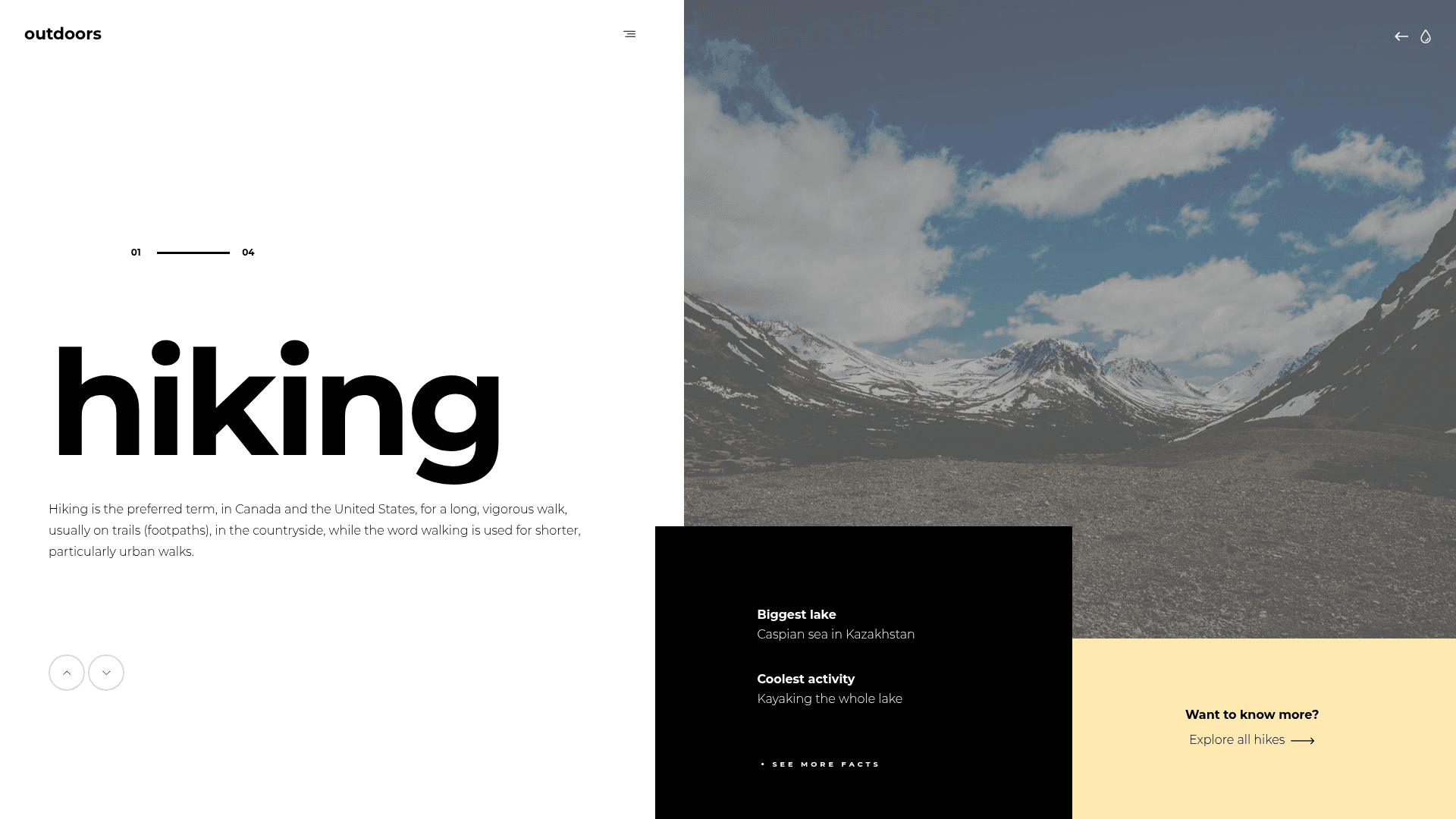
Free experimental HTML5 multipurpose one-page template by Codrops with animated slideshow, burger menu, and multipage layout in one page.
About this template
Outdoors is a free experimental HTML5 multipurpose one-page website template by Codrops that packs a multi-page layout into a single page using an animated content-and-image slideshow.
What is Outdoors?
Outdoors is a static HTML/CSS/JavaScript template created by Codrops, originally based on a UI design concept by Gil Huybrecht. It runs entirely in the browser and requires no server-side framework or build step. As input, the template takes content and images; as output, it produces an animated single-page website with a mixed content-and-image slideshow, expanding elements, and a burger menu. The download includes one HTML file, two CSS files, one uncompressed JavaScript file, and demo images from Unsplash.
Key Features
- Multi-page layout in one page — The template simulates a multi-page website inside a single HTML document, letting visitors navigate between sections without full page loads.
- Animated slideshow — The centerpiece is a content-and-image slideshow with expanding elements, animated using the Anime.js library.
- Burger menu — A ready menu UI is included; it requires modification to become fully functional.
- Device responsive — The layout adapts to mobile and desktop screens and works on Chrome, Edge, Firefox, Opera, Safari, and mobile browsers (but not Internet Explorer).
- Image collection section — A dedicated section is provided for displaying a collection of images.
- Preloader — A beautiful preloader is built in to enhance the page-load experience.
- Letter-level title animation — Charming.js splits titles into letters, enabling the distinctive typographic effects seen in the design.
- Open source and free — The template is open source, usable in commercial projects, and includes lifetime free updates.
Who should use Outdoors?
- Creative freelancers and designers — Use Outdoors to build a personal portfolio that highlights work through the animated slideshow and integrated image gallery.
- Small agencies — Adapt the template for a professional agency site that needs a visually unusual, motion-heavy homepage.
- Tour operators — Companies running tours in different destinations can turn the slideshow sections into destination pages for a touring website.
- Developers experimenting with web animation — The codebase demonstrates practical use of Anime.js, Charming.js, and imagesloaded.js in a single-page layout.
What can you do with Outdoors?
- Portfolio sites: Display a curated collection of images with hover effects and slideshow transitions.
- Agency landing pages: Present services and client projects using the burger menu and expanding slideshow sections.
- Tour destination sites: Structure each destination as a separate "page" within the one-page document, using the slideshow to transition between them.
- UI experiments: Use the template as a starting point for prototyping experimental navigation and page-transition patterns.
FAQ
Is Outdoors free?
Yes, Outdoors is free to download. The ThemeWagon listing states it is open source, can be used in commercial projects, and gets lifetime free updates.
What browsers does Outdoors support?
Outdoors works in Chrome, Edge, Firefox, Mobile, Opera, and Safari. It does not support Internet Explorer, and the author notes it may have issues fitting different display sizes.
What JavaScript libraries does Outdoors use?
Outdoors uses Anime.js for animations, imagesloaded.js to preload images, and Charming.js to handle the letter structure of titles. Demo images come from Unsplash.
Who created Outdoors?
Outdoors was created by Codrops, with the original design idea from UI designer Gil Huybrecht. It is distributed through ThemeWagon.
Is Outdoors a one-page template?
Yes, Outdoors is a one-page template, but it accommodates a multi-page layout within that single page, so visitors can navigate between distinct sections without reloading.